One of the great advantage of using an ARM core as on my FRDM-KL25Z board is that I can leverage a lot of things from the community. And one big thing around ARM is CMSIS (Cortex Microcontroller Software Interface Standard). It is an industry wide software library for the ARM Cortex microcontroller. Using the CMSIS libraries and interfaces will make it easier to port applications within the ARM Cortex family.
Category Archives: gcc
Creating and using Libraries with ARM gcc and Eclipse
In ‘A Library with ARM gcc and Eclipse’ I was using the CodeWarrior MCU10.3 beta version to create a library project. At that time I had to do things manually. Now with the final MCU10.3 there is an option in the New Project Wizard which makes things easier:
This will create a library (or better: an archive) with gcc for me. But how to use it from another project?
Tutorial: Printf() with (and without) Processor Expert
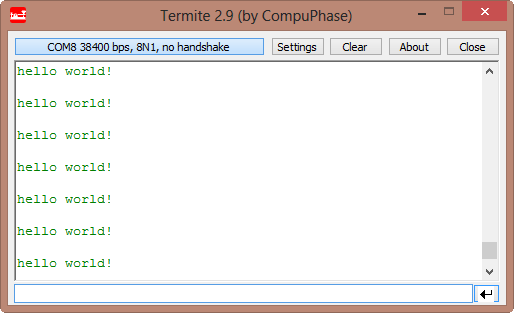
In this post I tapped into how to print messages to a console using the Kinetis/Freedom board. I’m not a fan of printf() for multiple reasons: It is simply a bad thing for embedded systems programming. But as many have asked for it, here is how to say “hello” from the Freedom Board using printf():
Switching ARM GNU gcc Toolchain in Eclipse
CodeWarrior for MCU10.3 comes with the ARM GNU 4.6.2 installed:
What about switching to a different (newer) gcc?
Reducing the build time with gcc for ARM and CodeWarrior
Eclipse based CodeWarrior for MCU10.3 comes with gcc build tools for Kinetis/ARM cores. While it features the parallel build make, I noticed that especially for larger projects build times are not as fast as it should be. The good news is: I was able to cut down my build time to less than half with a simple change :-).
When I looked at the output folder where all the object and make files are stored by Eclipse, I noticed that it has as well the listing files generated:
Free Static Code Analysis with Eclipse
I know for myself: the earlier I’m able to fix a bug, the better. So I’m always grateful for things which help me to find issues in my sources as early in the development process as possible. Eclipse and CodeWarrior already help me to find syntax errors in my code while I’m typing:
With the built-in syntax checker of Eclipse, this helps me many times to get things right without the need to build my code with the compiler. But when I’m able to compile successfully my code, this does not mean it is without bugs. It would be good to catch as many errors *before* downloading and running it on the target.
A Processor Expert Component to Help with Hard Faults
Ahrg! Again my ARM application crashed somewhere and I ended up in a HardFault exception :-(. In my earlier post I used a handler to get information from the processor what happened. But it is painful to add this handler again and again. So I decided to make things easier for me: with a special HardFault Processor Expert component :-).
After adding this HardFault component to my project, it automatically adds an entry to the vector table. So no manual steps are needed: having the component in the project and enabled will do the needed steps.
Migrating Kinetis-L Projects from Beta to Final MCU 10.3
I have successfully used CodeWarrior for MCU10.3 beta version for many projects. With the advent of the final CodeWarrior for MCU10.3, I want to migrate my existing projects to the new and final version. First: my existing projects work as well in the final version, which is good news. But there are two things to change to take advantage of the final 10.3:
- Linker file memory split
- ARM Micro Trace Buffer (MTB) support
Reducing Code Size with gcc and EWL
If you have not noticed: the final CodeWarrior for MCU10.3 has been released on the Freescale web :-).
It comes with a few changes compared to the 10.3beta release, and one is about the library configuration. I noticed that new projects created with the wizard are around 4 KByte larger than I expect them to be. For example my rather simple application below uses 8 KByte of code, where my expectation would be in the range of around 4 KByte:
text data bss dec hex filename 8644 24 1108 9776 2630 Freedom_2x16_HTA.elf
ARM Cortex-M0+ Interrupts and FreeRTOS
“Anything that can go wrong, will go wrong”.
strikes again. Well, the modified version of it:
“Anything that can go wrong, will go wrong, but it will wait until it really, really goes wrong”.
It is always amazing to see that systems having a fundamental flaw, they can work for a long period. Only that on day X my application crashes. And when found the problem, I’m wondering how in the world it was *ever* working with that bug in it :-(.