Ok, you are probably new to Eclipse, and want to do the fun part: Creating an Eclipse Processor Expert project in CodeWarrior for MCU10.2. Cool! Here are some steps and tips to make it smooth from the beginning…
Tag Archives: Tips&Tricks
Drag&Drop in Processor Expert
I have that wonderful project in MCU10.2 with Processor Expert using Embedded Components. It took me a while to carefully configure the settings, and now it works like a charm. I have another project and need the same components and settings in there. But how?
Configurations with Processor Expert
I have to make an application configuration decision: Using USB CDC or RS-232?
In the lab I use a Tower system which offers both RS-232 and USB connectivity. It uses a FSShell component to communicate with a terminal on the host. Typically this is using an RS-232 serial cable connected to the host. Well, the challenge is that today most notebooks do not have a serial port any more. But they have USB.
MCU10.2 on Ubuntu 12.04 64bit
In my class a student wanted to run CodeWarrior MCU10.2 with Ubuntu 12.04 (Precise Pangolin) on a 64bit notebook. According to the Freescale Website, that version of Ubuntu is not supported. And indeed, if you install CodeWarrior and launch it, it does not work. The splash screen comes up, but then it aborts. Claiming in the workspace/.metadata/.log file that it cannot find the libswt-gtk-java and libxtst6 packages. Continue reading
Compare and Merge with Eclipse
Go, multiply and detach: Multiple Screens with Eclipse
Multiple screens are a real productivity booster for every developer: it extends your ‘real estate’ and allows you to have more things visible all the time. Personally I always have a dual screen system in use. Well, except when I’m traveling. But I wish I would have it there too! Eclipse started to support the multiscreen environment already a while back. Continue reading
“An error occurred…”: Applied Debugging Rules
Yikes! Flashing failed!
All I wanted to do was to re-flash my boot loader on the TWR-LCD board with the ColdFire V1 MCF51JM128 on it. Trying to this gave me a P&E Connection Assistant dialog: Continue reading
Oh my! An Interrupt…
Ahhrg! Again, my microcontroller stopped in an interrupt. And I have no clue why?
Using Processor Expert in MCU10 is a great thing as it takes care about the vector table. Usually the default settings for code generation are fine, but not in my case here. If you run into a spurious and unexpected interrupt, you stop in the Cpu_Interrupt() handler:
Continue reading
No Source Available…
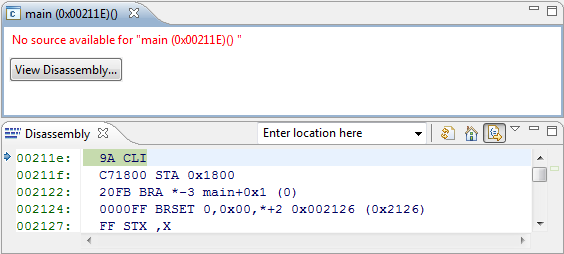
I just have run across a problem: I received a project for the S08QE128, and when I started a debug session with MCU10.2, the debugger was showing “no source available”. Ahhrg. Something must be wrong…
Well, at least I can debug on assembly level. But this is not the point. I have the sources, but somehow the debugger does not find them?
Continue reading
Make my Make with Eclipse and MCU10
I mentioned in Go Reference that MCU10 and eclipse come with a comfortable infrastructure: you add, remove, rename source files and set compiler options: managed make will take care and creates the make files for you. Make files are such a great thing because they allow you do to pretty much everything.
Classic CodeWarrior uses a different approach without make files. Exporting the project as make file did not really work, so make files were not something you could have used easily in classic. With the eclipse based MCU10 make files are the heart of the build system. In most cases using the managed make system is perfectly fine. But for a bare metal enthusiast it makes sense to use my own make file instead.
Continue reading