
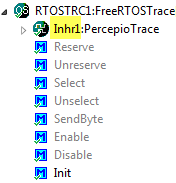
Inheriting Processor Expert components with CDE and the Component Wizard is easy. But sometimes it is tricky and requires some tweaking. Components should be easily accessible (see CDE: Show Inherited Methods), and names should make sense. And here is a challenge: changing the name for inherited components:
Category Archives: Processor Expert
CDE: Show Inherited Methods
Using Processor Expert components makes my development faster and easier. And when I have a useful piece of software I want to distribute or use in another project, I transform it into a Processor Expert component. But recently I noticed a strange thing with my components: the inherited components did not show the methods and events?
Tracing FreeRTOS with a Hardware Probe
Using an RTOS is an excellent thing: it provides services and allows to scale my application. But it adds complexity. With many tasks, queues and semaphores it is hard to have an overview what is going on. To get visibility, Martin Bucher has developed in a bachelor diploma work the FreeRTOS Trace Probe. Continue reading
Dissection of MCU10 Projects
Creating an eclipse managed make project with MCU10 is easy: Starting the wizard with File > New > Bareboard Project and after a few clicks I have a project. I don’t need to worry about all the files in the project structure, until……..well, until I need to put the files into a VCS.
USB CDC, reloaded
The Processor Expert USB CDC component posted in USB or not: CDC with Processor Expert has found many friends :-). A new version is available for download here with examples. It adds a bunch of new features and makes many things: simpler dependencies and setup, generation of an easily accessible cdc.inf and availability of error hooks. I have it running now with the TWR-MCF52259 and the DEMOJM (MCF51JM128 and S08JM60). Continue reading
USB or not: CDC with Processor Expert
I had a PREN student showing up into my office. He wanted to choose a microcontroller for that project. One requirement put on the table was “it needs USB”. Well, I asked why USB is required. I was not surprised by the answer: “to use USB instead of RS-232”. Wow. So what he really wanted was USB CDC (Communication Device Class). Yep. Most notebooks today have no serial COM port (see “Processor Expert Configurations“). But because “USB is serial” does not mean “USB CDC is simple”. Nope. USB is not simple. But it can be with Processor Expert.
Shared Files maintained by Processor Expert
As outlined in Quickstart for Processor Expert in Eclipse, it is easy to create a new Processor Expert project. There are three shared files which are maintained by Processor Expert. At the same time I need to change them with my code. So how does this work, and how can I configure it to my needs?
Quickstart for Processor Expert in Eclipse
Ok, you are probably new to Eclipse, and want to do the fun part: Creating an Eclipse Processor Expert project in CodeWarrior for MCU10.2. Cool! Here are some steps and tips to make it smooth from the beginning…
Drag&Drop in Processor Expert
I have that wonderful project in MCU10.2 with Processor Expert using Embedded Components. It took me a while to carefully configure the settings, and now it works like a charm. I have another project and need the same components and settings in there. But how?
Configurations with Processor Expert
I have to make an application configuration decision: Using USB CDC or RS-232?
In the lab I use a Tower system which offers both RS-232 and USB connectivity. It uses a FSShell component to communicate with a terminal on the host. Typically this is using an RS-232 serial cable connected to the host. Well, the challenge is that today most notebooks do not have a serial port any more. But they have USB.
