The development cycle does not end with debugging. Debugging is something manual, but for testing and automation I want to develop scripts I can run in an automated fashion. For this I use a tool in CodeWarrior: the Debugger Shell as command line debugger and using TCL as scripting language. This gives me a powerful way into automation and scripting with the debugger: from basic access to memory, to stepping and controlling the execution up to programming the flash memory.
Category Archives: Embedded
Software and Hardware Breakpoints
Using breakpoints is central part of debugging. I’m usually debugging my applications in flash memory. Because nearly all the microcontrollers I use have on-chip flash memory, and have more flash than RAM. With debugging in flash I limited by the number of hardware breakpoints. And here is the advantage with debugging code in RAM: availability of ‘unlimited’ software breakpoints. But how does this all works, and how to make efficient usage of hardware breakpoints?
Watching Static Variables
Debugging static variables, especially ‘static locals’ is sometimes challenging. Especially ‘static local’ debugging depends on the compiler capability how they are encoded in to the object file. I have found out that at least with CodeWarrior for MCU and ARM/Kinetis this works straight forward. Only ‘Watch Expressions’ need special attention.
FreeRTOS with GCC, Cortex-M0+ and Kinetis KL25Z Freedom Board
Yesterday was my ‘lucky day’: My Kinetis-L Freedom board arrived :-). This board is really nice and features the KL25Z from the recently announced Kinetis L Family. And guess what is the first thing I want to flash on that processor? Yep: some FreeRTOS tasks. But to get there, a few important things have to be sorted out:
PID with Processor Expert
In my class at the university I’m using a microcontroller attached to a DC motor from Maxon. The job of the microcontroller is to implement (among other things) a PID controller for the motor speed (or position). In the lab we implement the PID and all the related parts of the control loop without Processor Expert. But it easily can be done as well with Processor Expert components, as described here.
Stop on startup
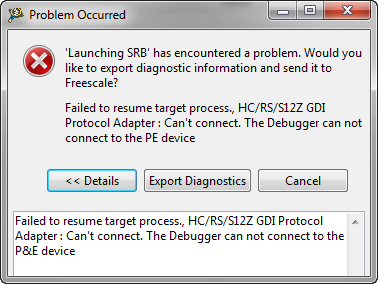
Occasionally I run into this kind of problem: I have downloaded my application, and it immediately crashes or looses the connection:
What is the problem? It is helpful to understand what happens if I press ‘debug’ in CodeWarrior or any other debugger:
Debug vs. Release?
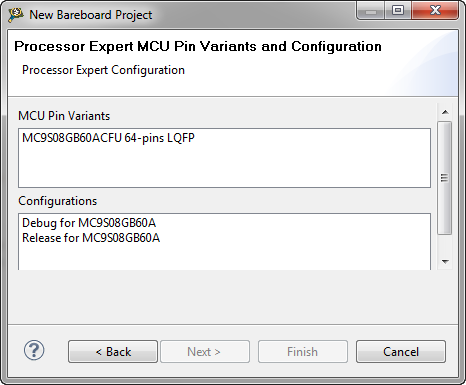
When I create a project with CodeWarrior for MCU using Processor Expert and S08GB60, I’m asked if I want to have a Debug and/or Release configuration:
Debug or Release? For an embedded microcontroller? Does this make any sense?
Device is secure?
It is one of these long weekends which allow to catch up on many things. One thing I finally completed was the move to FreeRTOS V7.1.1. With this I did some tests using the Tower boards, including the Kinetis one. So I have rebuild my Kinetis K60 application and was ready to flash the device. But then to my surprise I got this dialog:
FreeRTOS V7.1.1 released
FreeRTOS V7.1.1 was released beginning of May 2012. Finally I had some week-end time to integrate the changes and upgrade the Processor Expert component for it. V7.1.1 comes with smaller and larger changes. This includes maintenance and better support for various ports. One change is the removal of CLI from the original FreeRTOS distribution, an extra port macro and one trace hook macro.
Trimming S08 with P&E
Freescale S08 controllers have an internal clock generator (ICG) which allows the device to run without an external clock signal. But as devices differ, they need to be calibrated and trimmed. The microcontrollers are usually trimmed in the factory. How can I trim it myself if I need something better?