S-Record Generation with gcc for ARM/Kinetis

With my Freedom KL25Z board I’m using the GNU/gcc build tools and Eclipse/CodeWarrior. When I wanted to create an S19 file of my application using the GNU tools, this was not that easy to find out. So here are the steps to do this:

I open the project setting using the menu Project > Properties and go to C/C++ Build > Settings > Additional Tools and enable’Create Flash Image‘:
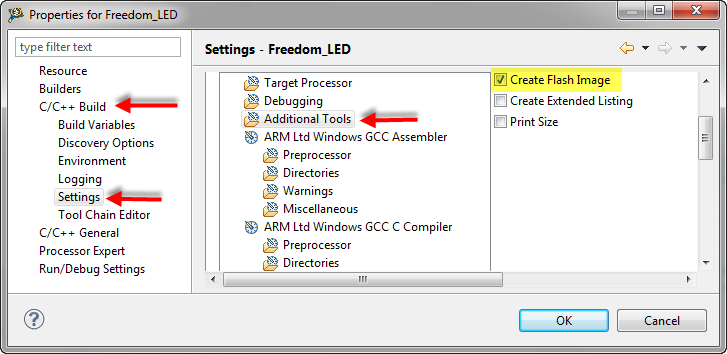
Additional Tools gcc Settings


Additional Tools gcc Settings

Continue reading

SMAC with Processor Expert

Freescale offers a free wireless SMAC stack  for their ZigBee and IEEE802.15.4 transceivers as found in the MC1321x (SRB and NCB) wireless kits, or as used on the MC13201 daughter card. The ‘S’ in SMAC stands for ‘Simple’. But it is not that simple to use that stack. So that’s why I’m using it transformed into a Processor Expert components. I have received recently requests and questions about it, and finally it is available on this site. If you are wondering for what it can be used, then read this post.

Created Tower Radio Card with MC13201 daughter board, SD card and Realtime Clock

Created Tower Radio Card with MC13201 daughter board, SD card and Realtime Clock

The stack is using the Freescale SMAC stack as base, and consists of four components: MC13192, SSEC, SPHY and SMAC. This post provides hopefully an entry point how to use them.

Continue reading

Sports Timing System in a Lunch Box

The 2012 London Olympics are over. And I had my own special sports event last weekend. Although not part of the Olympics, it is part of the Switzerland Central Mountain Race Championship. This is a series of mountain running challenges. And no, I did not run the race. I love the mountains, and I love hiking in the mountains, but this is definitely for the greatest athletes. Instead to run the race, I have chosen to implement and run the timing system :-).

Athletes approaching the finish line

Athletes approaching the finish line

Continue reading

Eclipse Debugging with Strings – Part 2

Maybe a better title for this post would be “Eclipse Debugging with Strings Attached’? Digging a bit more into the domain of string debugging, things are not always the way I wish they are.

I’m using here CodeWarrior for MCU10.2, which is based on Eclipse 3.6. Let’s use the following piece of code with the ARM Cortex-M4 Kinetis K60 core and the Freescale ARM compiler:

char buf[] = "abcd";
char *p = &buf[0];

unsigned char ubuf[]="ABCD";
unsigned char *up = &ubuf[0];

signed char sbuf[]="1234";
signed char *sp = &sbuf[0];

Continue reading

Eclipse Debugging with Strings

Here I am: past midnight, and debugging why my Kinetis ARM Cortex-M4 K60N512 application. So now you know what keeps me up at night :-). Stepping through some code which is using all kind of strings:

Debugging the K60 with Eclipse and CodeWarrior

Debugging the K60 with Eclipse and CodeWarrior

The challenge is: how to debug my strings?

Continue reading

A Shell for the Freedom KL25Z Board

I’m a big fan of physical UART/RS-232 ports on boards. So I was somewhat disappointed not to see a serial 9pin connector on the Freedom KL25Z board. But it is perfectly understood that for this price costs are critical, and a serial header or connector is pushing the budget for that board very likely out of the water. Still, I want serial connectivity for my applications.

Freedom Board with RGB LED

Freedom Board with RGB LED

Continue reading

Virtual COM/USB CDC for OSBDM/OSJTAG

Many new notebooks do not have a serial port any more: everything is USB. This can lead to problems (see USB or not: CDC with Processor Expert) as many embedded targets  use normal RS-232. In my classes I’m using the Tower boards: some Tower boards have an on-board 2 pin RS-232 header, e.g. the Tower TWR-MCF52259. Others like the TWR-K60N512 use the added TWR-SER board. The Tower boards have as well a USB capable S08JM60 which is used for debugging (OSBDM/OSJTAG), so why not using the OSBDM microcontroller as Serial-to-USB gateway?

Continue reading

CodeWarrior Flash Programming from a DOS Shell

I can do test automation or standalone flash programming using the Debugger Shell. But this requires me to use a view inside of Eclipse. What would be nice is to do such things from a lower level: from a Windows Command window (CMD or DOS Shell). This is possible with usage of Eclipse/CodeWarrior in command line mode.

Continue reading

Standalone Flash Programmer

In Scripting, the Debugger Shell and Debugger Shell: Test Automation I was exploring how to use the Debugger Shell for automation. For my lectures at the university I need to program multiple boards with the same application. I don’t want (and need) a debugger for this: all what I need is a ‘Standalone Flash Programmer’: the ability to flash one or multiple boards without debugging.

Continue reading

FatFs with Kinetis

An SD (Secure Digital) Card interface is kind of standard for many applications today: it provides a lot of memory at a reasonable cost. Still, I need a software stack for it, up to the level of a file system. So far I was really happy with using FatFs: an open source FAT file system provided by Elm-Chan. I’m using the FatFs Processor Expert component already in multiple designs. What was missing: a port to the Freescale Kinetis ARM Cortex-M4 family of processors.

Continue reading