S-Record, Intel Hex and Binary Files

My earlier posts were around the Kinetis gcc compiler which comes with CodeWarrior for MCU10.3. MCU10.3 comes as well with the Freescale Kinetis compiler as in MCU10.2. In “S-Record Generation with gcc for ARM/Kinetis” I explored how to generate S19 or other output files with gcc. However, you only can produce one file format at a time. What if I need multiple formats or a different format. What if I need to do the same with non-gcc build tools? S-Records are usually easy as supported in the linker. Other formats need a bit more plumbing. So this post is how I can create and manipulate the different output formats, so I can use it with a bootloader.

Continue reading

SMAC with Processor Expert

Freescale offers a free wireless SMAC stack  for their ZigBee and IEEE802.15.4 transceivers as found in the MC1321x (SRB and NCB) wireless kits, or as used on the MC13201 daughter card. The ‘S’ in SMAC stands for ‘Simple’. But it is not that simple to use that stack. So that’s why I’m using it transformed into a Processor Expert components. I have received recently requests and questions about it, and finally it is available on this site. If you are wondering for what it can be used, then read this post.

Created Tower Radio Card with MC13201 daughter board, SD card and Realtime Clock

Created Tower Radio Card with MC13201 daughter board, SD card and Realtime Clock

The stack is using the Freescale SMAC stack as base, and consists of four components: MC13192, SSEC, SPHY and SMAC. This post provides hopefully an entry point how to use them.

Continue reading

Changing the CPU with Processor Expert

I have an example project with Processor Expert and CodeWarrior. The problem I have is that I want to use it for another CPU derivative. So how can I migrate the project?

There are three different approaches:

  1. Change Wizard: In MCU10.2 there is the menu Project > Change Device/Connection. While this sounds promising, it only works for the very simple projects. And it does not change the project in-place: it simply creates a copy of the project and applies some (many times wrong) settings. So I do not recommend to use that option.
  2. New Project Wizard: For me in most cases this is the best way: this creates a new project for the new device, with everything set up correctly. In a second step I copy my source files and compiler settings (if I have changed them). The Processor Expert component I can transfer with using drag&drop.
  3. Changing the CPU: With Processor Expert, I can change the CPU. For this I add a new CPU to the project and change other settings (debugger, build tools settings) as needed.

Continue reading

Sports Timing System in a Lunch Box

The 2012 London Olympics are over. And I had my own special sports event last weekend. Although not part of the Olympics, it is part of the Switzerland Central Mountain Race Championship. This is a series of mountain running challenges. And no, I did not run the race. I love the mountains, and I love hiking in the mountains, but this is definitely for the greatest athletes. Instead to run the race, I have chosen to implement and run the timing system :-).

Athletes approaching the finish line

Athletes approaching the finish line

Continue reading

Please Check Your License

The good thing with many vendors is: they offer development tools free of charge. And the limitations are typically reasonable for many projects. The Eclipse based CodeWarrior for MCU10 is not an exception: it comes in a free (‘Special’) Edition which allows up to 128 KByte of code to download for my ARM/Kinetis projects.

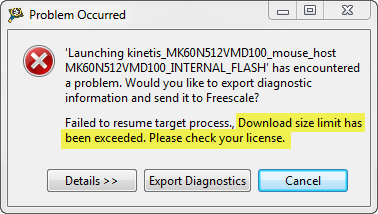
But, when I tried to debug an Example I have downloaded from the web, I get this dialog:

“Download size limit has been exceeded. Please check your license.”

Download Size Limit Has Been Exceeded

Download Size Limit Has Been Exceeded

Continue reading

Virtual COM/USB CDC for OSBDM/OSJTAG

Many new notebooks do not have a serial port any more: everything is USB. This can lead to problems (see USB or not: CDC with Processor Expert) as many embedded targets  use normal RS-232. In my classes I’m using the Tower boards: some Tower boards have an on-board 2 pin RS-232 header, e.g. the Tower TWR-MCF52259. Others like the TWR-K60N512 use the added TWR-SER board. The Tower boards have as well a USB capable S08JM60 which is used for debugging (OSBDM/OSJTAG), so why not using the OSBDM microcontroller as Serial-to-USB gateway?

Continue reading

Standalone Flash Programmer

In Scripting, the Debugger Shell and Debugger Shell: Test Automation I was exploring how to use the Debugger Shell for automation. For my lectures at the university I need to program multiple boards with the same application. I don’t want (and need) a debugger for this: all what I need is a ‘Standalone Flash Programmer’: the ability to flash one or multiple boards without debugging.

Continue reading

Bit Banging I2C

The Freescale ColdFire V2 (MCF52259) is a great communication device: an embedded Processor like a Swiss Army Knife: Great peripherals, USB and Ethernet interface, a lot of flash application space and up to 64 KByte of RAM. I’m using that core in many projects, and there is great community support for it with boards and software. Unfortunately Freescale somehow provides Processor Expert support only half way for it. Support for the I2C bus is missing :-(.

Continue reading

Programming part of flash

In many cases I do a full erase-flash-debug cycle: I get my embedded microcontroller flash completely erased and then programmed with my application. Well, that does not work that way if I program with a bootloader. Yes, I can flash the bootloader and then load my target application with the bootloader, but that’s not the scenario I want to use in the development phase. I want to flash my application and keep the bootloader on the target. This means: I need to do erase and program a part of the memory. But how to do this?

Continue reading

Traps&Pitfalls: Overlapping Interrupt Priorities

It happens to me that I run into a really, really nasty problem. I spend hours (if not weeks) to get it resolved. Strong coffee and the problem keeps me up at long nights. I think every embedded system engineer knows what I’m talking about. Yeah, most of the time it is my fault or an oversight. But once in a while I’m convinced that I have found a real bug. Then I report it back to the vendor to fix it. I hope my report will prevent another engineers to run into the same problem. Or that I learn something else as a by-product. Oh yes….

Continue reading