Processor Expert, gcc C++ and Kinetis-L with MQXLite

The Kinetis-L is a 32bit microprocessor family, based on ARM Cortex M0+. It comes with ARM gcc in CodeWarrior. Although the Kinetis-L does not have much RAM, it is very possible to use gcc with C++, especially as a programmer I keep the limited RAM amount in mind. So I thought I try C++ and Processor Expert for my Kinetis-L KL25Z Freedom board.

If I select C++ as language in the New Bareboard Project Wizard of CodeWarrior, then I cannot select Processor Expert or Device Initialization:
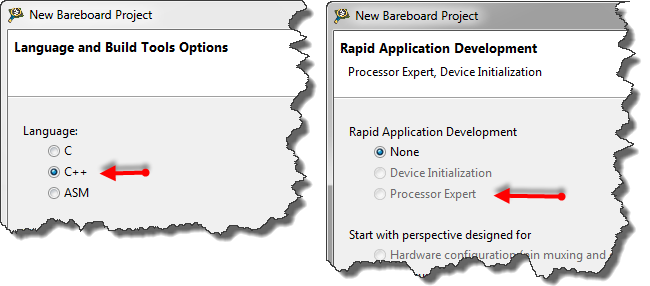
C++ in the New Project Wizard

C++ in the New Project Wizard

That makes somewhat sense, as Processor Expert creates normal C code and C files, but no C++. Still, what if I need C++? This is doable, but with anything advanced, I need to know exactly what I want and what I do. Here is the ‘How to use C++ with Processor Expert’.

Continue reading

Tutorial: Touching the Freedom KL25Z Board

I have covered several aspects of the Freescale KL25Z Freedom board with a tutorial: LED, Accelerometer and RTOS. One peripheral on the board is missing so far: the touch slider area:

Freedom KL25Z Board Touch Slider Area

Freedom KL25Z Board Touch Slider Area

Continue reading

Tutorial: Freedom with FreeRTOS and Kinetis-L

In my earlier tutorials “Enlightning the Freedom KL25Z Board” and “Accelerating the KL25Z Freedom Board” I have not used an RTOS. In this one I’m creating a project from scratch and run it with the open source FreeRTOS operating system, using the FRDM-KL25Z Freedom board. MCU10.3 comes with gcc, and is nicely integrated with Eclipse and CodeWarrior. With this tutorial, it is possible to get an RTOS up and running on a Kinetis device very quickly.

I have a KL25Z which has 128 KByte FLASH and 16 KByte of RAM. What I want to explore is if things could fit as well to the KL0 family where the smallest device has only 8 KByte of FLASH and 1 KByte of RAM. Can this work?

Continue reading

Tutorial: Accelerating the KL25Z Freedom Board

In “Tutorial: Enlightning the Freedom KL25Z Board” I used the RGB LED on the FRDM-KL25Z board. This tutorial extends it to use the MMA8451Q inertial sensor on the board which is connected through I2C to the KL25Z processor:

Freedom Board Block Diagram

Freedom Board Block Diagram with MMA8451Q (lower right corner)

The goal is show the accelerometer x, y and z-axis on the RGB LED.

Continue reading

Tutorial: Enlightning the Freedom KL25Z Board

The schematics for the Freedom board is now available on the element14 Freedom Board site (you need to log into the element14 community first) as FRDM-KL25Z Schematics (SPF-27556_D).pdf (314.7 K)). So time to write a tutorial how to use the LED on that board.

❗ Note: since this tutorial, the LED component has been simplified. So some of the steps below are much simpler and easer. Please see LED’s for Kinetis, simplified | MCU on Eclipse. I have updated this post with the new instructions and images.

In “FreeRTOS with GCC, Cortex-M0+ and Kinetis KL25Z Freedom Board” and “A Shell for the KL25Z Freedom Board” I have used that board with an RTOS: FreeRTOS. But it is really easy to use that board without an RTOS (‘bare metal’) too. In this tutorial I’m providing step by step instructions to use the RGB LED on the Freedom KL25Z board with Processor Expert and the open source LED component.

Continue reading

SMAC with Processor Expert

Freescale offers a free wireless SMAC stack  for their ZigBee and IEEE802.15.4 transceivers as found in the MC1321x (SRB and NCB) wireless kits, or as used on the MC13201 daughter card. The ‘S’ in SMAC stands for ‘Simple’. But it is not that simple to use that stack. So that’s why I’m using it transformed into a Processor Expert components. I have received recently requests and questions about it, and finally it is available on this site. If you are wondering for what it can be used, then read this post.

Created Tower Radio Card with MC13201 daughter board, SD card and Realtime Clock

Created Tower Radio Card with MC13201 daughter board, SD card and Realtime Clock

The stack is using the Freescale SMAC stack as base, and consists of four components: MC13192, SSEC, SPHY and SMAC. This post provides hopefully an entry point how to use them.

Continue reading

Changing the CPU with Processor Expert

I have an example project with Processor Expert and CodeWarrior. The problem I have is that I want to use it for another CPU derivative. So how can I migrate the project?

There are three different approaches:

  1. Change Wizard: In MCU10.2 there is the menu Project > Change Device/Connection. While this sounds promising, it only works for the very simple projects. And it does not change the project in-place: it simply creates a copy of the project and applies some (many times wrong) settings. So I do not recommend to use that option.
  2. New Project Wizard: For me in most cases this is the best way: this creates a new project for the new device, with everything set up correctly. In a second step I copy my source files and compiler settings (if I have changed them). The Processor Expert component I can transfer with using drag&drop.
  3. Changing the CPU: With Processor Expert, I can change the CPU. For this I add a new CPU to the project and change other settings (debugger, build tools settings) as needed.

Continue reading

Sports Timing System in a Lunch Box

The 2012 London Olympics are over. And I had my own special sports event last weekend. Although not part of the Olympics, it is part of the Switzerland Central Mountain Race Championship. This is a series of mountain running challenges. And no, I did not run the race. I love the mountains, and I love hiking in the mountains, but this is definitely for the greatest athletes. Instead to run the race, I have chosen to implement and run the timing system :-).

Athletes approaching the finish line

Athletes approaching the finish line

Continue reading

Tutorial: Timer (LED) with Processor Expert for Kinetis

In the ‘Pre-LDD age’, setting up a periodic timer event with Processor was really easy. With the concept of LED’s (see “There is a Time and Date for both Worlds”) things are a bit different. But once things are clear, it is not that hard. So here I’m doing a very exciting thing: blinking an LED using a timer! 😎

So I’m going to have an LED blinking every second. I’m using the TWR-K60N512 with an ARM Cortex-M4 and the Eclipse based CodeWarrior for MCU10.2. But it is easy to adopt it to any other Kinetis board.

Continue reading