The FSL_USB_Stack Processor Expert component (see USB CDC reloaded) has been extended to support USB CDC for the Freescale S08MM128 targeted for medical devices:
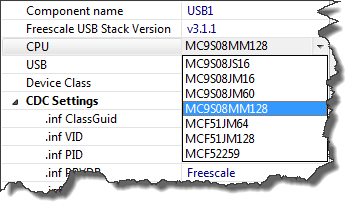
Choice of devices

The FSL_USB_Stack Processor Expert component (see USB CDC reloaded) has been extended to support USB CDC for the Freescale S08MM128 targeted for medical devices:
Choice of devices
The FSL_USB_Stack Embedded Component presented in “USB CDC, reloaded” has been updated to V1.004 and is available here. I was running into issues if the USB CDC stack had to send out either 16 or 32 bytes of data in the App_Task() function. In that case the data is not sent until the next USB_Class_CDC_Interface_DIC_Send_Data() request.
Processor Expert is great: it generates initialization code and driver sources for me. This makes it a great knowledge and source base for non-Processor Expert projects too. Wondering how to initialize the SCI? What are again the register settings to use the CPU with a 6 MHz clock rate using an external crystal in low power mode? Lets generate a Processor Expert project to find out. Then copy-past the drivers or parts of it into my non-Processor Expert project. But How to do this?
As shown in Tracing FreeRTOS with a Hardware Probe: I have a nice hardware probe to trace out events from my application. But what about to use the target memory as trace buffer? New devices have much more on-chip memory, so this could be an attractive option. That was on my list of future extensions, but then the news came in: Percepio announced their collaboration with FreeRTOS+Trace: exactly what I needed!
It is using the same concept as the FreeRTOS Trace Probe: the trace hooks provided by the FreeRTOS API. But instead streaming it off the target as with the FreeRTOS Trace probe, it is using a RAM buffer on the device. The real cool thing is: the Percepio trace viewer is very, very nice!
Processor Expert in MCU10 generates a lot of files for me. But sometimes I need to tweak things a bit. I change the generated sources to fit my needs, and then I want to prevent that my changes get overwritten by the next code generation.
First, I need to know which files are generated: the information in “Dissection of MCU10 Projects” helps me to identify them. But how can I prevent code generation for each component? Or for other generated files? Or how to completely disable code generation?
Inheriting Processor Expert components with CDE and the Component Wizard is easy. But sometimes it is tricky and requires some tweaking. Components should be easily accessible (see CDE: Show Inherited Methods), and names should make sense. And here is a challenge: changing the name for inherited components:
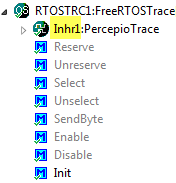
Inherited Component with ‘Inhr’ Base Name
Using Processor Expert components makes my development faster and easier. And when I have a useful piece of software I want to distribute or use in another project, I transform it into a Processor Expert component. But recently I noticed a strange thing with my components: the inherited components did not show the methods and events?
Using an RTOS is an excellent thing: it provides services and allows to scale my application. But it adds complexity. With many tasks, queues and semaphores it is hard to have an overview what is going on. To get visibility, Martin Bucher has developed in a bachelor diploma work the FreeRTOS Trace Probe. Continue reading
Creating an eclipse managed make project with MCU10 is easy: Starting the wizard with File > New > Bareboard Project and after a few clicks I have a project. I don’t need to worry about all the files in the project structure, until……..well, until I need to put the files into a VCS.
The Processor Expert USB CDC component posted in USB or not: CDC with Processor Expert has found many friends :-). A new version is available for download here with examples. It adds a bunch of new features and makes many things: simpler dependencies and setup, generation of an easily accessible cdc.inf and availability of error hooks. I have it running now with the TWR-MCF52259 and the DEMOJM (MCF51JM128 and S08JM60). Continue reading
 MCU on Eclipse