
Eclipse Debugging with Strings – Part 2

Maybe a better title for this post would be “Eclipse Debugging with Strings Attached’? Digging a bit more into the domain of string debugging, things are not always the way I wish they are.

I’m using here CodeWarrior for MCU10.2, which is based on Eclipse 3.6. Let’s use the following piece of code with the ARM Cortex-M4 Kinetis K60 core and the Freescale ARM compiler:

char buf[] = "abcd";
char *p = &buf[0];

unsigned char ubuf[]="ABCD";
unsigned char *up = &ubuf[0];

signed char sbuf[]="1234";
signed char *sp = &sbuf[0];

Continue reading

Eclipse Debugging with Strings

Here I am: past midnight, and debugging why my Kinetis ARM Cortex-M4 K60N512 application. So now you know what keeps me up at night :-). Stepping through some code which is using all kind of strings:

Debugging the K60 with Eclipse and CodeWarrior

Debugging the K60 with Eclipse and CodeWarrior

The challenge is: how to debug my strings?

Continue reading

Please Check Your License

The good thing with many vendors is: they offer development tools free of charge. And the limitations are typically reasonable for many projects. The Eclipse based CodeWarrior for MCU10 is not an exception: it comes in a free (‘Special’) Edition which allows up to 128 KByte of code to download for my ARM/Kinetis projects.

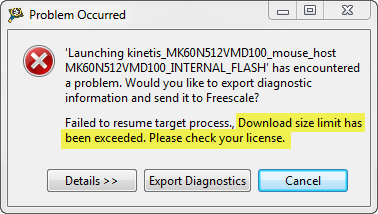
But, when I tried to debug an Example I have downloaded from the web, I get this dialog:

“Download size limit has been exceeded. Please check your license.”

Download Size Limit Has Been Exceeded

Download Size Limit Has Been Exceeded

Continue reading

Virtual COM/USB CDC for OSBDM/OSJTAG

Many new notebooks do not have a serial port any more: everything is USB. This can lead to problems (see USB or not: CDC with Processor Expert) as many embedded targets  use normal RS-232. In my classes I’m using the Tower boards: some Tower boards have an on-board 2 pin RS-232 header, e.g. the Tower TWR-MCF52259. Others like the TWR-K60N512 use the added TWR-SER board. The Tower boards have as well a USB capable S08JM60 which is used for debugging (OSBDM/OSJTAG), so why not using the OSBDM microcontroller as Serial-to-USB gateway?

Continue reading

CodeWarrior Flash Programming from a DOS Shell

I can do test automation or standalone flash programming using the Debugger Shell. But this requires me to use a view inside of Eclipse. What would be nice is to do such things from a lower level: from a Windows Command window (CMD or DOS Shell). This is possible with usage of Eclipse/CodeWarrior in command line mode.

Continue reading

Standalone Flash Programmer

In Scripting, the Debugger Shell and Debugger Shell: Test Automation I was exploring how to use the Debugger Shell for automation. For my lectures at the university I need to program multiple boards with the same application. I don’t want (and need) a debugger for this: all what I need is a ‘Standalone Flash Programmer’: the ability to flash one or multiple boards without debugging.

Continue reading

Debugger Shell: Test Automation

The development cycle does not end with debugging. Debugging is something manual, but for testing and automation I want to develop scripts I can run in an automated fashion. For this I use a tool in CodeWarrior: the Debugger Shell as command line debugger and using TCL as scripting language. This gives me a powerful way into automation and scripting with the debugger: from basic access to memory, to stepping and controlling the execution up to programming the flash memory.

Continue reading

Software and Hardware Breakpoints

Using breakpoints is central part of debugging. I’m usually debugging my applications in flash memory. Because nearly all the microcontrollers I use have on-chip flash memory, and have more flash than RAM. With debugging in flash I limited by the number of hardware breakpoints. And here is the advantage with debugging code in RAM: availability of ‘unlimited’ software breakpoints. But how does this all works, and how to make efficient usage of hardware breakpoints?

Continue reading

There is a Time and Date for both Worlds

The Kinetis ARM Cortex-M4(F) is a wonderful machine: a 32bit architecture, plenty of FLASH and RAM, an ideal play field. I love the Kinetis Tower boards, and even more the Freedom board which has an ARM Cortex-M0+ on it. I have a lot of projects on S08, S12 and ColdFire at the university, and they are all using a lot of Processor Expert components. Processor Expert is such a great productivity tool: having software in components allows easy software re-use. With Processor Expert abstracting from the hardware, I can easily port my applications to new boards and processors. Well, until Processor Expert changed for Kinetis :-(.

Continue reading

Watching Static Variables

Debugging static variables, especially ‘static locals’ is sometimes challenging. Especially ‘static local’ debugging depends on the compiler capability how they are encoded in to the object file. I have found out that at least with CodeWarrior for MCU and ARM/Kinetis this works straight forward. Only ‘Watch Expressions’ need special attention.

Continue reading