And here is number 4 of my ‘best of’ eclipse plugins: the Eclipse Hex Editor Plugin or EHEP. It is a great tool to inspect or change files in hex mode. Installation of the plugin is simple: Get it from the http://ehep.sourceforge.net/update site.
Category Archives: Tips & Tricks
Eclipse and PC-lint: Linticator
PC-lint from Gimpel has set the standard for static code analysis: it is used by many companies developing safety critical applications. Additionally PC-lint can check the MISRA rules which are standard for many coding guide lines. PC-lint has detected many subtle bugs in my sources. Thank you, PC-lint!
CodeWarrior classic provided a plugin for the PC-lint compiler: To bad that this does not exist in the eclipse based CodeWarrior. You might think that given PC-lint so popular, there should be an eclipse plugin available? Yes, there are many attempts on this: all of them did not work well enough for me. The good news: There is the Linticator eclipse plugin. The bad news: it is not for free.
5 Best Eclipse Plugins: #5 (WickedShell)
Eclipse and CodeWarrior for MCU10 come with a wealth of functionality. But there is more out there: I can install more plugins from the eclipse market place. The possibilities are endless! Here are the five plugins I always add to my base installation, starting with rank #5: WickedShell. The plugin is installed from http://www.wickedshell.net/updatesite.
Problem Occurred: Flash programming with overlapping memory
My post in “An error occurred…”: Applied Debugging Rules gives some hints about how to isolate and solve some debugging problems. But here is a case where the tips did not help: I had this dialog with “Failed to resume target process” for my HCS08 project again:
Error importing task?
I was running into that dialog while opening my S08 project:
Hmm, that’s weird: the target task framework complains about a target task, but in my project I’m not using any target tasks?
Disable my Code Generation
Processor Expert in MCU10 generates a lot of files for me. But sometimes I need to tweak things a bit. I change the generated sources to fit my needs, and then I want to prevent that my changes get overwritten by the next code generation.
First, I need to know which files are generated: the information in “Dissection of MCU10 Projects” helps me to identify them. But how can I prevent code generation for each component? Or for other generated files? Or how to completely disable code generation?
CDE: Inherited Component Base Name
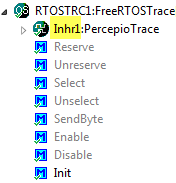
Inheriting Processor Expert components with CDE and the Component Wizard is easy. But sometimes it is tricky and requires some tweaking. Components should be easily accessible (see CDE: Show Inherited Methods), and names should make sense. And here is a challenge: changing the name for inherited components:
Fixing the Eclipse Index
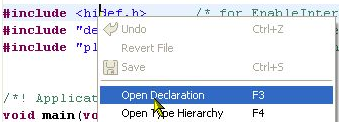
One of the greatest features in Eclipse is the Indexer: it parses automatically my code in the background. It creates all the needed information so I can browse around my sources. I can use the Open Declaration context menu in the source code:
Copy my Project
I’m using Subversion to keep track of changes in my eclipse MCU10 projects. That allows me to get back in time without the need to make copies of my project. But sometimes I do need to make a copy of my project: because I want to use a project as a base and then do something different with it. To make a copy of a project is simple, but requires some more steps if I’m using Target Tasks. Here is how I do this… Continue reading
Dissection of MCU10 Projects
Creating an eclipse managed make project with MCU10 is easy: Starting the wizard with File > New > Bareboard Project and after a few clicks I have a project. I don’t need to worry about all the files in the project structure, until……..well, until I need to put the files into a VCS.