
When I create a project with CodeWarrior for MCU using Processor Expert and S08GB60, I’m asked if I want to have a Debug and/or Release configuration:
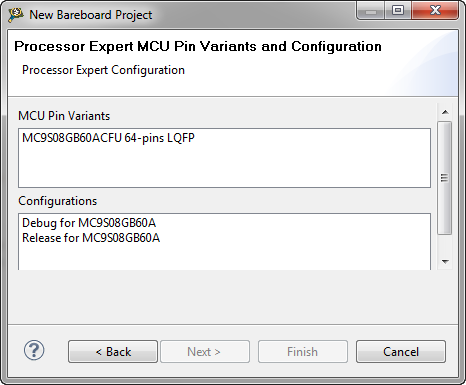
Debug or Release? For an embedded microcontroller? Does this make any sense?
When I create a project with CodeWarrior for MCU using Processor Expert and S08GB60, I’m asked if I want to have a Debug and/or Release configuration:
Debug or Release? For an embedded microcontroller? Does this make any sense?
FreeRTOS V7.1.1 was released beginning of May 2012. Finally I had some week-end time to integrate the changes and upgrade the Processor Expert component for it. V7.1.1 comes with smaller and larger changes. This includes maintenance and better support for various ports. One change is the removal of CLI from the original FreeRTOS distribution, an extra port macro and one trace hook macro.
The Freescale ColdFire V2 (MCF52259) is a great communication device: an embedded Processor like a Swiss Army Knife: Great peripherals, USB and Ethernet interface, a lot of flash application space and up to 64 KByte of RAM. I’m using that core in many projects, and there is great community support for it with boards and software. Unfortunately Freescale somehow provides Processor Expert support only half way for it. Support for the I2C bus is missing :-(.
Once I have a carefully configured Processor Expert component, I can use the approach described in Drag&Drop in Processor Expert to copy that component to a different project. However, this requires that the destination project is present in the same workspace. So how can I transfer a component with its settings from one workspace to another? Or from one machine to another?
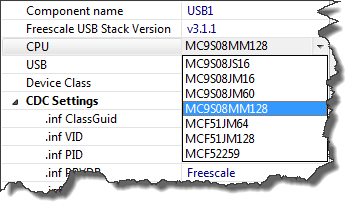
The FSL_USB_Stack Processor Expert component (see USB CDC reloaded) has been extended to support USB CDC for the Freescale S08MM128 targeted for medical devices:
It happens to me that I run into a really, really nasty problem. I spend hours (if not weeks) to get it resolved. Strong coffee and the problem keeps me up at long nights. I think every embedded system engineer knows what I’m talking about. Yeah, most of the time it is my fault or an oversight. But once in a while I’m convinced that I have found a real bug. Then I report it back to the vendor to fix it. I hope my report will prevent another engineers to run into the same problem. Or that I learn something else as a by-product. Oh yes….
The FSL_USB_Stack Embedded Component presented in “USB CDC, reloaded” has been updated to V1.004 and is available here. I was running into issues if the USB CDC stack had to send out either 16 or 32 bytes of data in the App_Task() function. In that case the data is not sent until the next USB_Class_CDC_Interface_DIC_Send_Data() request.
Processor Expert is great: it generates initialization code and driver sources for me. This makes it a great knowledge and source base for non-Processor Expert projects too. Wondering how to initialize the SCI? What are again the register settings to use the CPU with a 6 MHz clock rate using an external crystal in low power mode? Lets generate a Processor Expert project to find out. Then copy-past the drivers or parts of it into my non-Processor Expert project. But How to do this?
As shown in Tracing FreeRTOS with a Hardware Probe: I have a nice hardware probe to trace out events from my application. But what about to use the target memory as trace buffer? New devices have much more on-chip memory, so this could be an attractive option. That was on my list of future extensions, but then the news came in: Percepio announced their collaboration with FreeRTOS+Trace: exactly what I needed!
It is using the same concept as the FreeRTOS Trace Probe: the trace hooks provided by the FreeRTOS API. But instead streaming it off the target as with the FreeRTOS Trace probe, it is using a RAM buffer on the device. The real cool thing is: the Percepio trace viewer is very, very nice!
Processor Expert in MCU10 generates a lot of files for me. But sometimes I need to tweak things a bit. I change the generated sources to fit my needs, and then I want to prevent that my changes get overwritten by the next code generation.
First, I need to know which files are generated: the information in “Dissection of MCU10 Projects” helps me to identify them. But how can I prevent code generation for each component? Or for other generated files? Or how to completely disable code generation?