In an earlier article I explained how to generate GNU coverage information, for an embedded application written in C.
In this article, I show the steps and configuration needed to use GNU gcov targeting an embedded application with C++.

Outline
In this article, I’ll show how to set up and setup a C++ application to collect GNU coverage information. Using gcov or GNU Coverage is an essential part of CI/CD or the test process. Coverage provides information about what has been executed and how many times.
For this, I’m using the NXP MIMXRT1064-EVK with the Eclipse (MCUXpresso IDE 11.10).

It goes through the configuration steps and needed settings. An example application is available on GitHub (see links at the end of the article).
Common challenges are configuring the build tools. Another challenge is how to initialize the library. Lastly, there is the challenge of how to generate and collect the coverage information.
Difference C and C++ for gcov
GNU gcov with C++ is different in two aspects, compared to an application in C (for example as shown in Tutorial: GNU Coverage with MCUXpresso IDE:
- In a C application the constructors have to be called.
The startup code for a C++ application already calls the C++ constructors, which includes the gcov constructors. - In a C application the linker file (.ld) needs to implement the directives to collect the gcov initialization code for each compilation unit which has been instrumented.
With C++, the linker file for C++ applications include the necessary linker file entries for the constructor entries. - In a C application, the compiler uses the
-ftest-coverage -fprofile-arcscompiler option.
For C++, the same option needs to be added to the C++ compiler settings.
Linker File
As noted earlier: the standard C++ linker file can be used and does not need to be changed.
Compiler Settings
In a C++ application, generate the gcov information both for the C and C++ compiler:


Do the above for all the files and folders which shall be instrumented. The example on Github has several folders instrumented:

The compiler setting will generate the .gcno (notes) files:

Linker Setting
Same as for C applications, turn on the coverage library in the C++ linker settings:

💡 the NXP MCUXpresso IDE version 11.10 includes the correct gcov libraries and can be used out-of-the-box for GNU coverage.
McuLib Configuration
The MCU Library is configured through the IncludeMcuLibConfig.h header file, using the following settings:
#define McuSemihost_CONFIG_IS_ENABLED    (1) /* 1: enable Semihosting */
#define McuRdimon_CONFIG_IS_ENABLED      (1) /* 1: RdiMon is enabled */
#define McuCoverage_CONFIG_IS_ENABLED    (1) /* 1: enable gcov */
This enables Semihosting with RdiMon (see Using Semihosting the direct Way), plus enables using GNU gcov usage.
Application Initialization
In the application, the library modules need to get initialized.

Beside the usual drivers, for C++ and gcov we have to call the following:
McuSemiHost_Init(); /* using Semihosting to write the files to to host McuRdimon_Init(); /* initialize standard file descriptors */
The McuCoverage_Init() is *not* called, as the constructors are already handled in the C++ startup code.
Writing Coverage Information
After running the application, the collected coverage information gets written with:
McuCoverage_WriteFiles();
Build and run the application with the debugger. You should see the data (.gcda) files generated on the host:

Result
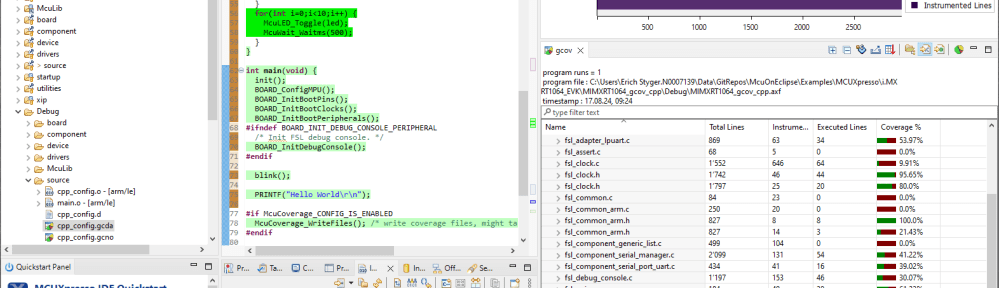
Double-click on the generated .gdca or .gcno files to visualize the generated coverage information:

Summary
Using GNU coverage with Eclipse and the McuLib is simpler and easier for C++ compared to C applications. The C++ startup code already handles the constructor calls. Everything else gets handled in this example with the semihosting library.
If you want to use other means of data transfer without semihosting for embedded targets, check out my other article. That article suggests using gcov in a standalone or freestanding environment. Check out “How to Use GNU Coverage (gcov) in a Freestanding Environment for Embedded Systems“.
Are you using GNU gcov? With C or with C++? Let me know your thoughts.
Happy covering 🙂
Links
- Tutorial: GNU Coverage with MCUXpresso IDE
- Example project on GitHub: https://github.com/ErichStyger/mcuoneclipse/tree/master/Examples/MCUXpresso/i.MX%20RT1064_EVK/MIMXRT1064_gcov_cpp
- McuLib on GitHub: https://github.com/ErichStyger/McuOnEclipseLibrary
- GNU coverage with C: https://mcuoneclipse.com/2021/09/19/tutorial-gnu-gcov-coverage-with-the-nxp-i-mx-rt1064/
 MCU on Eclipse