No Source Available…

I just have run across a problem: I received a project for the S08QE128, and when I started a debug session with MCU10.2, the debugger was showing “no source available”. Ahhrg. Something must be wrong…
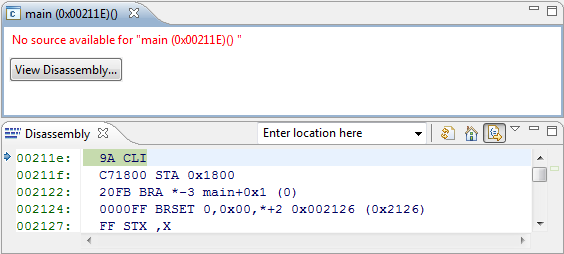
No Source Available

No Source Available?

Well, at least I can debug on assembly level. But this is not the point. I have the sources, but somehow the debugger does not find them?
Continue reading

Make my Make with Eclipse and MCU10

I mentioned in Go Reference that MCU10 and eclipse come with a comfortable infrastructure: you add, remove, rename source files and set compiler options: managed make will take care and creates the make files for you. Make files are such a great thing because they allow you do to pretty much everything.

Classic CodeWarrior uses a different approach without make files. Exporting the project as make file did not really work, so make files were not something you could have used easily in classic. With the eclipse based MCU10 make files are the heart of the build system. In most cases using the managed make system is perfectly fine. But for a bare metal enthusiast it makes sense to use my own make file instead.
Continue reading

Show me your files, lib!

Getting to the details is my natural engineering passion, see memory is everything. The same applies for building my embedded application: you should know what you pack into your binary file.

One aspect of this are the libraries. The linker does the heavy lifting, but still I want to know the details, right? In CodeWarrior for MCU, things are a little bit different for the 8/16bit tools (HCS08 and RS08) compared to Kinetis, ColdFire, DSC and Qorivva: the format for the libraries is not the archive (*.a) format. Therefore, I cannot use the usual command line tools like readelf, objdump or elfdump available in the GNU Binutils to inspect the libraries. The good news is: there are other good ways to get the information I need :-).
Continue reading