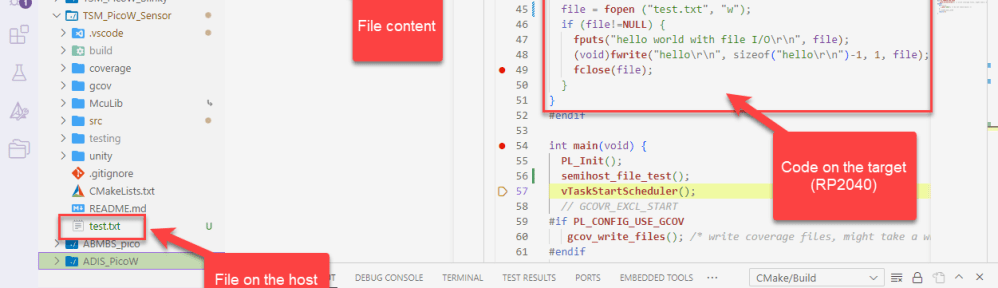
I’m working recently on a new lecture module using the Raspberry Pi Pico (RP2040) board, which highlights several aspects of modern software engineering, including DevOps and CI/CD. An important part of any CI/CD pipeline is testing. For a host application, one could pass arguments to the application, e.g. ‘myapp --test=module1‘, or let it read such information from a configuration file which describes the tests. Or write GNU gcov data to a file to collect coverage information.
Unfortunately, a normal embedded application has no argv[], and many system have no file system. A solution to this problem would be using semihosting with file I/O. Unfortunately for the Raspberry Pi Pico SDK 1.5.1 for the RP2040, there is no semihosting file I/O implemented :-(.
I have now implemented and added file I/O to the SDK, making it possible for the RP2040 to access and use files on the host, among other things. This greatly extends the capabilities of the device, and is very useful for testing, including gathering test coverage information.
Outline
Unlike for host based applications, there usually no file I/O available, and it is not easy to pass startup (command line) parameters to the DUT (Device under Test).
One solution to this part is to run the embedded application under control of the debugger, and pass the data that way to the application, e.g. with scripting memory read and writes. Another approach is to have the application accessing data on the host using file I/O semihosting. I explained semihosting in previous articles, e.g. “Semihosting with VS Code on RP2040“.
With file I/O semihosting, calls to things like fopen(), fread(), fwrite() and fclose() are redirected to the host machine, making it possible to access the embedded application the file system on the host.
In this article, I show how the RP2040 SDK 1.5.1 can be enhanced with semihosting file I/O. For this, the low-level standard I/O routines get replaced with semihosting ones, using the McuSemihost library.
I have published an example project for the RP2040 Pico board on Github.
McuSemihost
Key to the implementation is the module McuSemihost.c of the McuLib, as presented in Using Semihosting the direct Way. The module is part of the McuLib on GitHub and located here.
To use the module, you have to configure it, for example in IncludeMcuLibConfig.h of your application, for the debug probe used. The reason is that each debug probe can have different capabilities. Below the setting for using a SEGGER J-Link:
/* ---------------------------------------------------------------------------------------*/
/* McuSemihost */
#define McuSemihost_CONFIG_DEBUG_CONNECTION         McuSemihost_DEBUG_CONNECTION_SEGGER
McuRdimon
The McuRdimon is a new addition to the McuLib. It implements the low-level glue between the C/C++ standard library calls (e.g. _write()) to the semihosting functionality (e.g. McuSemihost_SysFileWrite()):
/* fh, is a valid internal file handle.
   Returns the number of bytes *not* written. */
int _swiwrite (int fh, const void * ptr, size_t len) {
  return McuSemihost_SysFileWrite(fh, ptr, len);
}
The McuRdimon.c is based on the GNU ARM Embedded ‘libgloss/arm’ which implements semihosting, but has been changed to be used for the RP2040 (or any other custom hardware).
By default, the module is disabled. You have to enable it with a define:
/* ---------------------------------------------------------------------------------------*/
/* McuRdimon */
#define McuRdimon_CONFIG_IS_ENABLED       (1)       /* 1: RdiMon is enabled; 0: RdiMon is disabled*/
Make sure you initialize the library from your application code to get the default file handles initialized. It can be done like this:
#include "McuRdimon.h"
...
#if McuRdimon_CONFIG_IS_ENABLED
  McuRdimon_Init();
#endif
Linking Libraries
Add in your top-level CMakeLists.txt the sub-directories of the McuLib and rdimon:
# add component directories to the list
add_subdirectory(${MCULIB_DIR}          build/McuLib)
add_subdirectory(${MCULIB_DIR}/rdimon   build/rdimon)
Link both the rdimonLib and McuLib with your application, e.g. in the top-level CMakeLists.txt:
target_link_libraries(
  ${CMAKE_PROJECT_NAME}
  pico_stdlib # pico SDK standard library
  rdimonLib # file I/O with semihosting
  McuLib
  ...
)
File I/O Testing Code
I recommend testing file I/O with your debug probe (I’m using for example the Cortex-Debug VS Code Extension with J-Link and OpenOCD). Below is a simple test writing a file on the host:
#include <stdio.h>

void semihost_file_test(void) {
  FILE *file;

  file = fopen ("c:\\test.txt", "w");
  if (file!=NULL) {
    fputs("hello world with file I/O\r\n", file);
    (void)fwrite("hello\r\n", sizeof("hello\r\n")-1, 1, file);
    fclose(file);
  }
}
If creating a file without path (e.g. ''test.txt''), then it will be created in the root folder of your VS Code project. You can use the test routine inside McuSemihost.c to make more tests if needed.
SDK stdio.c
Unfortunately, I have not found a working and reliable way to overwrite the weak stdio symbols inside the standard I/O library of the SDK 1.5.1. I played a lot with library linking order, but somehow it did not work as expected. 😦
So the ugly part is that I had to patch the following file:
${PICO_SDK_PATH}\src\rp2_common\pico_stdio\stdio.c
I had to disable with an #if ... #endif the file I/O low-level functions in case the rdimon implementation is used:
#if !McuRdimon_CONFIG_IS_ENABLED
int __attribute__((weak)) _read(int handle, char *buffer, int length) {
    if (handle == STDIO_HANDLE_STDIN) {
        return stdio_get_until(buffer, length, at_the_end_of_time);
    }
    return -1;
}

int __attribute__((weak)) _write(int handle, char* buffer, int length) {
    if (handle == STDIO_HANDLE_STDOUT || handle == STDIO_HANDLE_STDERR) {
        stdio_put_string(buffer, length, false, false);
        return length;
    }
    return -1;
}

int __attribute__((weak)) _open(__unused const char *fn, __unused int oflag, ...) {
    return -1;
}

int __attribute__((weak)) _close(__unused int fd) {
    return -1;
}

off_t __attribute__((weak)) _lseek(__unused int fd, __unused off_t pos, __unused int whence) {
    return -1;
}

int __attribute__((weak)) _fstat(__unused int fd, __unused struct stat *buf) {
    return -1;
}
#endif
This ensures that the functions are disabled and enabled, according to the settings. Below the two added source lines:

One can verify the proper function linking in the linker map file:

Debugging
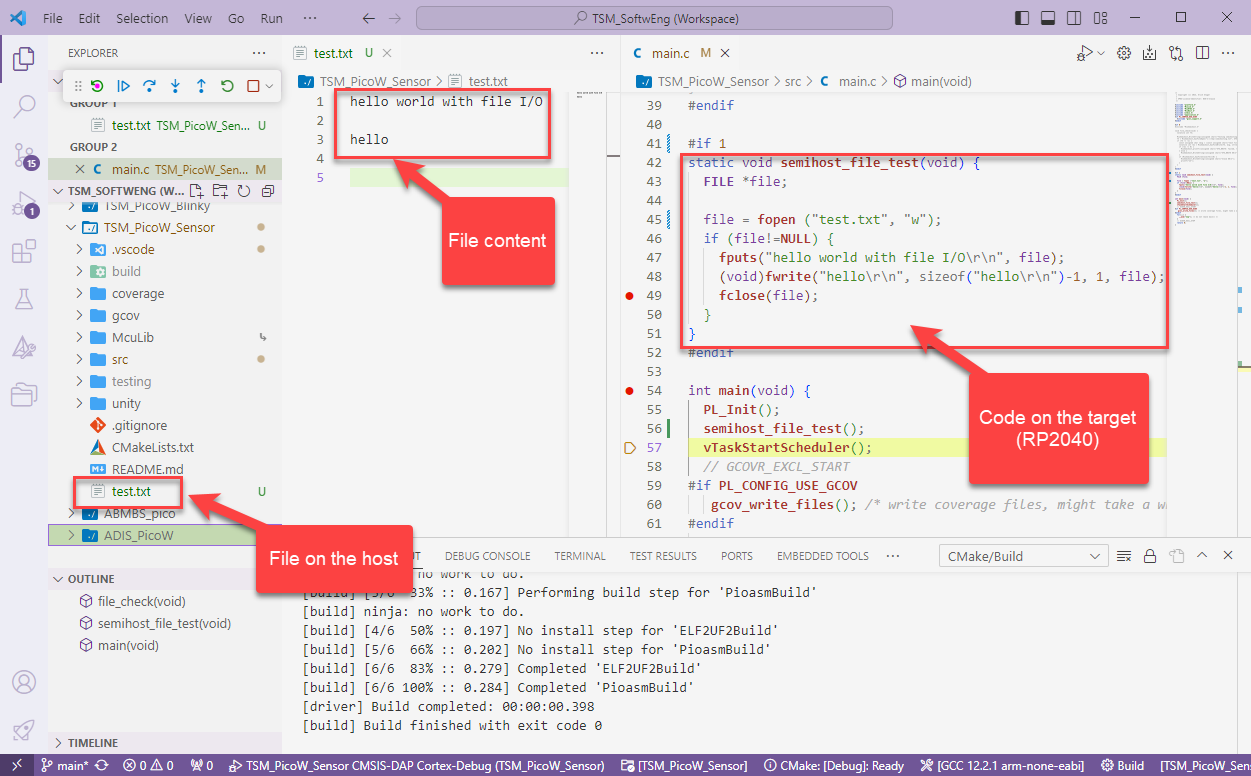
Now everything is in place, I can build and debug my application (do not forget to enable the debug probe semihosting, see Semihosting with VS Code on RP2040), and I can enjoy file semihosting with the RP2040:
Summary
It took me some time to implement a file I/O with semihosting for the RP2040, because the SDK and libraries for the Raspberry Pi Pico did not support it. But now I can access host functionalities, including reading and writing files. This will be very useful for my ongoing testing efforts of applications on the RP2040.
If I find a solution for the ‘weak’ symbol overwrite in the Pico SDK library, I’ll post an update. Or maybe someone has the solution?
Happy hosting 🙂
Links
- Example project on GitHub: https://github.com/ErichStyger/mcuoneclipse/tree/master/Examples/RaspberryPiPico/pico_semihosting
- CI/CD for Embedded with VS Code, Docker and GitHub Actions
- Semihosting with VS Code on RP2040
- Using Semihosting the direct Way
- Raspberry Pi Pico SDK: https://github.com/raspberrypi/pico-sdk
- McuLib: https://github.com/ErichStyger/McuOnEclipseLibrary
 MCU on Eclipse
About overwriting the weak symbols of the Pico SDK: defining the overrides as non-weak (i.e. simply *not* tagging your own functions with __attribute__((weak))) should be sufficient. The reason they are defined as weak in the SDK is exactly to allow overriding them.
LikeLike
Yes, I 100% agree. And this is how it works for me in other projects. But for unknown reasons, that did not work here, and I’m really puzzled by this, and I asked others. I suspected it might have something to do with the link order, and I played with this with the library order: that seemed to help at some point, but not always. It might be even an issue with the toolchain I’m using. I did not find any way to have a log of the linker about its ‘weak’ handling, or do you know one?
LikeLike
I did a quick test with my own project (MicroLua ). If I add overrides for _read(), _write(), _open(), _close(), lseek() and fstat(), the disassembly shows that they correctly override the ones provided by the Pico SDK, and they are actually called at runtime.
Do you use a custom linker script, or some weird compiler flags? Are you maybe overriding the reentrant variants (_read_r(), etc.)? Maybe one of your dependencies does so?
I see at least a couple of files in McuOnEclipseLibrary that override _write(), for example:
lib/SEGGER_RTT/RTT_Syscalls_GCC.c
lib/src/McuSWO.c
Maybe those interfere with the definitions in McuRdimon.c? What happens if you remove the __attribute__((weak)) from the overrides? Any linker errors?
LikeLike
Hi Remy,
thanks for your thinking and suggestions.
Yes, in my non-Pico RP2040 projects it works as expected: I can overwrite weak symbols.
I’m not using anything fancy in the linker files, just the standard RP2040 pico one.
And I do only try to overwrite the _write and others, and not the reentrant hooks.
Good point about the RTT system hooks: but they are all disabled and not compiled/linked.
I tried to remove the __attribute((weak)) in the pico standard implementation, it gave no error or whatever.
I feel it could be a GNU linker issues. I see that many vendors like NXP are providing the rdimon implementation in .o (object files), while I have them in a .a (archive) library. Maybe the linker treates weak symbols differently if they are overwritten from a library instead coming from a .o file?
LikeLike
I think I have found the culprit: it seems to be related to the fact that I’m using STATIC (the default) with target_link_libraries. There is discussion on this here: https://stackoverflow.com/questions/70679832/weak-function-definitions-for-interrupt-vector-in-a-static-library-are-preferred. This seems to make the library more ‘contained’, and I would have to use OBJECT in target_link_libraries, but this creates a lot of include dependency issues. I’m not sure yet how to solve it, but it seems I have found at least something to work on.
LikeLike
Why not INTERFACE? That’s what’s used throughout the pico-sdk, and also what I use here.
(I have to admit that I’m not a cmake guru, so I’m mostly copying what I see elsewhere.)
LikeLike
good suggestion. I had tried that out, maybe I need to look closer into using INTERFACE. Thank you!
LikeLike