
Going with the factory default can be fine. But an upgrade could give a performance boost plus added functionality. Many of the NXP i.MX RT evaluation boards have an LPC4322 based debug circuit on it. One example for this is the i.MX RT1010 board.

On such boards, one of the first steps I do is: upgrading the firmware and change it to a better option: improved speed, SWO support plus avoiding issues with the USB MSD device.
Outline
I have discussed the LPC4322-based debug probes already in Debug Firmware Switching for the LPC4322 and Freelink LPC4322JET100 based Debug Circuit on NXP i.MX RT1064-EVK Board, but I think it is time for another article on that subject. I’m using the i.MX RT1010-EVK here, but things apply to other i.MX RT board with the LPC4322 circuit, including the i.MX RT1064.
Default Firmware
The board has a LPC4322-based debug interface on it, also named ‘Freelink Interface‘. As shipped from the factory, the board comes with a DAPLink CMSIS-DAP debug probe firmware, which enumerates as USB MSD device, with following details:
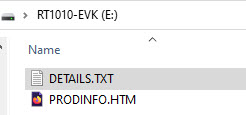
# DAPLink Firmware - see https://mbed.com/daplink
Unique ID: 022700001713b13900000000000000000000000097969905
HIC ID: 97969905
Auto Reset: 0
Automation allowed: 0
Overflow detection: 0
Daplink Mode: Interface
Interface Version: 0246
Bootloader Version: 0244
Git SHA: b965bacc9b93e23943b39e1b09cb4699468a3c49
Local Mods: 0
USB Interfaces: MSD, CDC, HID, WebUSB
Bootloader CRC: 0xe493996b
Interface CRC: 0xb3ff60f9
Remount count: 0
It is recognized as such in the NXP MCUXpresso IDE:

That default firmware works (at least most of the time), but has several problems:
- Flash programming is slow: loading another firmware speeds it up by a factor of ~4 times faster
- The MSD (drag&drop programming) causes issues with newer host OS (Windows 11) or if USB MSD (Memory Stick) devices are blocked by virus scanners or corporate security policies. The new firmware does not have MSD programming, and I don’t need that for development.
- No SWO (trace/profiling/ITM): new firmware gives that capability
- Possible USB power issues, if USB port is not able to provide enough power
Power
There is one possible downside with changing the firmware: the original firmware does enable the target power with the POWER_EN signal:
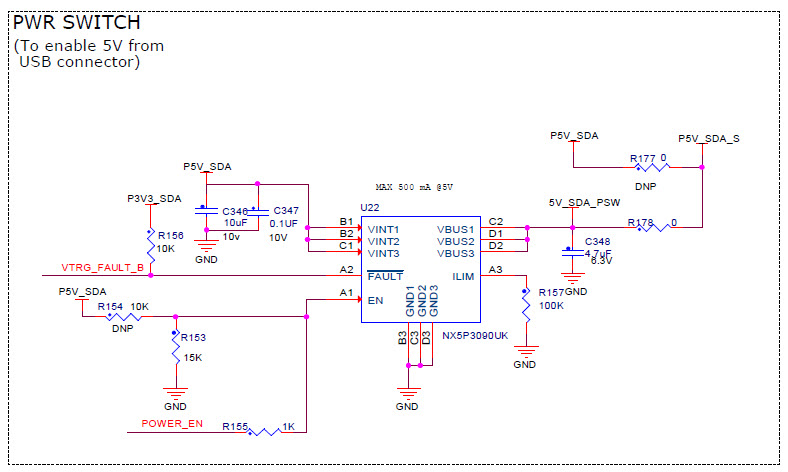
If using the SEGGER J-Link firmware (see later), then in my experiments I did not find a way that the J-Link Firmware would turn on that signal. There is a ‘provide power’ option in the debugger settings, but this did not work for me. So for the on-board J-Link option I need to provide power in a different way. There is a board jumper setting to change that:

My solution is to set J1 to the 3-4 position. That way I have a cable powering the debug circuit, and another one to power the target MCU and peripherals:
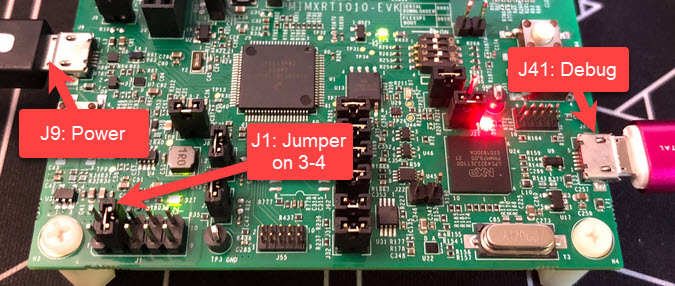
Having two cables gives more power if needed. But it is not ideal.
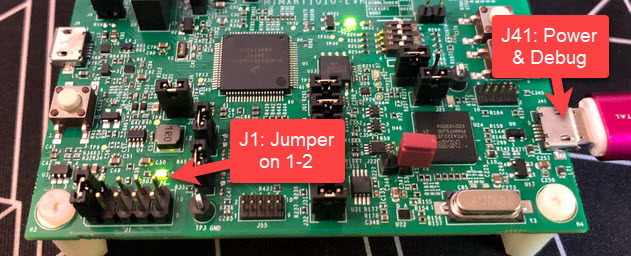
The good news is: if using the LinkServer (LPC-Link2) software/firmware v1.2.45 on, the firmware is handling POWER_EN, and I only need one cable:
Upgrading the Firmware
I have to put the LPC4322 into boot mode first.
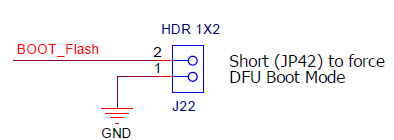
I have to set that jumper and power the board with the USB cable:
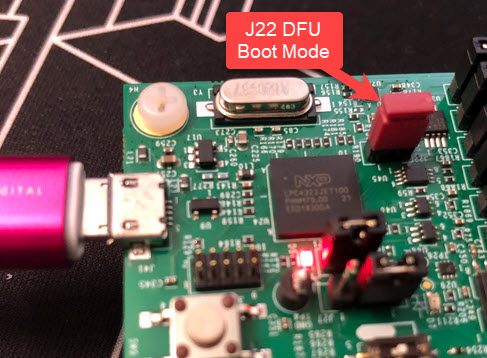
To program the firmware, I need LPCScrypt (https://www.nxp.com/lpcscrypt). That utility is part of the LinkServer package too.

Inside LpCScrypt, I can program the new CMSIS-DAP (LPC-Link2) or J-Link firmware. Run one or the other, below the output for the LinkServer (CMSIS-DAP):

At the end, remove the jumper and power the board again.
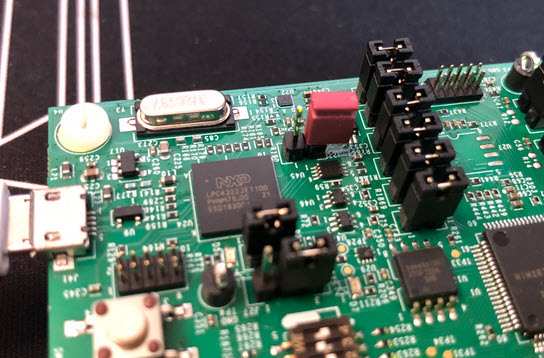
Congratulations: you have upgraded the probe firmware :-).
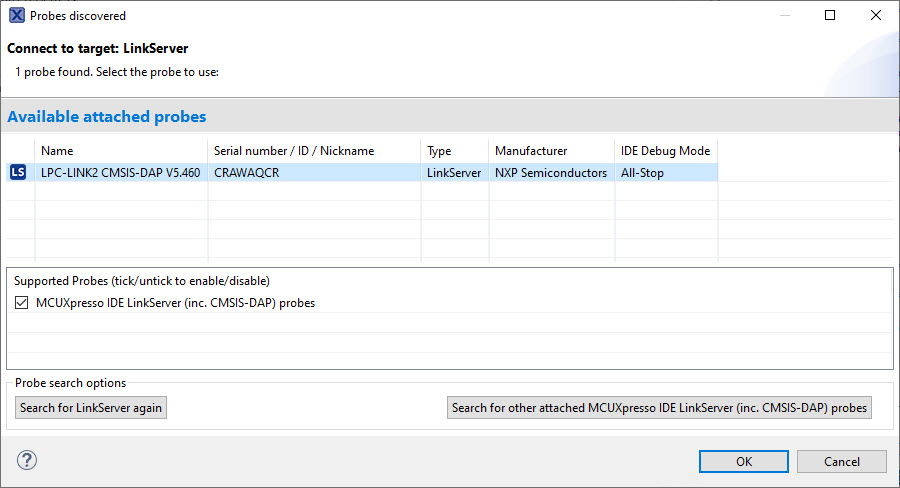
In the debugger, I can see now a LPC-Link 2 or J-Link:

Another Option: External Debug Probe
Of course I can use an external debug probe too. In the case of the NXP i.MX RT1010 EVK board, I have to remove the isolation jumpers of the debug interface:
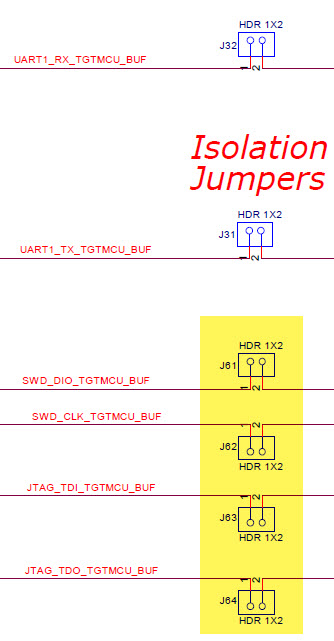

With the jumpers removed, I can happily use an external debug probe which gives the benefit of extra speed and software tools.
Summary
I do not use the default firmware on my i.MX RT1010 or i.MX RT1064 board any more. With the firmware upgrade get higher programming and debugging speed, have no issues with the MSD bootloader, plus I have SWO trace/profiling/ITM on top of it. And with using LinkServer/LPC-Link2 v1.2.45 I can continue using a single USB cable.
Happy upgrading 🙂
Links
- NXP i.MX RT1010 EVK: http://www.nxp.com/imxrt1010evk
- Freelink LPC4322JET100 based Debug Circuit on NXP i.MX RT1064-EVK Board
- Debug Firmware Switching for the LPC4322
- MCUXpresso IDE 11.8.0
- AN13206: https://www.nxp.com/docs/en/application-note/AN13206.pdf
- LPCScypt: https://www.nxp.com/lpcscrypt
- LinkServer: https://nxp.com/linkserver
 MCU on Eclipse