Typically a Processor Expert component creates two files: a header file and a source file. That’s fine for normal drivers. But this does not work well for more complicated things like an RTOS or communication stacks: these are built from a whole set of source files. So how can I generate multiple files with a Processor Expert Component?
Category Archives: CDE
CDE Hacking: Processor and Compiler
Writing Processor Expert components is not always completely independent of the compiler and underlying microcontroller. In many cases I need to know the compiler for which the source code is generated. Or I need to know on which CPU architecture the code shall run. For this I need to know the compiler and the CPU family.
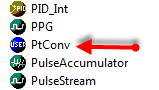
PID with Processor Expert
In my class at the university I’m using a microcontroller attached to a DC motor from Maxon. The job of the microcontroller is to implement (among other things) a PID controller for the motor speed (or position). In the lab we implement the PID and all the related parts of the control loop without Processor Expert. But it easily can be done as well with Processor Expert components, as described here.
CDE RTOS Hacking: Show it as an RTOS component
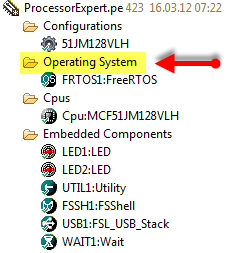
Technically, a normal user component can implement any RTOS. This is what I did with the Micrium MicroC/OS-II component. That way the component shows up in the ‘Embedded Components’ group. But how to make it showing up as RTOS component inside the ‘Operating System’ group as the FreeRTOS component? What I want is this: to show the RTOS component under the ‘Operating System’ group of my project:
CDE Hacking: Component Icon
Ah, a lot of work went into a new Processor Expert component, and finally it shows up in the component library:
Oh, wait: *that* icon does not look nice enough for that amount of work behind the component?
CDE Hacking: *.inc Files
In my previous post I mentioned the Drivers\Common folder which has ‘include’ files. These files are maintained automatically by the Component Wizard. But what is the purpose of these files?
The Common Folder has *.inc files which are included in the driver as ‘function’ header. The .inc file contains documentation about the function and parameters for that function.
CDE Hacking: Where is my stuff? A dissection…
What I describe here is an overview about the different locations, folder and files you will see if you are importing or developing a Processor Expert User component. I’m showing below example screenshot for the FreeRTOS component, as this is probably the most complex one I ever have created.
The Making Of RTOS Processor Expert Components
OK, I think this topic is a very special one, and probably not of interest of many folks out there. Or how many want to create a Processor Expert Plugin for an RTOS? Well, I did this. And I think that topic might be very controversial too, especially for all the RTOS vendors out there :-). The thoughts expressed here about creating Processor Expert components do not only apply for an RTOS, but as well for any other ‘complex’ software or stack. So if you are interested about the ‘behind the scenes’ of creating Processor Expert components, especially in the context of an RTOS, then read on ;-).
FSL_USB_Stack updated: sending 16 or 32 byte blocks
The FSL_USB_Stack Embedded Component presented in “USB CDC, reloaded” has been updated to V1.004 and is available here. I was running into issues if the USB CDC stack had to send out either 16 or 32 bytes of data in the App_Task() function. In that case the data is not sent until the next USB_Class_CDC_Interface_DIC_Send_Data() request.
CDE: Inherited Component Base Name
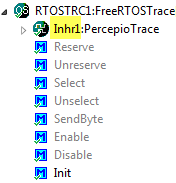
Inheriting Processor Expert components with CDE and the Component Wizard is easy. But sometimes it is tricky and requires some tweaking. Components should be easily accessible (see CDE: Show Inherited Methods), and names should make sense. And here is a challenge: changing the name for inherited components: