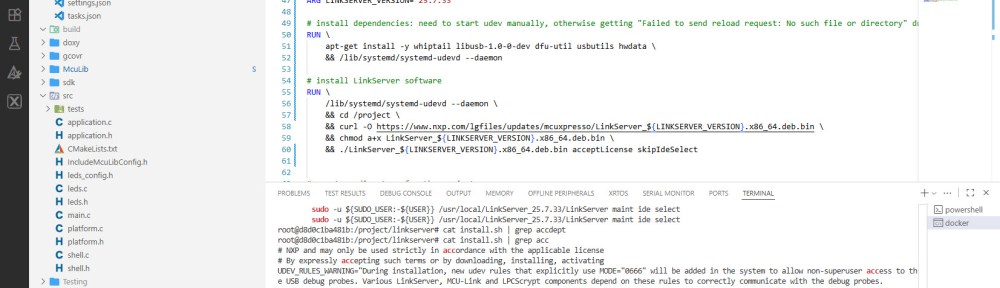
I’m shifting more and more of my CI/CD testing infrastructure using the LinkServer runner. One reason is the LinkServer runner can run the test on-target. It can also collect GNO gcov coverage information at the same time. LinkServer is a suite of software tools for launching and managing GDB servers for NXP debug probes.
Outline
In my CI/CD pipeline, I’m using GitHub, GitLab plus Docker running an Ubuntu container. The container image installs all the necessary tools, including the LinkServer software.
Over the past weeks, I have streamlined the LinkServer software installation. LinkServer as other non-open-software usually asks for a license agreement, for example with a click-through license agreement. In a CI/CD environment, no user intervention is desired. So special command line options have been used to automate the process.
Starting Point
Below is an extract from the docker image I have been used for over a year now:
# Install LinkServer software: make sure you have the same version installed on your host!
RUN \
  apt-get install -y whiptail libusb-1.0-0-dev dfu-util usbutils hwdata
# Linkserver download paths, e.g.
# Windows: https://www.nxp.com/lgfiles/updates/mcuxpresso/LinkServer_24.9.75.exe
# Linux: https://www.nxp.com/lgfiles/updates/mcuxpresso/LinkServer_24.9.75.x86_64.deb.bin
# MacOS Arch64: https://www.nxp.com/lgfiles/updates/mcuxpresso/LinkServer_24.9.75.aarch64.pkg
# MacOS: https://www.nxp.com/lgfiles/updates/mcuxpresso/LinkServer_24.9.75.x86_64.pkg
RUN \
    cd /project \
    && curl -O https://www.nxp.com/lgfiles/updates/mcuxpresso/LinkServer_24.9.75.x86_64.deb.bin \
    && chmod a+x LinkServer_24.9.75.x86_64.deb.bin \
    && ./LinkServer_24.9.75.x86_64.deb.bin --noexec --target linkserver \
    && cd linkserver \
    && dpkg --unpack LinkServer_24.9.75.x86_64.deb \
    && rm /var/lib/dpkg/info/linkserver_24.9.75.postinst \
    && dpkg --configure linkserver_24.9.75 \
    && dpkg --unpack LPCScrypt.deb \
    && rm /var/lib/dpkg/info/lpcscrypt.postinst \
    && apt-get install -yf
It works fine and does not ask for any user input. It allows me to pick a specific version of the LinkServer software which is great. But the version number information is duplicated throughout the script.
The first improvement was to use a variable, so the version number can be specified in on e location. In Docker files, this can be done with an ARG.
Using ARG
With using ARG, I can create and use a runtime variable for Docker during the image build.
ARG LINKSERVER_VERSION="25.7.33"
With this I specify which version of LinkServer I want to use. Inside the script I can use it like this:
LinkServer_${LINKSERVER_VERSION}.x86_64.deb.bin
Now the script looks much better:
# Install LinkServer software: make sure you have the same version installed on your host!
ARG LINKSERVER_VERSION="25.7.33"
RUN \
  apt-get install -y whiptail libusb-1.0-0-dev dfu-util usbutils hwdata
# Linkserver download paths, e.g.
# Windows: https://www.nxp.com/lgfiles/updates/mcuxpresso/LinkServer_${LINKSERVER_VERSION}.exe
# Linux: https://www.nxp.com/lgfiles/updates/mcuxpresso/LinkServer_${LINKSERVER_VERSION}.x86_64.deb.bin
# MacOS Arch64: https://www.nxp.com/lgfiles/updates/mcuxpresso/LinkServer_${LINKSERVER_VERSION}.aarch64.pkg
# MacOS: https://www.nxp.com/lgfiles/updates/mcuxpresso/LinkServer_${LINKSERVER_VERSION}.x86_64.pkg
RUN \
    cd /project \
    && curl -O https://www.nxp.com/lgfiles/updates/mcuxpresso/LinkServer_${LINKSERVER_VERSION}.x86_64.deb.bin \
    && chmod a+x LinkServer_${LINKSERVER_VERSION}.x86_64.deb.bin \
    && ./LinkServer_${LINKSERVER_VERSION}.x86_64.deb.bin --noexec --target linkserver \
    && cd linkserver \
    && dpkg --unpack LinkServer_${LINKSERVER_VERSION}.x86_64.deb \
    && rm /var/lib/dpkg/info/linkserver_${LINKSERVER_VERSION}.postinst \
    && dpkg --configure linkserver_${LINKSERVER_VERSION} \
    && dpkg --unpack LPCScrypt.deb \
    && rm /var/lib/dpkg/info/lpcscrypt.postinst \
    && apt-get install -yf
Still, that installation script does a lot of tweaking of the installation process.
acceptLicense & skipIdeSelect
In my above script, I first unpack the archive into the ‘linkserver’ folder:
./LinkServer_${LINKSERVER_VERSION}.x86_64.deb.bin --noexec --target linkserver
The installer has two interactive parts. One is accepting the license agreement. Plus in newer installations it asks if MCUXpresso IDE’s shall be updated.
Looking through the linkserver/install.sh script I can see that there are options to skip them:
if [ $# -gt 0 ]; then
    for arg in "$@"
    do
        if [ "$arg" == "acceptLicense" ]; then
            ACCEPT_LICENSE=1
        fi
        if [ "$arg" == "skipIdeSelect" ]; then
            SKIP_IDE_SELECT=1
        fi
    done
fi
So instead unpacking the archive and script modifications, I can do what I want directly with:
./LinkServer_${LINKSERVER_VERSION}.x86_64.deb.bin acceptLicense skipIdeSelect
Not working?
But doing this, I noticed that I had strange error messages:
"Failed to send reload request: No such file or directory"
After some searching, I have found out that this is related to the udev service. In my docker image case, udev has not been started, so I had to add this to the script:
/lib/systemd/systemd-udevd --daemon
Final Version
Finally everything comes together:
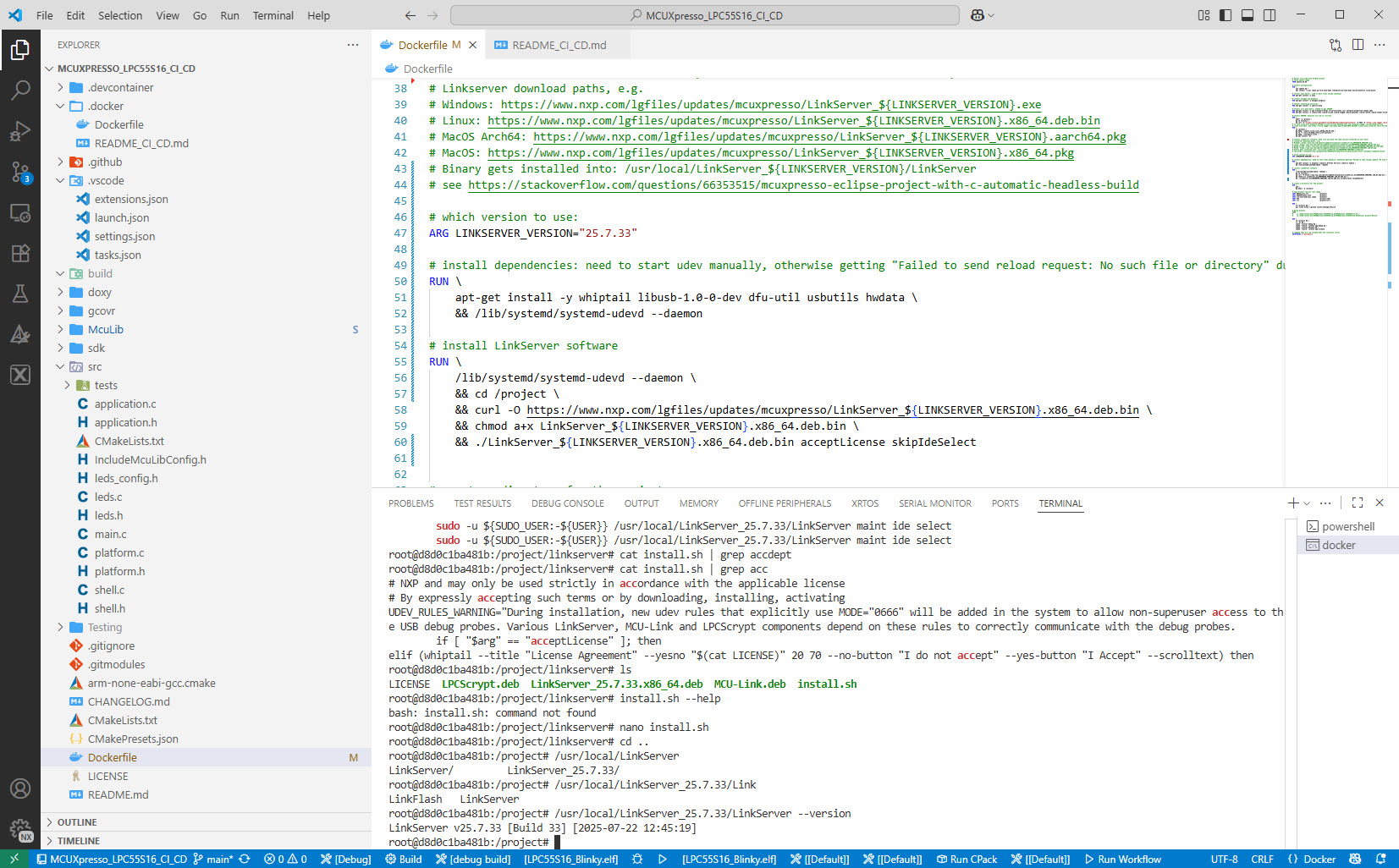
# which version to use:
ARG LINKSERVER_VERSION="25.7.33"

# install dependencies: need to start udev manually, otherwise getting "Failed to send reload request: No such file or directory" during LinkServer installation
RUN \
    apt-get install -y whiptail libusb-1.0-0-dev dfu-util usbutils hwdata \
    && /lib/systemd/systemd-udevd --daemon

# install LinkServer software
RUN \
    curl -O https://www.nxp.com/lgfiles/updates/mcuxpresso/LinkServer_${LINKSERVER_VERSION}.x86_64.deb.bin \
    && chmod a+x LinkServer_${LINKSERVER_VERSION}.x86_64.deb.bin \
    && ./LinkServer_${LINKSERVER_VERSION}.x86_64.deb.bin acceptLicense skipIdeSelect
With this, the LinkServer software gets installed without user intervention. And it works fine too for a docker image, tested with Ubuntu 24.04.
Summary
The LinkServer software is a suite of debugging and test running tools for NXP debug probes. In above approach I have streamlined the installation script, requiring less steps and modifications. It works fine in my CI/CD environment using Docker and Linus (Ubuntu).
What is your preferred way to install software, especially for CI/CD? Or what has been your challenges installing software that way? Let me know and post a comment!
Happy installing 🙂
Links
- Project on GitHub: https://github.com/ErichStyger/MCUXpresso_LPC55S16_CI_CD
- NXP LinkServer: https://www.nxp.com/design/design-center/software/development-software/mcuxpresso-software-and-tools-/linkserver-for-microcontrollers:LINKERSERVER
- Running On-Target Tests with Coverage in VS Code
- On-Target Testing with LinkServer Runner and VS Code
- Modern On-Target Embedded System Testing with CMake and CTest
- Optimizing CI/CD with RAM Target Applications
 MCU on Eclipse
Hi Erich,
Great post and extremely informative and useful.
Have you had a chance to test some other docker base images besides Ubuntu 24.04?
I’m wondering about some lightweight images like debian slim for example.
Going with lightweight image like could be a bit too-hardocre, as I already tried this one for some other flash-like tool for embedded and it was not happy about anything really 😀
However, it’s worth a shot IMHO.
LikeLike
Hi Michal,
no, I have always used Ubuntu for this kind of things in the past. I tried other distributions, but they were mostly only a pain dealing with it. Ubuntu seems to be widely used and supported, so I have continued to use it, and rarely had any issues with it.
Erich
LikeLike
I know the pain 😀
I will try out other distros as well (once I have some free time for that), because there might be a case for having an image with minimal “bloat”, so that it can spin up, do its job and get terminated/shut-down.
That’s especially useful for CI/CD purposes where often docker containers are short-lived.
Although it might only be dozens of MB of a difference, but once you have many such tiny applications it starts to add up.
I always try to have a minimum image size as a good practice (provided it works without issues). So that’s why I asked in the first place 😉
I’m eagerly anticipating further posts, because the ones in 2025 were totally killing it!!
Keep it up, best regards to you,
Michal
LikeLike
Hi Erich,
Could you do a similar tutorial for installing MCUXpresso in a container?
The MCUXpresso package should have a similar option to skip the license as seen below, but it does not seem to work.
This has been driving me crazy for multiple days now. Your help would be much appreciated.
Best regards,
Jelle
LikeLike
Hi Jelle,
why not consider VS Code with DevContainers? See https://mcuoneclipse.com/2025/02/08/optimizing-embedded-development-with-vs-code-and-devcontainer/
Erich
LikeLike
Thanks for the post, Erich – appreciated.
On a Ubuntu 24.04 based docker image I can install LinkServer 25.12.83 and run the image through:
docker run –privileged –rm -ti <IMAGE> bash
and LinkServer enumerates the probe:
$ LinkServer probes
# Description Serial Device Board Capabilities
— —————————————– ————- ——– ——- ————–
1 MCU-LINK on-board (r0E2) CMSIS-DAP V3.156 BHB3CZLGETE40 DEBUG, VCOM
However non-root users fail to query the connected probe:
$ LinkServer -l 5 probes
[192]DEBUG:asyncio: Using selector: EpollSelector
[192]DEBUG:launcher.core.utils: Looking for free port on :12222
[193]DEBUG:launcher.core.utils: Found free port 12223
[193]DEBUG:launcher.core.utils: Looking for free port on :11111
[193]DEBUG:launcher.core.utils: Found free port 11111
[193]DEBUG:launcher.core.redlinkserv: Starting redlinkserv: /usr/local/LinkServer_25.12.83/binaries/redlinkserv [‘–port’, ‘11111’, ‘–telnetport’, ‘12223’, ‘–no-telnet-defaults’]
[196]DEBUG:launcher.core.probeboot: Listing usb devices
[196]DEBUG:launcher.core.utils: Subprocess exec: lsusb []
[199]DEBUG:launcher.core.utils: Connecting to redlinkserv (127.0.0.1:12223)
[201]DEBUG:launcher.core.utils: Connected to redlinkserv (127.0.0.1:12223)
[201]DEBUG:launcher.core.redlinkserv: [read]
[204]DEBUG:launcher.core.probeboot: Found 4 USB devices
[204]DEBUG:launcher.core.redlinkserv: [write] probelist
[260]DEBUG:launcher.core.redlinkserv: [read-partial] b’Error: No probes foundn’
[300]DEBUG:launcher.core.redlinkserv: [read] Error: No probes found
[300]DEBUG:launcher.core.redlinkserv: [write] exit
[301]DEBUG:launcher.core.redlinkserv: Waiting for redlinkserv to close
[402]DEBUG:launcher.core.redlinkserv: Redlinkserv has closed Description Serial Device Board Capabilities
I assume it relates to lack of udev (since it works for root) in the container – am I missing something obvious?
Thanks,
Martin
LikeLike
Hi Martin,
Yes, I did run it as root in the container. Have you already tried to add the udev rules?
Erich
LikeLike
I did now – installing udev rules on the host allows for non-root usage in the container.
Thanks 🙂
LikeLike
Excellent, thanks for confirmation!
LikeLike