
One of the great advantage of using an ARM core as on my FRDM-KL25Z board is that I can leverage a lot of things from the community. And one big thing around ARM is CMSIS (Cortex Microcontroller Software Interface Standard). It is an industry wide software library for the ARM Cortex microcontroller. Using the CMSIS libraries and interfaces will make it easier to port applications within the ARM Cortex family.

CMSIS Version 3 Block Diagram (Source: Arm.com)
CMSIS has evolved over time, and even has added an RTOS API (CMSIS-RTOS API). What is the most interesting for me now is the CMS-DSP part of it: a set of over 60 functions for fixed point and floating point library routines. So how to use it in my project for the ARM Cortex-M0+ on the Freedom board?
For this Tutorial I’m using the Eclipse based CodeWarrior for MCU10.3, the CMSIS version V3.01 and the ARM GNU build tools with the Freedom FRDM-KL25Z board. As steps are pretty generic, that should work for other combinations too.
Downloading CMSIS
CMSIS is provided free of charge by ARM from their Silver Portal. On that Self-Service Portal there is a ‘Downloads’ link, but downloads are only available after I’m registered.
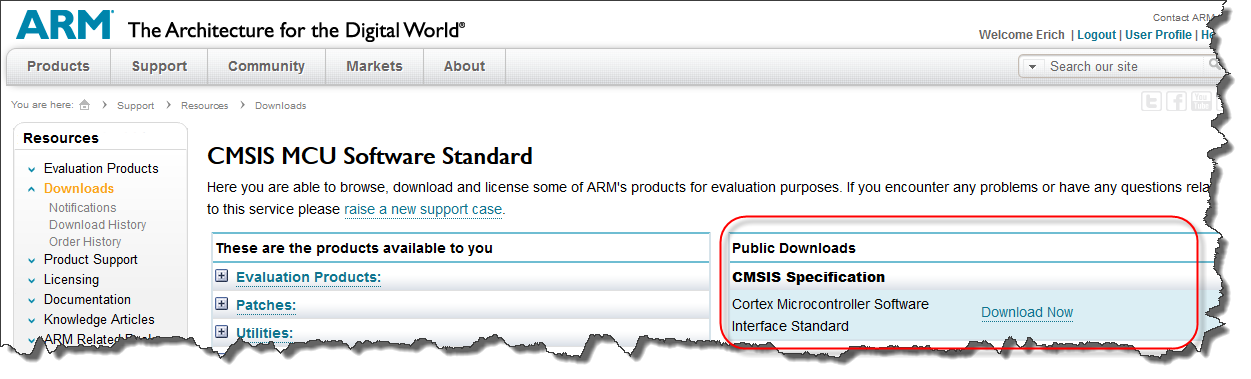
CMSIS Download Page
The current release is V3.01 and downloaded in a zip file of about 44 MByte in size.
Installing CMSIS
To simplify things, I have the CMSIS zip file unpacked inside my workspace. It creates the folders ‘Device’, ‘CMSIS’ and a file with the version number:

Installed CMSIS
Creating a Project
Inside the workspace, I create a project for my board using the File > New > Barboard Project wizard to create a GNU gcc project. This creates a default project for me:

CMSIS CodeWarrior Project
Instead of writing my own example, I’m using one which is part of the CMSIS installation:

sin cos example
💡 ARM provides many such examples. They are a great way to verify that they work properly in my application. One consideration with using the libraries is their stack consumption. If they work as the simple example, but not within my application, then typically I have not reserved enough stack space. At least worth a try.
An easy way to add this file to my project is to drag&drop it into my project Sources folder. As the example comes with a main(), I can remove the original main.c from my project:

Added Sin Cos Example
Creating a Build Variable
We need to reference the CMSIS installation path in the next steps several times. To make things easier and more portable, I’m going to add a Build variable. For this I press ‘Add’ in the project properties > C/C++ Build > Build Variables:

Adding a Build Variable
In the following dialog I define my variable and press OK:

CMSIS_LOC Variable
❗ Of course you should use a path pointing to to where you have CMSIS installed. For me, it is is “c:\tmp\wsp_cmsis\CMSIS” in this tutorial, so you need to use the path which you have on your system.
With this, I can always use
${CMSIS_LOC}
instead of a hard-coded path.

Defined Build Variable
Using CMSIS
The above project will not compile and link. I need to tell the compiler where to are the CMSIS header files, and what library to link.
Header File Include
The CMSIS header files are in CMSIS\Include, so I add this to my compiler include paths:

Compiler Directories Setting
💡 I’m using here the CMSIS library inside my workspace. Change the path if you have the CMSIS installed somewhere else.
Architecture Define
The other important thing is: I need to set a define which tells the CMSIS library which ARM Cortex core I’m using. For the ARM Cortex-M0+ this is ARM_MATH_CM0. I add this define to the project properties of the ARM gcc preprocessor settings.

Added ARM_MATH_CM0 to the Preprocessor Defined Symbols
💡 If using an ARM Cortex-M4 (like for the Kinetis K family), then the define would be ARM_MATH_CM4
Library
CMSIS already comes with pre-built libraries. So all what I need to do for gcc is to link the correct libraries with my application. The libraries are inside CMSIS\Lib\GCC:

GCC CMSIS libraries
💡 The M denotes the ARM core, while the ‘l’ means ‘little endian’. The ‘f’ means an ARM core with Harware Floating Point Unit (e.g. Cortex-M4F).
With this information, I add the library name and the library search path to my linker settings:

Linker Library Settings
❗ Important: the library name is *without* the ‘lib’ prefix and *without* the ‘.a’ suffix! See Creating and using Libraries with ARM gcc and Eclipse.
Build and Debug
With this, everything should be in place to compile, link and download without errors. But if I step into the CMSIS functions, I get a message from the debugger that it cannot find the source file:

Can’t find a source file
The reason is that I’m using the precompiled libraries from ARM, and obviously that person was using a different path to the CMSIS library.
To help the debugger to find the source, I’m going to add a path mapping. I press the ‘Edit Source Lookup Path’ button:

Edit Source Lookup Path
Then I select Path Mapping:

Add a container to the source lookup path
Then I specify that ‘c:\working\CMSIS_Setup\CMSIS shall be replace with the path on my machine:

Specified Path Mapping
❓ I would love to use my ${CMSIS_LOC} variable in that dialog, but this is not supported in this Eclipse version? That would be a great feature extension.
Now it shows the source properly:

Showing CMSIS Source
On a side note: the debugger launch configuration has as well a panel to configure where the debugger is looking for source files:

Debugger Source File Mapping
Summary
Using the CMSIS from ARM is a great add-on to my applications: I can take advantage of DSP and other functionality without writing them myself. All what it needs is to set configure my project to use one of the precompiled libraries.
My current CMSIS library and application project are on GitHub.
Happy CMSISing 🙂
 MCU on Eclipse
That is very helpful… especially how to overcome the path problems. It would be helpful to know your suggestions on some of the specific functions that you would recommend. I don’t do floating point calculations because of the excessive amount of code generated (at least under the 9sx12 series when I last used them). For the calculations that need decimal point accuracy I do these in Q16 and Q32 format, then use the pc app to do the resulting arithmetic to get to decimal precision. Although I know there are probably times floats have to be done on the embedded side…..
That is when you have time…. 🙂
LikeLike
Yes, I avoid floating point operations wherever I can if my micro does not have a hardware floating point unit. The thing with CMSIS and Cortex is that some have DSP like functions, and with CMSIS they can be easily used.
LikeLike
Hi.
I am already worked with CMSIS library with Kinetis MCUs (K60, K40, K20, K10 series). It was hard to get started because of misconfiguration CMSIS into the project. But Freescale support helped me.
This tutorial is very helpful – all information in one place.
Thanks.
LikeLike
Yes, it took me a while too to sort out things. I was running into a GNU linker problem (number of object files linked). The good news is: according to the ticket, this should be resolved soon in MCU10.4 🙂
LikeLike
Pingback: Review of CodeWarrior for MCU10.4 | MCU on Eclipse
Pingback: Low-Level Coding with PDD (Physical Device Driver) | MCU on Eclipse
How can I use this standard to make non ARM cores use compliant header files?
LikeLike
The CMSIS library is more about library functions (like DSP functionality), but not much about the core. There are the CMSIS-CORE header files which are for the different cores produced by the different vendors (TI, STM, NXP, Freescale). On the other side: CMSIS is for ARM cores, and the ARM Inc. licensing terms say if I remember right they only should be used for ARM cores. Given the fact (if the industry continues with the current pace), there are probably not many non-ARM cores in the future any more, or only niche non-ARM cores. Just how I see things evolving at least over the last few years.
LikeLike
Hi, Erich!
I’ve been reading your web site for weeks and you’ve been of great help! Thank you and congratulations for all the contents you’re making available for everyone out there, like me.
I’ve used this particular tutorial a couple of weeks ago when I started using CMSIS. A couple of days ago, I changed the computer at work. I had to install CodeWarrior and the CMSIS library all over again. Every thing seemed to be ok, until I tried to build the project (The same project I was using in the old computer).
I got an error from the linker saying the m_text was overflowed. Looking at the .map, I found the problem but cannot seem to find a solution. What is happening, and did not happen before, is that the linker includes all the variables from arm_common_tables.o!
Do you know how i could change the settings so as to solve this problem?
If you need, I could upload both .map, before and after the computer change.
LikeLiked by 1 person
Hi Juan,
thanks 🙂
if m_text overflowed, this means your code is larger than your FLASH. Could it be that you link/compile more stuff?
Maybe your compiler optimizations are not the same?
What you could try is to increase the FLASH memory size in your linker file (just be able to link), so you can inspect the .map file what is taking so much space?
LikeLike
Hi Erich!
Thanks for the reply.
I already did what you said.
Actually, that’s how I found that there was a difference between the CMSIS versions.
I managed to solve the problem by using and old version of it (3.20) instead of the newer on (4.00). I can’t tell why, but I suppose they build there library in a static manner , and not dynamically.
So, that’s it.
LikeLike
Hi Erich,
I am unable to get CMSIS library to work in KDS environment for FRDM-K64F target.
I have added ARM_MATH_CM4 as defined symbol under project/Properties/C/C++ Build/Settings/Cross ARM C Compiler/Preprocessor.
I have included #include “arm_math.h”, yet when I use “arm_mult_q31(input, coeffs, out, 5);”
I get the error: undefined reference to `arm_mult_q31′
What am I missing?
Thanks,
-Irwin
LikeLike
Hi Irwin,
Are you building the CMSIS DSP library with your project? This is what I do for Cortex-M0, and I have not seen that problem?
Erich
LikeLike
Hi Erich,
I do see CMSIS folder under my project’s ../SDK/Platform/CMSIS
My thought is that it should be getting built, and the problem happens during linking. Here is the Console log at the trailing end:
..
..
‘Building file: ../Generated_Code/uartCom1.c’
‘Invoking: Cross ARM C Compiler’
arm-none-eabi-gcc -mcpu=cortex-m4 -mthumb -mfloat-abi=hard -mfpu=fpv4-sp-d16 -O0 -fmessage-length=0 -fsigned-char -ffunction-sections -fdata-sections -g3 -D”CPU_MK64FN1M0VLQ12″ -D”ARM_MATH_CM4″ -I”C:\Freescale\KSDK_1.1.0/platform/system/inc” -I”C:\Freescale\KSDK_1.1.0/platform/hal/inc” -I”C:\Freescale\KSDK_1.1.0/platform/osa/inc” -I”C:\Freescale\KSDK_1.1.0/platform/hal/src/sim/MK64F12″ -I”C:\Freescale\KSDK_1.1.0/platform/system/src/clock/MK64F12″ -I”C:\Freescale\KSDK_1.1.0/platform/CMSIS/Include” -I”C:\Freescale\KSDK_1.1.0/platform/CMSIS/Include/device” -I”C:\Freescale\KSDK_1.1.0/platform/CMSIS/Include/device/MK64F12″ -I”C:/KDS_WS_2_0_0/K64_PEx_UART/SDK/platform/startup” -I”C:/KDS_WS_2_0_0/K64_PEx_UART/Generated_Code/SDK/platform/startup/MK64F12″ -I”C:/KDS_WS_2_0_0/K64_PEx_UART/Sources” -I”C:/KDS_WS_2_0_0/K64_PEx_UART/Generated_Code” -I”C:\Freescale\KSDK_1.1.0/platform/drivers/inc” -std=c99 -MMD -MP -MF”Generated_Code/uartCom1.d” -MT”Generated_Code/uartCom1.o” -c -o “Generated_Code/uartCom1.o” “../Generated_Code/uartCom1.c”
‘Finished building: ../Generated_Code/uartCom1.c’
‘ ‘
‘Building target: K64_PEx_UART.elf’
‘Invoking: Cross ARM C++ Linker’
arm-none-eabi-g++ -mcpu=cortex-m4 -mthumb -mfloat-abi=hard -mfpu=fpv4-sp-d16 -O0 -fmessage-length=0 -fsigned-char -ffunction-sections -fdata-sections -g3 -T “C:/KDS_WS_2_0_0/K64_PEx_UART/Project_Settings/Linker_Files/ProcessorExpert.ld” -Xlinker –gc-sections -L”C:/KDS_WS_2_0_0/K64_PEx_UART/Project_Settings/Linker_Files” -Wl,-Map,”K64_PEx_UART.map” -nanolibc -o “K64_PEx_UART.elf” ./Static_Code/System/PE_low_level_init.o ./Sources/Events.o ./Sources/MyDataCruncher.o ./Sources/main.o ./SDK/platform/system/src/interrupt/fsl_interrupt_manager.o ./SDK/platform/system/src/clock/MK64F12/fsl_clock_MK64F12.o ./SDK/platform/system/src/clock/fsl_clock_manager.o ./SDK/platform/system/src/clock/fsl_clock_manager_common.o ./SDK/platform/startup/MK64F12/gcc/startup_MK64F12.o ./SDK/platform/startup/MK64F12/system_MK64F12.o ./SDK/platform/startup/startup.o ./SDK/platform/osa/src/fsl_os_abstraction_bm.o ./SDK/platform/hal/src/uart/fsl_uart_hal.o ./SDK/platform/hal/src/sim/MK64F12/fsl_sim_hal_MK64F12.o ./SDK/platform/hal/src/port/fsl_port_hal.o ./SDK/platform/hal/src/pit/fsl_pit_hal.o ./SDK/platform/hal/src/osc/fsl_osc_hal.o ./SDK/platform/hal/src/mcg/fsl_mcg_hal.o ./SDK/platform/hal/src/mcg/fsl_mcg_hal_modes.o ./SDK/platform/hal/src/lptmr/fsl_lptmr_hal.o ./SDK/platform/hal/src/gpio/fsl_gpio_hal.o ./SDK/platform/drivers/src/uart/fsl_uart_common.o ./SDK/platform/drivers/src/uart/fsl_uart_driver.o ./SDK/platform/drivers/src/pit/fsl_pit_common.o ./SDK/platform/drivers/src/pit/fsl_pit_driver.o ./SDK/platform/drivers/src/pit/fsl_pit_irq.o ./SDK/platform/drivers/src/gpio/fsl_gpio_common.o ./SDK/platform/drivers/src/gpio/fsl_gpio_driver.o ./Generated_Code/Cpu.o ./Generated_Code/gpio_component.o ./Generated_Code/hardware_init.o ./Generated_Code/osa1.o ./Generated_Code/pin_init.o ./Generated_Code/pitTimer1.o ./Generated_Code/uartCom1.o
./Sources/MyDataCruncher.o: In function `processReceivedData’:
C:\KDS_WS_2_0_0\K64_PEx_UART\Debug/../Sources/MyDataCruncher.c:67: undefined reference to `arm_mult_q31′
collect2.exe: error: ld returned 1 exit status
make: *** [K64_PEx_UART.elf] Error 1
10:45:22 Build Finished (took 31s.273ms)
-Irwin
LikeLike
Hi Erich,
Local Freescale FAE, Michael Steffen, helped me to finally resolve this issue. Perhaps that is what you meant above.
The steps needed to include CMSIS DSP Library in KDS project are (K64F target as an example):
1) Tell the linker to link already built library: Project->Properties->C/C++ Build->Settings->Cross ARM C++ Linker->Miscellaneous
Add new Other objects (path may differ for individuals):
“C:\Freescale\KSDK_1.1.0\platform\CMSIS\Lib\GCC\libarm_cortexM4lf_math.a”
2) Project->Properties->C/C++ Build->Settings->Cross ARM C Compiler->Preprocessor
Add new Defined symbol “ARM_MATH_CM4”
3) Your project should appropriately have:
#include “arm_math.h”
This works!
Thanks,
-Irwin
LikeLike
Yes, this is waht I meant: either building the library sources directly with the application, or using the pre-built library from ARM.
Erich
LikeLike
Hi
I am trying to implement FFT transform in FRDM KL25Z which is cortex M0+ using codewarrior 10.6. I have downloaded the CMSIS 4.2 library and tried the procedures mentioned in above. But i am not able to implement them successfully, I am getting some errors even when i tried to implement some example codes. Can any one help me with this issue.
Regards,
Charan Kumar.
LikeLike
Hi Charan,
I pretty much moved away from CodeWarrior and using either Kinetis Design Studio or Eclipse Kepler with gcc/gdb. So not sure if your problem is related to CodeWarrior, but as there are no further details you have provided, it is hard to tell.
Erich
LikeLike
Hi Erich,
I am new to CodeWarrior,Can you please tell me what are the details that need to be provided …?
I am trying to impliment Your CMSIS_kl25z_app example with CMSIS_Library for FRDM KL25Z. But while debugging i am getting error at “in = x * 0.159154943092f + 0.25f;” in arm_cos_f32.c as No source available for “__aeabi_fmul (0x00000E80)() ” .
LikeLike
It would be good to have any information which are helpful to know what the problem is.
As for “no source available”: this is normal, as the libraries do not come with debug information. You would need to rebuild the libraries which is for sure not something simple.
LikeLike
Hi
Thanks for your replay. I will try the procedure you have mentioned.
Regards,
Charan Kumar
LikeLike
The current CMSIS Version is the 4.2. Does this tutorial also works with that version? I haven’t tried yet and I’m asking to avoid any headache trying to make it work if it does not.
Regards.
LikeLike
Yes, it should apply for 4.2 as well, but I have not moved to 4.2 yet too.
LikeLike
Hi Erich
In this post is the only place I could find at least some mention about “path mapping” or “source file lookup” problems. I already know the dialog which is displayed, if source code you want to step into when debugging, is not available. One of my questions is: is there another place, where you can edit existing mappings? Like in the Project Properties (haven’t found it yet)? I have a weird situation where my project, which I want to debug, jumps to the same file in a copy of the project in another location.
I am using Code Warrior 10.3 on Windows so far, but maybe soon moving to 10.6, because I need a license anyway (Code Size exceeded).
Any suggestions are appreciated.
Cheers, Adrian
LikeLike
Hi Adrian,
yes, there is a panel in the debug configuration settings, a tab labeled ‘Source’. I have added that information/screenshot at the end of this article. This one should be present as well in your CodeWarrior version.
LikeLike
Pingback: Solving the 8192 Character Command Line Limit on Windows | MCU on Eclipse
Hi Erich, i had tried to port this to the KDS 3.0.0,CMSIS 4.3, i got no errors but when i step through the code the cosOutput and senOutput variables never change, i know it’s hard to know but what can be the problem?.
LikeLike
Hi Victor,
it has been a while since I used that library (using my own one instead). Have you turned on optimizations? This might result in code where it seems that the variables do not change, as the compiler keeps them in registers. Have you stepped through the assembly code to see what is going on?
LikeLike
Hi, Erich.
I’m using the CMSIS DSP library on KDS 3.0.0, running a MKL26Z64 on a custom board. Some functions, as the cosine and sine, work. Others, like the sqrt and the FFT give me a hard fault. I tried debugging using your HardFault component and disassembling, only to find that apparently the program is trying to access a memory address it cannot read. What could it be?
Thanks.
LikeLike
Hi Gustavo,
hard to say what the problem could be. I have not used the CMSIS libray in my recent projects. Can you make sure that you have enough stack space allocated? Maybe it is a stack overflow?
LikeLike
Hi, Erich.
I tried increasing the stack size (from 0x0100 to 0x0400), but I’m still getting the same fault at the same line, which is
str r2, [r3, #0]
where r2 is 0x40000000 and r3 is 0x0.
Thanks.
LikeLike
Have you built the library from the source code? Any idea why r3 is zero?
LikeLike
No, I am using the pre-compiled libraries.
Before the mentioned code, it runs:
0x00001ab8: adds r2, r0, #0
0x00001aba: ldr r3, [r7, #0]
when the hard fault happens, r7 is 0x200017e0.
Thanks.
LikeLike
Maybe there are wrong compiler settings with your libraries. I recommend that you rebuild at least that source file and try with that one.
LikeLike
I rebuilt the DSP library (using gcc-arm-none-eabi on Linux), but I still get the exact same error.
Thanks!
LikeLike
Erich, I have created a project with the DSP functions on Keil uVision 5. It works. I assume it is indeed something with the compiler.
Thanks!
LikeLike
Hi Gustavo,
or it could be something with the library. uVision5 is not using the same CMSIS library, right? Maybe there is a compatiblity problem between the library you use and the compiler you use. I have seen such problems in the past, and they got resolved once I have rebuilt the source file or library with the compiler I use. You will not need to build the whole library: add the files/functionality of CMSIS DSP sources to your project should be good enough.
LikeLike
Hi, Erich.
uVision 5 is using the CMSIS-Packs, so it is a different library.
I will try rebuilding the library with different settings.
Thanks for your help.
LikeLike
Could it be possibile to have an example of a multiplicaion ?
My environment is:
-TWR-K70F120M
-KDS_3.0.0
-KSDK_1.2.0
-PROCESSOR EXPERT
Thank you in advance
Daniel Abad
LikeLike
Hi Daniel,
not sure what you mean, but here is an example of multiplication:
long L, K, J;L = K*J;
LikeLike
Hi Erich,
The idea was to ask a multiplication example using the CMSIS library, applicable at:
-TWR-K70F120M
-KDS_3.0.0
-KSDK_1.2.0
-PROCESSOR EXPERT
Thank you very much in advance.
Daniel
LikeLike
Hi Daniel,
in short, I do not have such an example at hand. (still wondering what kind of multiplication example? Why do you need CMSIS library for multiplication?).
Erich
LikeLike
Hi Erich,
What I really need for my project is (using CMSIS DSP ?) ;
Working on an input real vector , 32 samplings from an ADC 12 bit conveter:
1) Fast Fourier Transform (to obtain the signal spectrum)
2) Discrete Fourier Transform (to obtain a single harmonic )
3) Low pass , Band Pass , etc… filters
But to ask this …..I know is a little bit exagerated ………………………
So I am tryng to begin from the basics……..
Thank you
Daniel
LikeLike
HI Eric,
I am using the KSDK 1.2 with Kinetis Design Studio 3.0. I have been trying to use the cmsis dsp library without any success so far. When using processor expert, it seems like the library is already included automatically by PE. However, I cannot use any function of this library. I am especially interested in the digital filter part of the dsp library. Do you have any tutorial or advices how to access this library ?
thanks
Hung
LikeLike
Hello Hung,
Processor Expert and/or Kinetis SDK does not come with the CMSIS library. But you can add the CMSIS library to any other project, and actually this post is such a tutorial about it.
As with using a lot of CMSIS files, make sure that you do not run into the 8192 character limit on Windows, see https://mcuoneclipse.com/2015/03/29/solving-the-8192-character-command-line-limit-on-windows/ for the problem and solution.
I hope this helps.
LikeLike
Thanks very much for this posting. For the new CMSIS and the new Kinetis SDK, it appears the architecture define needs to be ARM_MATH_CM0PLUS, not the older ARM_MATH_CM0 any longer.
Frank.
http://www.frankvh.com
LikeLike
thanks for that hint, good to know! I sticked with that older version of the CMSIS library because it was working well for me, and have not upgraded to the later versions.
LikeLike
Many thanks for this post! Very helpful!
LikeLike
Thanks a lot !!!!!!
I lost two hours before finding your tuto, trying to add the library ( because of the “.lib” at the beginning of the string name :@ )
THANKS
LikeLike
You are very welcome! I was in that trap first too, not realizing that I need to use special naming convention for the linker. It is not logical, but that’s the way how the GNU linker is working with libraries.
LikeLike
Thanks… The note with the lib prefix was my solution… took me two hours to investigate and finally read it here …
LikeLike
Hi Eric
Looking at the current picture of the current CMSIS architecture diagram, Is it correct to think that KSDK would be contained in the purple square named “Device HAL (Silicon Vendor)”? It seems to me that would be the way of thinking about CMSIS and KSDK but I’m not sure.
I ask because I’m a little confused between these two.
Thanks!!
LikeLike
Hi Manuel,
The Kinetis SDK v1.x includes a device HAL layer, so yes, for that SDK the Kinetis SDK HAL would be that purple box. And the rest of the Kinetis SDK v1.3 would be that CMSIS-Driver green box. But the Kinetis SDK is *not* built with the CMSIS-Driver API, it is using its own silicon vendor API.
In the Kinetis SDK there is no special HAL layer any more needed. Here again, Kinetis SDK is not CMSIS-Driver API, but doing the same/similar thing.
LikeLike
Erich
Thanks for the reply, nevertheless I still confused and here is why. This is my thought about how this idea of a vendor independent CMSIS and vendor HAL should work.
I have a Kinetis K64 and a STM32F4 MCUs. I’m creaitng an application that should work in both MCUs so what I’m thinking is that I can put the CMSIS framework in both MCUs and build my application in top of that, this way my application will be totally hardware independent and portable between this two micros. The only difference is at the HAL layer and since “…the software interfaces across all Cortex-M silicon vendor products [is standardized]” and “…CMSIS enables consistent and simple software interfaces to the processor for interface peripherals, real-time operating systems, and middleware.” (according to the CMSIS website), I should be able to just “switch” between kinetis HAL and STM32 HAL depending on the MCU I need to use, the same applies for the vendor-specific middleware (both purple boxes in the diagram).
I understand that for example UART could be much more complex between MCUs and there is where a “specific vendor driver API” that extends the “CMSIS-Driver API” will work, but for generic UART configuration I could use just CMSIS APIs.
Am I seeing this the wrong way? I mean, it seems that this way it could justify having a CMSIS, and a KSDK, and a STM32CubeF4, etc. Otherwise is really confusing if KSDK can be used “instead” CMSIS and if I build my application in top of KSDK it would be difficult to port it to the STM32.
Thank you very much for helping!!
LikeLike
Hi Manuel,
I understand that confusion. As said, the Kinetis SDK is not following CMSIS-Driver, so therefore what you describe is not possible: if only one vendor is following CMSIS-Driver, but not the other one, you cannot switch between them. To me, every vendor still wants to do their secret sauce stuff, and this makes things not compatible. It is not the fact that STM and NXP sell ARM cores (they are a commodity), but they create their value proposition with their specific and custom perpherals (and drivers). I think things will change in the future. You might have a read at https://mcuoneclipse.com/2016/02/14/are-arm-cmsis-pack-the-future-of-software-components/ and the discussion there as this goes into a similar direction.
LikeLike
Hi
I want to know how to find the parameters of IIR and FIR filter functions in CMSIS DSP Software Library
parameters like
uint16_t numStages
float32_t * pState
float32_t * pkCoeffs
float32_t * pvCoeffs
Actually i have to implement digital IIR filter on the control side(bessel filter with cutoff frequency 15Hz ).
please help me to find these parameters
LikeLike
Hi Eldho,
Have a read at http://www.keil.com/pack/doc/CMSIS/DSP/html/index.html.
I suggest you have a look at the sources of the filter functions in the CMSIS-DSP library.
Erich
LikeLike
Pingback: How to use Custom Library Names with GNU Linker and Eclipse | MCU on Eclipse
Hi Erich,
This is Chum !
I’m using STM32F429 Nucleo-144 board
I’m trying to build and debug CMSIS-DSP example through the arm-linux-gnueabi-gcc and Eclipse (SystemWorkbench).
Is it possible through eclipse, if possible how to add CMSIS-DSP example on eclipse project and how to debug on STM32F429 board ?
LikeLike
Yes, there should be no difference if you use Eclipse or directly the build tools.
LikeLike
Eclipse.
If i use gnu toolchain and openocd for flashing at the time I’m getting request from telnet
LikeLike
I’m following http://regalis.com.pl/en/arm-cortex-stm32-gnulinux/
LikeLike
Well, OpenOCD/CMSIS-DAP has been working very unreliable for me. I recommend you set up your own toolchain and use for example a SEGGER J-Link or a P&E Multilink: https://mcuoneclipse.com/2017/07/30/breathing-with-oxygen-diy-arm-cortex-m-cc-ide-and-toolchain-with-eclipse-oxygen/
LikeLike
Can you please tell how to run “STM32Cube_FW_F4_V1.23.0/Projects/STM32F429ZI-Nucleo/Examples/GPIO/GPIO_EXTI” this example on STM32F429 Nucleo 144 development board
LikeLike
I’m sorry, but I don’t have that board at hand.
LikeLike
Thanks Erich!
I got it working 🙂
LikeLike
great!
LikeLike