
It is one of these long weekends which allow to catch up on many things. One thing I finally completed was the move to FreeRTOS V7.1.1. With this I did some tests using the Tower boards, including the Kinetis one. So I have rebuild my Kinetis K60 application and was ready to flash the device. But then to my surprise I got this dialog:

Device is secure. Erase to unsecure?
Strange, I do not remember that I have secured that device. Actually I’m very careful not to secure any devices as this might be a permanent thing.
Most microcontroller offer different levels of protection, usually with special configuration registers and settings:
- Protect: the device or parts of it are protected against programming the flash memory. This is typically used to protect a bootloader or any parts of the device to be overwritten either by the debugger or by the application itself. To unprotect usually a configuration register has to be reprogrammed or the flash memory needs a mass erase.
- Secure: Access to the flash memory with an external tool or debugger is not possible any more. This used to protect the software on the device to be inspected or to prevent reverse engineering. To recover the device a mass erase typically has to be applied.
- Disable Mass Erase: This is probably the most dangerous option a device can offer for a developer. With this configuration set, it will not be possible to do a mass erase of the device. So if I combine ‘secure’ with ‘disable mass erase’, I will not be able to recover my device any more.
Depending on the device/flash features, CodeWarrior provides Protect/Unprotect and Secure/Unsecure target task actions for the flash programmer.
For this I have the Target Tasks view open (menu Window > Show View > Other > Debug > Target Tasks). In that view, I can create a new Target Task with the ‘import’ button:
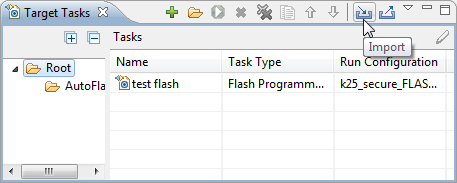
Import Target Task
Then I go to <installation path>\MCU\bin\plugins\support:
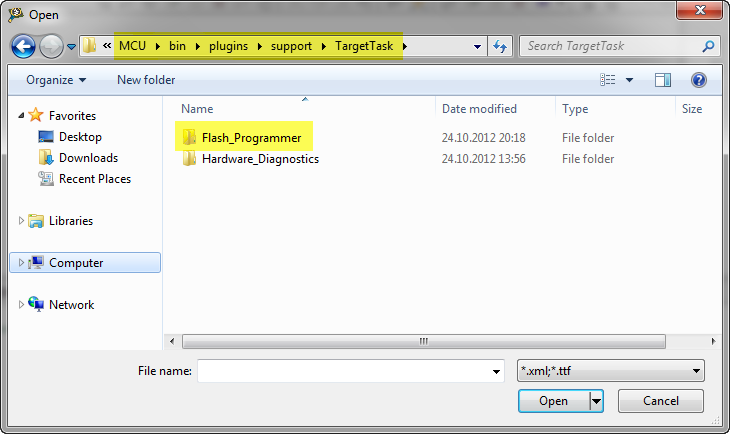
Flash_Programmer inside MCU\bin\plugins\support
Then I go inside the Flash_Programmer folder and select the XML file matching my device:
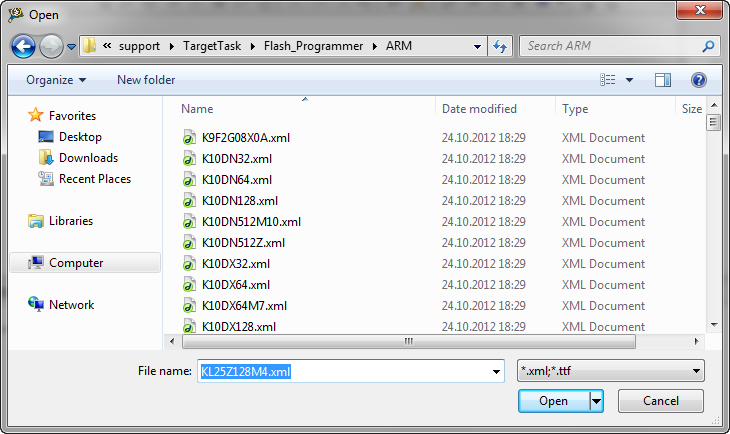
Selecting flash file
Then I can double-click on the newly created Target Task and change/configure it:

Flash Programmer Task
And in that dialog I can add more actions:
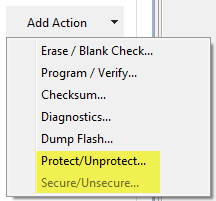
Protect/Secure Target Task Actions
The problem is that during development it can happen that I write wrong settings to my device, and with this accidentally secure it. And if my wrong settings as well include ‘disable mass erase’, I’m really doomed. And unsoldering a CPU from a board is not something easy if has >100 pins or is a ball grid array device type :-(.
Back to my dialog from the beginning:
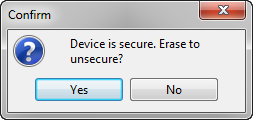
- Device is secure. Erase to unsecure?
So it looks I might have accidentally secured my device? I pressed ‘Yes’, but unsecuring failed again, resulting with the same dialog. Tried it again: same thing. Oh, oh! Could it be that the ‘disable mass erase’ bit is set as well? That would be really bad. I only have that single Kinetis K60 board. Wait! I have as well the Kinetis K60F (Kinetis K60 with floating point using an Cortex-M4F) on my desk. And here was my problem: the OSBDM debug cable was not connected to the TWR-K60N512, but instead to the TWR-K60F120M one!
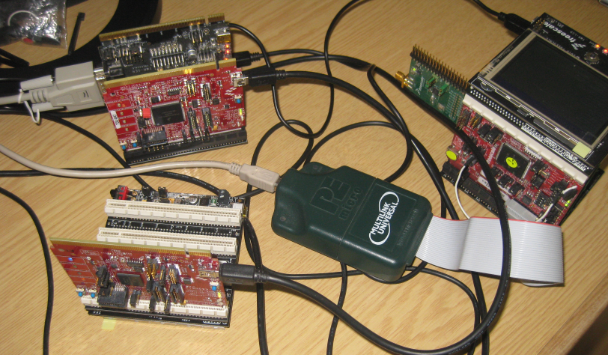
Which board I’m debugging?
Connecting the correct TWR-K60N512 one to my host machine, and I was able to download my application :-).
Lessons learned, in priority order:
- Connecting to the wrong device might trigger a false alarm about the device being secured.
- Carefully check to which board/device I’m connecting.
- Cleanup my desk and reduce the number of boards, power supplies and USB cables on it.
Interestingly, my wife only agrees to point 3.
PS: My desk is still not close to the famous one of Jim Williams of Linear Technologies group. Or as commented in this EEtimes article : “A clean desk is a sign of empty mind”.
Happy Unsecuring, and Cleaning 🙂
 MCU on Eclipse
Pingback: Killing Me Softly: Zombies and Debugger Engines | MCU on Eclipse
Hi Erich
I am getting this same problem. I can load a small program but cannot load my main program of 94k. I was working with trying to set up a bootldr and think something was changed incorrectly. Can you tell me where the options are you mention above. I have looked and can not find the flash programmer in cw10.3 with these options?
Thanks
Robert
LikeLike
Hi Robert,
I have extended the description with additional screenshots and instructions. I hope this will help you to locate the settings now.
LikeLike
Hi Erich
Thank you, that was very helpful, it also show more of about the plugins. I checked this but I do not see how to use the programmer. Is this this called automatically as part of a debug configuration, or is the programmer run separately.
Also when I call up the protect/unsecure option for the k20dx256z, it shows that all the address’s are set to unsecure. But a windows comes up saying the device is secured, the consoles says that it is unsecuring the device, then fails on a write. This only happened after I tried implementing the bootldr apps, 4367,68,70.
I have tried looking into the memory protect registers but don’t see anything different.
Do you know of anyway just to reset/erase the device using the programmer plugin or any other way? I know if the disable mass erase is set, the game is over; that bit could have been set by a mistake in the lcf file build. I once had a system, now I don’t. The problem is this is a custom board and the only one that is/was working.
Thanks
Robert
LikeLike
Hi Robert,
the target task is not used for Kinetis as part of the debugger download. It is used for ColdFire V2. You can run the target task independently of a debug session, as your probably have found out.
LikeLike
I found the problem. Something became corrupted in the mqx installation. Even though my application and all the middleware components built without error. My quess is that the loader was loading memory incorrectly offset from the allowed boundaries, ie 32 byte boundaries. I restored mqx from my oct 15 backup, and it all worked again. But this was after I had changed out a 100 pin processor because of this error and now I have found this was not anything related to hardware or the memory protect registers. This is a bad design in the debug component loader; the error messages are inconsistent and misleading.
But I would still like to know how to run the programmer plugin as a target task if possible. Mine is greyed out.
Thanks
Robert
LikeLike
Hi Robert, right click on the target task, and change the run configuration. That should help? Erich
LikeLike
Pingback: Unsecuring the KL25Z Freedom Board | MCU on Eclipse
Hi
I have the same problem.. I have tried what you have written, but nothing works.. My board is TWR-K60F120M.
But no matter what i do i get the message “Device is secure. Erase to unsecure?”
I am just trying to get one of CW small example codes to work..
Thanks
LikeLike
Hello,
maybe indeed you have secured your device? Are you using MCU10.2 or MCU10.3?
LikeLike
I have had the same thing, many, many times. What I have found that works sometimes (usually for me) is to create a new debug configuration. I think that the database/files for the configuration in Eclipse becomes corrupted. The debug system is a spawned process and a third party one as well, sometimes it just hangs, other times I get the ‘Device is secure’ message. Also you may need to go into Task Manager and delete the “DE” process on CW10.2 and “DE & DE monitor” on CW10.3.
Robert
LikeLike
In case the P&E layer/debugger is not able to talk to the device (or better: if the device does not respond), then the ‘device is secure’ dialog comes up. Beside of having the device really secured :-(, it happened to me as well in case the power supply was somewhat flaky, or when I tried to debug the wrong device. That of course could happen as well in case the debug configuration is wrong/corrupted.
LikeLike
I am using MCU10.2.. I will try what you suggests
LikeLike
Hi Erich, Can you provide any reference to where I can find instructions to apply security(read protect) to my KL15 MCU? As seen in one of the screenshots above, the secure/unsecure option is grayed out. Wondering why?
Do I have to write a long word value to the .cfmprotect region declared in the linker file?
I am not trying that method fearing i might lock out my MCU. What is a proper way to do it?
LikeLike
I am using a J-Link and CodeWarrior 10.3
LikeLike
Hi Safwat,
That option is grayed out if it is not implemented/available in the target task. I do not have a Segger J-Link, so I cannot try out things for you. But you might have a look at freescale community thread/302014 because Segger has provided a script to erase the device. I hopt this helps.
LikeLike
Thanks for the link. But I think the script is intended for unlocking secured devices. My query was regarding __securing__ the MCU. More specifically,
“What is a good way of loading values in the Flash Configuration Field so that my MCU is secured and the flash is not readable”.
I am guessing I have to write the values in an array and use the linker to place it at the Flash Configuration Field address. Something like this…
const uint8_t FCF_Reg[]__attribute__((section(“.cfmprotect”)));
is my understanding correct? Sorry to ask simple questions, but i dont want to try something wrong and lock up my MCU 🙂
LikeLike
Yes, I misread it the first time (sorry, had probably not enough coffee early this morning :-)). Your thinking is correct, I would do it the same way.
LikeLike
Hi Safwat,
the proper way to secure an application in my view is to have the security word programmed in the application binary (at least that’s how I do it). But there are other options, especially as securing only applies to production programming. Either the production programmer does support this (writing sepecial bytes), or the other way is to combine two S19 files into one: one S19 file contains the bytes for security enabled, plus the application S19 file.
LikeLike
Thanks Erich. I think i will have it in the application binary so that they only have to burn one binary during production.
LikeLike
Hi everybody,
Bill Lewis’ suggestion worked for me.
I’m using an FRDM-KL46Z with a P&E Multilink FX and I just got the security message for the first time today. I would click on “Yes” to erase the device but this wouldn’t solve the problem. Bill said to create new debug configurations. By that I mean the options that you get when you open up the drop down menu from the Debug icon (the one with the “green bug”).
You can create a new debug configuration by closing your current *project* and then reopening it without closing CW. The debug configurations will not be erased if you just close CW. You really have to just close and reopen your project. Then I opened up the Debug drop down menu again and clicked on the “Debug Configurations” option and I selected the Multilink unit on the window that opened up. Finally, I was able to program the board without even getting the security message.
If this doesn’t work then you can still program your freedom boards using the OpenSDA interface. At least I was able to do so. Before reading Bill’s comment, I tried switching back and forth between the OpenSDA and Multilink interfaces. The OpenSDA interface would allow me to program my board and it wouldn’t give the security message. But then I would switch to the Multilink and I would get the security message again and the “Can’t connect to the device” error. Everything went back to normal after I created the new debug configurations.
I hope this helps.
LikeLike
Hi Carlos,
your findings are really intersting. This indicates that something was wrong with your debug configuration. If it happens again to you, it would be good to make a copy (zip of the project files) and compare it afterwards with the ‘fixed’ version to see what is causing this. I bet P&E would be intersted too in this.
Thanks!
Erich
LikeLike
Hi Erich,
Good idea! I’ll make the comparison next time I get the error. The only hint I have to the cause of the problem is that this started happening to me since I started using the Multilink FX with a custom KL46 board.
I haven’t been successful in programming the custom KL46 board so I’ve been going back and forth between the custom board and the FRDM-KL46Z to spot the differences with an oscilloscope. Maybe this has something to do with the problem?
My test app runs fine with the FRDM-KL46Z and if I get the “secure/unsecure” message I can always fix it by closing and reopening the project. However, I get this other error when trying to program the custom KL46 board:
“Error launching your-projects-name_FLASH_PnE U-MultiLink
ARM GDI Protocol Adapter : Can’t connect. The Debugger can not connect to the P&E device”
Also, the console log says that it couldn’t enter “background mode”.
P&E posted this document about troubleshooting the SWD connection when the background mode problem appears:
Click to access USBMLUNIVERSALFX.pdf
They say to check the four steps of the SWD programming sequence. But all steps fail:
1) My external oscillator isn’t running.
2) RESET shows a sawtooth wave when I power the custom board and then it always stays low after the first programming attempt with the Multilink.
3) SWD_CLK and SWD_DIO shows brief activity every time I click “Retry” after getting the “Can’t connect” error.
4) RESET is not released to logic high.
5) Debug activity does not appear on SWD_CLK and SWD_DIO. They stay low until I click “Retry”.
Anyway, I’ll perform the comparison on the next time I see the error. Is there anything specific that I should be looking for?
LikeLike
Hi Carlos,
nothing specific. But as it seems that creating/changing the launch configuration file makes a change, I hope we can spot a difference in the file content. The files are not very large, so that is hopefully easy.
LikeLike
Hi Erich, If you remember I write at other post (https://mcuoneclipse.com/2013/10/27/usb-with-the-twr-k60f120m-and-twr-k70f120m/), I tried what you said and it start working. But now, when I tried to upload an example of K70 board it show the dialog that you show at this post. The board is new, and I only work with this one, what can happen? Thanks
LikeLike
Are you using the TWR board in a tower or standalone? Can you try it standalone? I assume you are using OpenSDA? I just think that somehow the OpenSDA circuit might not be powered, or that it is not able to connect to the processor. I need to check if I have a K70 board around.
LikeLike
Im using the TWR-K70F120M without the tower (standalone), but I have a tower and I also try with the board inside it but CW gives me the same error. Im downloading with PE Multilink, or eventually with Open Source JTAG.
I tried again this morning and now the download on FLASH stucks at 99% saying “downloading binary to target”.
Using CW 10.6 and OSBDM/OSJTAG.
Here a post that shows my problem (Im not the author)
LikeLike
Hi Juan,
hard to tell from remote. Does it happen for you as well with a small project created by the wizard (just to make sure the program is ok?).
What about the SWD settings: can you try with both? What kind of application is on the board? Maybe you have disabled the debug pins?
Do you have a JTAG/SWD programming adapter (J-Link, Multilink) available? You might try them to program the board directly.
As another trick: try holding/pressing the Reset button while the debugger connects, maybe the OSJTAG is not able to put the device into reset.
LikeLike
As another thought: can you verify the jumper setting of the board as in this post:
or even use that project?
LikeLike
Pingback: Unlocking and Erasing FLASH with Segger J-Link | MCU on Eclipse
Eric,
My Wife would also say point #3 too! She has grown to tolerate it, especially after talking with other wives of engineers. Thank you for the humor, put a smile on my face!
Thanks,
LikeLike
And I think wives of engineers talk too much with each other 🙂
LikeLike
Hi! I’m currently in the double-click part but it doesn’t open the “Kinetis Flash Programmer Task@ window, do you know if there-s another way to open that window?
LikeLike
Nevermind I found it. The problem is that after the configuration in “Kinetis Flash Programmer Task” window, i can’t run the task. The green button with the the triangle is not available
LikeLike
You have to tell the target task what it has to use as connection. Right-Click on the entry and use ‘Change Run Configuration’. Then from the list select the correct debug launch configuration. Then you can use the green execute button.
LikeLike
Thanks Eric! I could do the execution, but unfortunately it showed me repeatedly the message “Device is secure. Erase to unsecure?” 😦
LikeLike
I’m afraid that you have indeed bricked your board and you need a new one. Or you can unsolder the chip and place a new one there if you have the right equipment.
LikeLike
Use the context menu on it (right-click), then use Edit Task Configuration
LikeLike