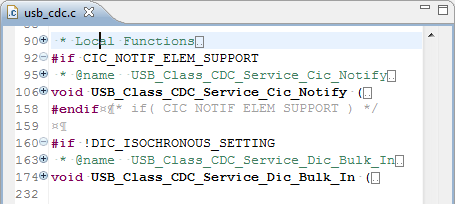
No, this is not about how to fold Eclipse: it is about the Folding feature of the Eclipse editor view. My source files tend to get much larger than a single screen page. The Eclipse framework comes with many great editor and navigation features, but it would be great to have the amount of information reduced. Well, it can look like this:
Tag Archives: Eclipse
5 Best Eclipse Plugins: #1 (Eclox with Doxygen, Graphviz and Mscgen)
The #1 award in my list goes to Eclox+Doxygen+Graphviz+Mscgen. Yes, it is a single Eclipse plugin (Eclox) for Doxygen, and with two other powerful tools. It solves a typical engineering problem: “How to document my project? And how to keep it up-to-date?”.
Like many other engineers, I do not like to write documentation. Because it is painful. I want to write code and program. Writing documentation for it should be fun too. And it should solve the problem that the documentation does not match what has been implemented. I’m a big fan of the ‘single source’ concept: information has to be in a single place, and not copied and distributed among different places. And here my #1 helps me doing this.

Eclipse Local History & Quick Diff
I worked long hours on my project, and it was working well. But after a series of edits, somehow the application was not working the way it should. What did I change to break my code? Usually I smile, because I have things in a version control system. But: not this time (I should know better!). Luckily there are some ways to find out what has been changed: with the Local History and Quick Diff.
Delete or not?
If I decide to delete a project from my workspace, I hit delete and get this dialog:
If I press OK, then my workspace will not list that project anymore. But what about this ‘Delete project content on disk (cannot be undone)‘ check box?
Bracketeer: the ultimate bracket plugin
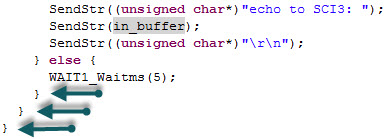
If you are like me, then it is easy to miss a bracket or two in my source code. Or I have tons of closing brackets at the end of a function, and it is hard to tell which one is which? Eclipse comes with basic bracket support: you select/click a bracket, and it helps you to find the closing one. I was pretty happy about that, unless I saw a list of most popular Eclipse plugin. One plugin stood out of the masses in the Top 10 Most Popular New Eclipse Plugins review: Bracketeer. That plugin exactly helps me to solve my problem: which bracket is which?
It would be really cool to know to which code block each ‘}’ belongs. And Bracketeer can do this for me!
Uninstalling Eclipse Plugins
Installation of Eclipse plugins is really ease: I use the menu Help > Install New Software, point to the update site and I have it installed. Uninstallation of a plugin is not that obvious. Not sure why it is so hidden, and yes, I rarely need to uninstall a plugin. But from time to time I try out a new plugin, and if it does not fit my needs, I want to get it removed. How to uninstall it?
MQX Eclipse Working Sets
Working Sets are a very useful feature in the Eclipse Framework (see Working Sets Explained). But: with a standard Eclipse distribution it is not possible to import or export working sets. The good news is: the AnyEdit plugins (see 5 Best Eclipse plugins) provides that missing functionality. The other good news is: Buried in the Freescale MQX 3.8 distribution for Eclipse CodeWarrior, there is an even better implementation for the Eclipse Working Sets.
Eclipse Working Sets Explained
Eclipse comes with a large set of different views: They allow the developer to represent the information in various forms and with different angles. Most of these views are navigation oriented: a perfect example for this is the projects view or the Outline view. But over time I add more projects, more resources to my project, and at a certain time things get overwhelming. I have a lot of projects, and I do not want to switch between workspace too often. Yes, I can open and close projects, but this gets cumbersome too. Thankfully, there is a solution in Eclipse: Working Sets.
5 Best Eclipse Plugins: #2 (AnyEdit Tools)
Small little helpers are the things in a developers hand which can make his life easier and simpler. The advantage with the Eclipse IDE is that there are many such helpers and extensions in the form of extra plugins you can install and use. And one of such a kind are the AnyEdit Tools provided by Andrey Loskutov. That Eclipse plugin comes with a wealth of useful extensions and utilities:
Exporting and Importing Projects in Eclipse
I admit that I have (a few? or not so few) bad habits: one of it is that usually I find a way to do things, and if that works, I stick with it. I know that there are other ways to do things, but hey, why bother? And sometimes a good friend asks an excellent question (are there any bad questions?), and this let me review the way I’m doing things. And here is such a thing: exporting and importing projects in Eclipse.