The Rust programming language is making its way into different areas: Rust gets added to the Linux Kernel. I see an increasing interest for using Rust in embedded projects. And Rust is used for embedded tools. I noticed this with the latest LinkServer v25.09 release: there is a new tool included in the package, rblhost.

The release note just mentioned:
- Switched to using rapid blhost (rblhost) utility.
This triggered my interest, and actually that utility is implemented in Rust :-).
Outline
rblhost is a tool from NXP. It is for example part of the LinkServer installation:

LinkServer is a suite of tools (flash programming, gdb server, CI/CD test runner, …) from NXP. It supports various debug probes, including the MCU-Link Base or MCU-Link Pro. It used in the past a tool named ‘blhost‘ from NXP to update the probe firmware.
‘blhost‘ is a command-line utility that runs on the host. It communicates with a boot loader, which can be flash resident or ROM, on the target device. It can talk to the target device for example over USB HID, UART, I2C, SPI or CAN. I have not used blhost much much in my projects. Mainly because it requires some an extra interface (UART, USB, …). It does not support the debug (JTAG/SWD) interface/pins, which I would have available anyway.
‘rblhost‘ on the other hand is implemented in Rust. It claims to be faster, which imho is simply because it is not using Python. It uses the same command line interface as blhost, but adds optional interfaces for C and Python.
Performance
NXP has compared the performance between blhost (C/C++ or Python) implementation vs. the implementation in Rust:
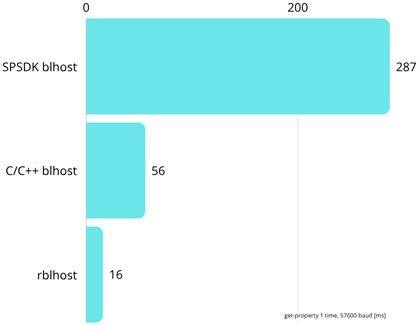
The above benchmark by NXP measures the time in milliseconds for a ‘get-property’ command. Later in this article I’m doing a more realistic quick check.
Installation
To install rblhost with cargo in the Rust system, use
cargo install rblhost
To add it a Rust project:
cargo add rblhost
Building from Sources
To build rblhost from the sources is super easy with Rust and git:
git clone https://github.com/nxp-mcuxpresso/rblhost
cd rblhost
then for example build the release version:
cargo build --release
On a Windows host, make sure you have x86 build tools (e.g. from Visual Studio) installed.

The executable is then found as target/release/rblhost

Usage
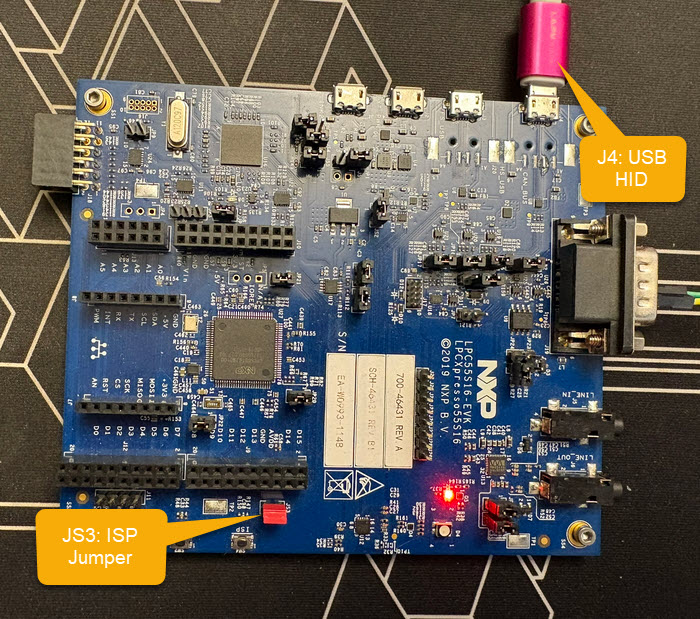
To show how to use rblhost, here an example for the LPC55S16-EVK. See Using CAN FD for Remote Hardware Debugging of Cortex-M Devices. To enter ISP mode, I set the ISP JS3 jumper. Then connect the USB cable on J4 to power the board.
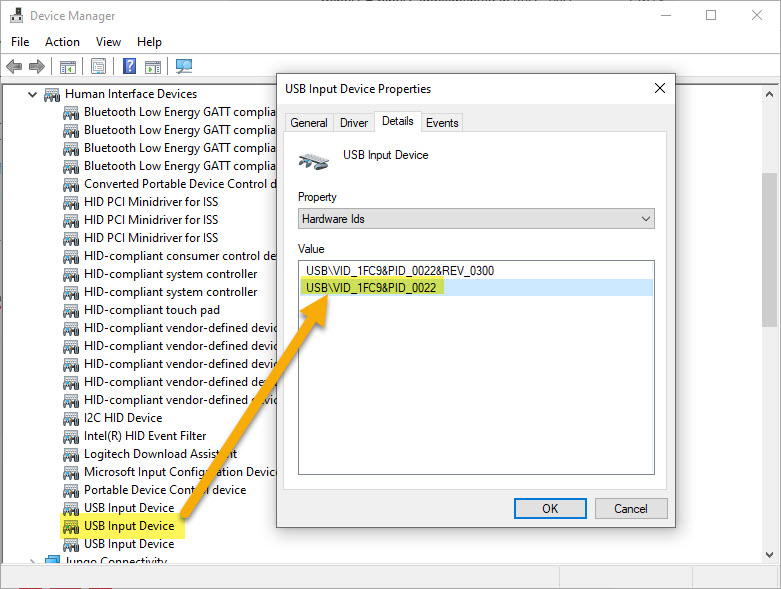
The board enumerates as USB HID with VID 0x1FC9 and PID 0x0022:
I can check with rblhost if connection works:
rblhost --usb 0x1fc9,0x0022 -- get-property 1
which gives:
Response status = 0 (0x0) Success.
Response word 1 = 1258487808 (0x4b030000)
Current Version = K3.0.0
To erase all the flash memory, I use:
rblhost --usb 0x1fc9,0x0022 flash-erase-all
To flash a binary to the board, I can use the next line:
rblhost --usb 0x1fc9,0x0022 flash-image can_debug_gateway.s19
This gives:
Loaded image file: C:\Users\Erich Styger.N0007139\Data\GitRepos\CAN Debug\can-debug-gateway\armgcc\debug\can_debug_gateway.s19 (2 segments)
  Header:  can_debug_gateway.s19
  Data length: 47756
  Memory regions: 2
  Segment #1: address=0x00000000, size=308 bytes
  Segment #2: address=0x00000200, size=47448 bytes
Erasing flash regions...
Erasing segment #1: address=0x00000000, length=0x00000400
Erasing segment #2: address=0x00000000, length=0x0000BC00
Writing segment #1: address=0x00000000, size=308 bytes
Writing segment #2: address=0x00000200, size=47448 bytes
Flash image operation completed successfully
Quick Performance Test
To measure blhost v2.6.5 vs. rblhost v0.2.0, I used the next in a Windows PowerShell:
Measure-Command {rblhost --usb 0x1fc9,0x0022 flash-erase-all; rblhost --usb 0x1fc9,0x0022 flash-image can_debug_gateway.s19"}

Days              : 0
Hours             : 0
Minutes           : 0
Seconds           : 0
Milliseconds      : 847
Ticks             : 8475079
TotalDays         : 9.80911921296296E-06
TotalHours        : 0.000235418861111111
TotalMinutes      : 0.0141251316666667
TotalSeconds      : 0.8475079
TotalMilliseconds : 847.5079
The same with blhost gives:
Measure-Command {blhost --usb 0x1fc9,0x0022 flash-erase-all; blhost --usb 0x1fc9,0x0022 flash-image can_debug_gateway.s19"}

Days              : 0
Hours             : 0
Minutes           : 0
Seconds           : 0
Milliseconds      : 771
Ticks             : 7716960
TotalDays         : 8.93166666666667E-06
TotalHours        : 0.00021436
TotalMinutes      : 0.0128616
TotalSeconds      : 0.771696
TotalMilliseconds : 771.696
Interestingly, rblhost seems to be slower than its blhost counterpart, at least for this test. Of course timing depends on the host machine load, but in my quick tests, blhost was always faster. Not that the 50-100 ms difference measured would be a big deal.
Summary
In the past, I have not much used blhost in my projects. The ISP mode on the NXP LPC evaluation boards is very useful. It needs an extra interface which in many cases I do not have available because of limited pins available. The ISP mode with blhost/rblhost would much more useful with supporting the debug port as communication channel. Still, it is an interesting way for updating the firmware or communicating with the bootloader.
The new implementation of blhost as rblhost in Rust language is very interesting. It shows further adoption of Rust in the industry. It has a C and Python interface if needed. The ‘r’ in its name is less about ‘rapid’ at least in my few tests.
But I very much like the ‘r’ as ‘Rust’ for me :-). I can easily build it with cargo. It serves as another example how to implement a real-world application. And it shows the path. Rust is used for embedded programming. It could also be significant in embedded tools.
So what do you think: Is the Rust language of interest for you? Do you care (or not) if tools are written in Rust? Let me know in the comments!
Happy rusting 🙂
Links
- Introducing a new host utility: RAPID BLHOST (RBLHOST)
- GitHub: https://github.com/nxp-mcuxpresso/rblhost
- Documentation: https://crates.io/crates/rblhost
- User guide (blhost): https://www.nxp.com/docs/en/user-guide/MCUBLHOSTUG.pdf
- Another example usage of blhost: https://mcuoneclipse.com/2018/03/03/flash-resident-usb-hid-bootloader-with-the-nxp-kinetis-k22-microcontroller/
 MCU on Eclipse
Nice! I’m planning to develop a Rust bootloader for the NXP FRDM-K64F on 2026. Let’s see how it goes. Thank you Erich!
LikeLike
Yes, please let me know!
LikeLike