
The Rust Programming Language makes its way into the Linux kernel, and is used for embedded tooling. What about using it for Embedded? In this article, I’ll show how you get started with Rust on the NXP LPC55S69-EVK:

Outline
Why Rust for embedded? Rust is a modern programming language, with exceptional tooling and vibrant community. While Rust is not as relevant as C/C++ in the embedded space, this could change. Rust offers the promise that the compiler will catch more typical programming problems. This leads to better code and application. While learning something new like Rust can have a steep learning curve, it can be very rewarding. And is lot of fun too. This alone would justify it :-).
In this article, I show how to run a first ‘blinky’ with Rust on the NXP LPC55S69-EVK board as example. In case you have a different board, the steps outlined can be re-used, with minor changes.
As framework and for the hardware abstraction, I’m using Embassy. For downloading and flashing, I’m using the NXP McuLink/LPCLink with probe-rs embedded toolkit.
Rust Installation
This tutorial is not an introduction to Rust: you can find plenty of good tutorials and online documentation. If Rust is new for you, I suggest you go through the Rust Getting Started:
- Install Rust: https://rust-lang.org/learn/get-started/
- If you installed it a while ago, update it with
$ rustup update
probe-rs
probe-rs is a suite of embedded tools for debugging, flashing and downloading binaries to embedded targets. As a debug adapter it is used with IDEs, like VS Code. It even includes support for Segger RTT.
For installation, see https://probe.rs/docs/getting-started/installation/. I used the next steps:
First, build it from sources:
$ cargo install probe-rs-tools --locked
Additionally, installed the binary utilities:
$ cargo install cargo-binutils
I’m having the LPC-Link2 debug probe firmware running on my LPC55S69-EVK. I can check the probe with:
$ probe-rs list
And this gives for me:
The following debug probes were found:
[0]: LPC-LINK2 CMSIS-DAP V5.460 -- 1fc9:0090:OQA2BQHR (CMSIS-DAP)
Embassy Framework
embassy is an embedded framework for Rust on Embedded.
First, clone the repository with git:
$ git clone https://github.com/embassy-rs/embassy.git
Building Blinky
Embassy comes with examples in the repository.
$ cd embassy/examples/lpc55s69
We are using cargo to build the examples:
$ cargo build
This builds for this board three examples (see the readme), and one is the ‘blinky_nop‘:
blinky_nop: Blink the integrated RED LED using nops as delay. Useful for flashing simple and known-good software on board.
💡 As noted in the readme, there is an issue with probe-rs and the other example. You have to power-reset the board to get the application started. This happens with probe-rs 0.29.1 which I’m using.
Running Blinky
Let’s run the ‘blinky_nop‘ code:
//! This example has been made with the LPCXpresso55S69 board in mind, which has a built-in LED on PIO1_6.

#![no_std]
#![no_main]

use cortex_m::asm::nop;
use defmt::*;
use embassy_executor::Spawner;
use embassy_nxp::gpio::{Level, Output};
use {defmt_rtt as _, panic_halt as _};

#[embassy_executor::main]
async fn main(_spawner: Spawner) {
    let p = embassy_nxp::init(Default::default());

    let mut led = Output::new(p.PIO1_6, Level::Low);

    loop {
        info!("led off!");
        led.set_high();

        for _ in 0..200_000 {
            nop();
        }

        info!("led on!");
        led.set_low();

        for _ in 0..200_000 {
            nop();
        }
    }
}
The code initializes embassy, muxes the PIO1_6 as output pin for the LED. It uses NOP’s to delay the blinking in the loop.
Load the program with cargo which uses probe-rs in the background:
$ cargo run --bin blinky_nop
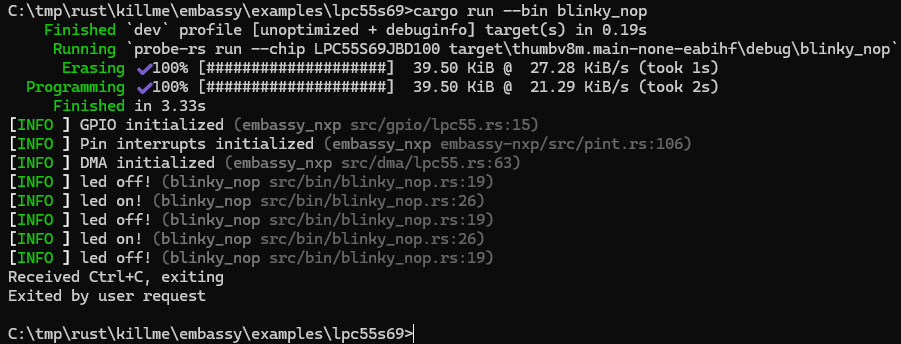
Congratulations! You have a first ‘blinky’ running on your board with Rust.
Summary
With embassy, Rust has a framework for development on embedded target systems. Rust provides a refreshing and modern tooling. I like the cargo package manager which simplifies a lot of things. Everything can be command-line driven, or you can use GUI tools like VS Code (did not cover this here). While learning Rust will take time, and the learning curve is sometimes not easy, it is very rewarding. C/C++ won’t go away: Rust has ways to integrate different worlds together.
Are you looking into Rust for embedded programming. Or actively using it? Let us know with a comment. I plan to continue posting articles around Rust for embedded.
Happy rusting 🙂
Links
- Rust programming language: https://rust-lang.org/
- NXP LPC55S69-EVK: https://www.nxp.com/design/design-center/software/development-software/mcuxpresso-software-and-tools-/lpcxpresso-boards/lpcxpresso55s69-development-board:LPC55S69-EVK
- McuLink Debug Probe for Rust: https://mcuoneclipse.com/2024/03/17/nxp-mcu-link-for-rust-with-probe-rs/
- Embedded tool implemented in Rust: rblhost: Exploring Rust’s Role in Embedded Development Tools
- Embassy framework: https://github.com/embassy-rs/embassy
- probe-rs embedded toolkit: https://probe.rs/


Yey!!! Blink LED using Rust! Thanks for sharing your knowledge!
LikeLike
Yes, a blinky is always a good rewarding milestone in every embedded project 🙂
LikeLike