
To switch between perspectives I can use the toolbar in Eclipse:

Eclipse Perspective Toolbar
But there must be another or better way to do this?
Actually there is another way: I can use <CTRL>+<F8> on Windows or <CMD>+<F8> on Mac and I can use it to switch the perspective:
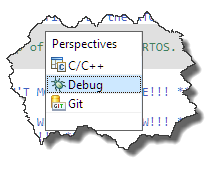
CTRL-F8
Press again <CTRL>+<F8>, and it will select the next perspective.
Happy Perspecting 🙂
 MCU on Eclipse
I also love key shortcuts. They speed up my work processes a lot (I usually put them on some F-keys). Sadly Eclipse doesn’t support key shortcuts very well.
Do you know a way to run/debug the last launched binary? There is a shortcut to run the “last launched external tool”, how ever for run/debug I couldn’t find a way 😦
What ever I try, it always opens the “run as” list. Same behaviours exists when you click on the run/debug button in the toolbar.
LikeLike
That depends on the version of Eclipse used. For recent Eclipse versions including MCUXpresso IDE, see https://mcuoneclipse.com/2018/07/27/debug-the-last-launchend-application-with-eclipse-and-other-debug-tricks/
I hope this helps,
Erich
LikeLike