
I can do test automation or standalone flash programming using the Debugger Shell. But this requires me to use a view inside of Eclipse. What would be nice is to do such things from a lower level: from a Windows Command window (CMD or DOS Shell). This is possible with usage of Eclipse/CodeWarrior in command line mode.
In Show Workspace Location in the Title Bar I have used the Eclipse feature to launch it with command line arguments. A list of command line arguments is documented here. There is an interesting option: Using the -data argument I can specify the workspace:
"c:\Freescale\CW MCU v10.2\eclipse\cwide.exe" -data "c:\tm
p\wsp_StandaloneFlsh"
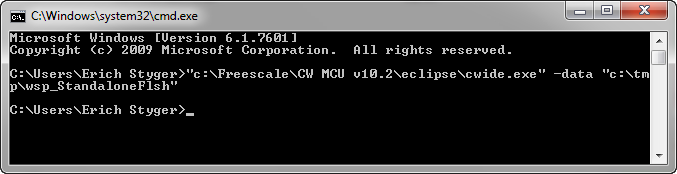
cmd.exe launching eclipse with a workspace
Note that there are two different executable I can use
- cwide.exe: this is what I launch normally. If I call this one from my DOS shell, then it will not wait until Eclipse has finished
- cwidec.exe: The difference to cwide.exe is that this one will wait until Eclipse finishes.
But there is one more magic option: the -vmargsplus argument:
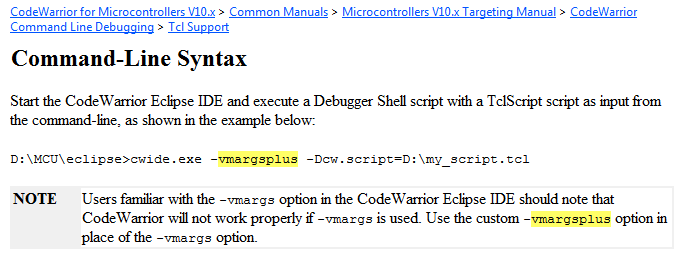
vmargsplus argument description in the documentation
Aha! That way I can execute any Debugger Shell script from the DOS shell :-). What I needed to do is to add quitIDE to my script to flash a board:
############################################################
# Standalone.tcl: a script file to flash my application
############################################################

# in any case, disconnect an existing debug connection
fl::disconnect

# set launch configuration:
fl::target -lc "LC for Simple Flash"

# set Set the target RAM buffer for downloading image data:
fl::target -b 0x20000000 0xffff

# switch off verify and logging:
fl::target -v off -l off

# select flash device, organization and memory range:
cmdwin::fl::device -d "CFM_MCF5225X_512" -o "256Kx16x1" -a 0x0 0x7ffff

# specify target file, auto detect format, range settings on followed by the flash range, offset settings off
cmdwin::fl::image -f "C:\\tmp\\wsp_StandaloneFlsh\\Application.S19" -t "Auto Detect" -re on -r 0x0 0x7ffff -oe off

# now erase the flash...
cmdwin::fl::erase image

# ... followed by writing the application to flash:
cmdwin::fl::write

# disconnect connection
fl::disconnect

# exit Eclipse IDE
quitIDE
From the DOS shell, I launch it like this:
"c:\Freescale\CW MCU v10.2\eclipse\cwide.exe" -data "c:\tm
p\wsp_StandaloneFlsh" -vmargsplus -Dcw.script="c:\tmp\wsp_StandaloneFlsh\standalone.tcl"
That way no user interaction is required: launching a batch file and things are flashed to the board.
Happy Shelling 🙂


Additional info to consider. If you want for DOS shell script to wait for Eclipse/CodeWarrior exit (e.g. to finish flashing to target), you should use “cwidec.exe”
LikeLike
Thanks, that’s indeed a good tip! I update the post to reflect this.
LikeLike
I tried to do the same with “C:\Program Files\Freescale\CW MCU v10.1\eclipse\cwide.exe” -data “C:\Documents and Settings\testuser\Desktop\flash_proj” -vmargsplus -Dcw.script=”C:\Documents and Settings\testuser\Desktop\flash_proj\script.tcl”
This open IDE. But my script is not running and I am not able to flash. What might be going wrong here? Please help…………
LikeLike
I see that your command line is showing MCU v10.1. So it very likely could be that this functionality does not exist in this version. Have you tried it with MCU10.3?
LikeLike
Ok Erich. I am able to run the scripts in the debugger shell after opening IDE. And it is working fine. Thanks for the info provided. I have one more doubt. If I want to erase flash from location 0x4000 to end of flash, How do I need to pass the arguments for fl::erase command?
Please help.
Thanks,
Jagadeesh.
LikeLike
Hello,
try help fl::erase
According this, you can use the list parameter. The list is configured with fl:device command.
LikeLike
The paper is very helpful to me.
I would like to have a question that how can we pass parameters to the tcl scripts as Command Line Arguments, It looks like:
-Dcw.script=add.tcl 23 15
LikeLike
Hi,
I am trying to follow the example in the tutorial but it isn’t working for me.
CodeWarrior Debugger Shell v1.0
%>source C:\scriptErase.tcl
cmdwin::fl::disconnect
cmdwin::fl::target -lc LC for Simple Flash
cmdwin::fl::target -b 0x1fff0000 0x20000
cmdwin::fl::target -v off -l off
cmdwin::fl::device -d FTFE_PFlash512 -o 64Kx64x1 -a 0x0 0x7ffff
cmdwin::fl::erase all
Flash Programmer internal error: connection list is empty
Beginning Operation …
————————-
Error: Operation failed. CodeWarrior Plugin is unable to open file “P3-PFlash.elf”
in “C:\Freescale\CW MCU v10.5\MCU\bin\Plugins\Support\Flash_Programmer” directory.
Please make sure the file exists and is readable.
Error: Couldn’t open flash driver file.
Error: Operation failed.CodeWarrior Plugin is unable to open file “P3-PFlash.elf”
in “C:\Freescale\CW MCU v10.5\MCU\bin\Plugins\Support\Flash_Programmer” directory.
Please make sure the file exists and is readable.
It can’t open the “P3-PFlash.elf” file but it is in “C:\Freescale\CW MCU v10.5\MCU\bin\Plugins\Support\Flash_Programmer\ARM_EABI” instead of “C:\Freescale\CW MCU v10.5\MCU\bin\Plugins\Support\Flash_Programmer”.
How could i solve this Error?
Thanks,
Rui Faria
LikeLike
can you copy that file to the expected location?
LikeLike
I tried that but doesn’t work.
I think that i solve the problem by creating a new DEBUG CONFIGURATION and name it “LC for Simple Flash”.
I don’t undestand very well why but it works 🙂
thanks
LikeLike
“LC for Simple Flash” is a Launch Configuration (LC) which is used by the ‘flash button’ or ‘Flash file to target’, see https://mcuoneclipse.com/2012/04/30/flashing-with-a-button-and-a-magic-wand/
LikeLike
Yes, it works when we use ‘flash button’ or ‘Flash file to target’ but it doesn’t work by TCL script without creating the specific LC.
Another question, is it possible to open only one time the cwide.exe then run several scripts to erase and write differents FLASHs/Boards and close the IDE in the end?
Thanks for the attention,
Rui Faria
LikeLike
Yes, you have to have a launch configuration, otherwise Eclipse has no clue how to connect to the board/target. And yes, you an do whatever you want/need in the tcl script, so you should be able to flash multiple boards that way. On the other side, you might consider trying the new Kinetis Design Studio (KDS) which has been announced by Freescale: it contains GDB with OpenOCD, and for example with OpenOCD you can script things from the DOS shell, so no need to run the IDE. The KDS is in beta phase right now, and you can register for the beta program (it looks things will be available beginning of May).
LikeLike
cmdwin::fl::device -d “MC9S08MP16_48” -o “1024kx16x1” -a 0x0 0x7ffff
got error “Error: Can’t find description for device MC9S08MP16_48”
LikeLike
Hi Edwin,
when do you get this error?
LikeLike
During launching of .tcl file via debugger shell. I couldn’t get the exact device id, org and mem. Appreciate it if you could help me on this. I was stucked here. My objective here is to automate the flashing of my mcu w/o operator intervention toprevent it from making error in selecting .s19 file. Here’s the copy of my .tcl file.
#!
#change SP 0x00
# in any case, disconnect an existing debug connection
fl::disconnect
# set launch configuration:
fl::target -lc “wsp_StandaloneFlsh”
# set Set the target RAM buffer for downloading image data:
fl::target -b 0x20000000 0xffff
# switch off verify and logging:
fl::target -v off -l off
# select flash device, organization and memory range:
cmdwin::fl::device -d “MC9S08MP16_48” -o “64kx16x1” -a 0x00000090 0x0000048F
#cmdwin::fl::device -d 9S08MP16, All
# specify target file, auto detect format, range settings on followed by the flash range, offset settings off
cmdwin::fl::image -f “C:\\AIF-B\\RELEASED TESTCODES\\BLT\\AIF50BS355N-B_TEST_V1_0.s19” -t “Auto Detect” -re on -r 0x0 0x7ffff -oe off
# now erase the flash…
cmdwin::fl::erase image
# … followed by writing the application to flash:
cmdwin::fl::write
# disconnect connection
fl::disconnect
# exit Eclipse
IDEquitIDE
. TIA
LikeLike
Unfortunately I do not have have a MP16 available, so I cannot try out things. You might have posted this to the Freescale forum, so you might get some help there?
LikeLike
Hi Erich, thanks. I’ve got it after 2 days of intense coding and reading. To summarized what i did, here are some.
i’ve got the wrong device id,mem and org and was corrected only after executing manually in the debugger shell(this parameter can bee seen there). Secondly, i’ve got this error “Flash Programmer internal error: connection list is empty” and was corrected only after creating a launch configuration. For now, my programming is semi-fully automated and what i did on some other tasks(some other models) i’ve created a .tcl file(with different FW version). To make it a fully automated, i need to know the script exit code status. With my current workaround, i launched it thru a batch file and wasn’t able to get the programming result. What i only have for now is, i was able to know the exit code if there’s an error launching the ide. The challenge for me right now is how to get the exit code if the operator terminates the ide without waiting the programming jobs to finish. Appreciate it much anyone could help me on this. TIA
LikeLike
This is a great resource! Do you know if this same technique works with KDS?
LikeLike
Thanks! 🙂 And yes, this should be even easier with KDS, as it is using gdb as debugger. GDB itself comes with a command line debug interface, and you do not need to launch the IDE, so you can do it directly with gdb.
LikeLike
Pingback: Programming Kinetis with CodeWarrior from the DOS Shell | MCU on Eclipse
Hi Erich.
As others have mentioned, I also get the “Flash Programmer internal error: connection list is empty” error.
One of the users above suggests that in can be fixed by creating a launch configuration.Can you please explain what exactly that means?
I have a ‘*.launch’ file within the project whose executable I am trying to program, but there is nowhere in the TCL file to indicate the name of that file.
Thanks
LikeLike
Hi Barak,
the launch configuration is specified with this:
# set launch configuration:
fl::target -lc “LC for Simple Flash”
Erich
LikeLike
Hi Erich.
Thank you for your quick response.
So I tried renaming my launch file to “LC for Simple Flash” and it didn’t work.
Then I tried renaming it to “LC for Simple Flash.launch” and it still didn’t work.
Finally, I tried changing “LC for Simple Flash” in the TCL script to my launch file name.
In all cases, I get the same “connection list is empty” error.
Any idea what I am missing here?
Also, where does the file “LC for Simple Flash” file come from?
I have not been able to find it within the CW installation path.
Thanks again for your help 🙂
LikeLike
Hi Barak,
that “LC for Simple Flash” is automatically created in the workspace, see https://mcuoneclipse.com/2012/08/02/standalone-flash-programmer/
LikeLike
Thank you.
I do not see that “LC for Simple Flash” is automatically created in the workspace (in .metadata\.plugins\org.eclipse.debug.core\.launches, as suggested in another post of yours at https://mcuoneclipse.com/2012/04/30/flashing-with-a-button-and-a-magic-wand/).
However, when I execute the task from CW (in the ‘Flash File to Target’ menu option), it seems to be working, so I am lead to believe that “LC for Simple Flash” is created and immediately deleted afterwards… Is that indeed the case?
In any case, I have been able to workaround this problem, by specifying my project’s launch file instead (the one used when downloading the executable through the ‘Debug’ button).
One problem remaining though – the ‘Device is Secure. Erase to unsecure?’ message, which appears upon a non-first attempt to execute the task on a given MCU.
In yet another post of yours at https://mcuoneclipse.com/2012/11/04/how-not-to-secure-my-microcontroller/, you suggest how to workaround this problem, but I have not managed to figure out how to embed this workaround within the TCL script.
You also suggest that using the ‘Simple Flash Programmer’ may prevent this problem to begin with (which is possibly what happens when downloading the executable through the ‘Debug’ button).
How can I resolve this problem within the TCL script?
Thanks again!!!
LikeLike
I’m not sure any more, but this “LC for Simple Flash” was kept/present in my workspace. Maybe it failed to delete it? Anyway you need a launch configuration, one way or the other. The easiest way might be for you to use a dummy project I think.
LikeLike
This is turning out to be a very clumsy IDE.
Indeed, I need a launch file.
But I keep this file on the same path along the rest of my source code, since I need to have it under version control.
But the IDE, for some strange reason, goes to the workspace path (where the temporary files are), and from there figures out “a path back to the launch file”.
So if I want to set up an infrastructure for automatic programming, I need to place the entire project, including the source code path and the workspace path, on the machine in use.
Is that correct?
LikeLike
You always will need a workspace (that’s how Eclipse works), and you always will need a project (where the launch configuration file can be attached to).
So as part of your automation, you could do this (if you want to a clean build):
– have the launch configuration stored as file in the project (shared launch config)
– check out the project from your version control system into a folder
– launch eclipse from the command line with a workspace folder
– import the project into the workspace
– do the build/debug/etc
LikeLike
OK, that is precisely what I did, and everything seems to be working now!
I also finally understood the ‘-lc’ option in the TCL file, and why it didn’t work for me when I used “LC for Simple Flash” (got the “connection list is empty” error):
– ‘Launch Configuration’ is the equivalence of Code Warrior to Visual Studio’s ‘Project’
– ‘Project’ is the equivalence of Code Warrior to Visual Studio’s ‘Solution’
So all I had to do in the TCL is fl::target -lc “My Project Name” (where “my project name” is in fact “my launch configuration name”).
In short, the confusing terminology was the source of the problem.
I have yet another issue:
Since we are trying to set up a production line, we would like to reduce the duration of each single MCU programming task. For this purpose, we would like to avoid opening and closing CW per task. Is there anyway to “inject” the TCL script to an existing CW process?
Thanks again for all your help, your blog (?) is a life-saver!!!
LikeLike
Hi Barak,
life-saver? 🙂 Thanks!
Maybe this helps: you could run tcl scripts (Debugger shell), see https://mcuoneclipse.com/2012/07/29/debugger-shell-test-automation/
I hope this is what you are looking for.
LikeLike
Hi Erich
Here is a problem that I’ve been struggling with unsuccessfully (as of yet).
I am using CW Target Tasks in order to burn (program) an image to flash.
My target MCU is MC9S08QG4.
I have configured the task (ttf file) to execute the following operations:
– Unprotect all sectors
– Erase all sectors
– Program image
Flash address range is 0xF000 thru 0xFFFF.
For all it matters (though I don’t think that it has anything to do with the problem at hand), the security bits (SEC01:SEC00) are located at 0xFFBF.
Now, this task occasionally fails.
The output I get in the console varies.
Here are a few examples:
– Error: Erase sector failed. Operation timeout.
– Error: Protect Command Failed. Operation timeout.Failed to erase sector data.
– Error: Detect frequence Loop count suspended
– Error: Can’t resume target HC/RS/S12Z GDI Protocol Adapter : An error occurred while trying to write registers. The Debugger can not write one register.
If it helps, then you can see the entire output in a query that I have submitted on Freescale (NXP) community.
Now, I would normally suspect the HW (power supply, cable length, CPU clock / oscillator, physical connections, etc).
However, when I program the same image via the debugger (i.e., Run Configuration –> Debug), it always completes successfully.
So there is definitely a “soft” way to resolve the problem that I am experiencing, and I am left to conclude that the CW debugger performs additional operations during the image-download procedure (operations which I have skipped in my task).
The question is – what?
I have searched through my project’s Run/Debug settings, but I have not found anything to explain it. In fact, I feel quite limited in the ability to even compare the two methods, as they seem to be using a different interface and/or language:
– The target task uses TCL (though the ttf file is in XML format, so I don’t quite see how I can add TCL commands to it anyway).
– The CW image-download procedure runs via some other functionality, which I do not fully understand.
One way to see what CW is actually doing “behind the scene”, is by enabling the Flash Programming Dialog (in the project’s launch-configuration).
This is a very clumsy utility (dialog-box) which disappears automatically as soon as the image-download process completes, so I need to disconnect the MCU during the process, and be extremely lucky in order to see the entire procedure up to the point when it’s done.
To make it worse, it doesn’t even allow you to copy the text (though I could “live with that”).
In any case, here is what I’ve managed to get from that dialog-box (not including what I believe is just “status messages”):
CMD>RE
CMD>CM C:\Freescale\CW MCU v10.6\MCU\bin\Plugins\support\hc08\gdi\P&E\9s08gq4.s8p
CMD>EM
CMD>PM
I suppose that the above is equivalent to Reset, Erase, Program (and that an additional Verify or something similar would probably follow).
But how can I emulate that using TCL (or if possible, how can I add it in the ttf file)?
The following description in the MCU’s data-sheet, provides me with a good reason to suspect that CW sets the FCDIV register during the process:
“Before any program or erase command can be accepted, the FLASH clock divider register (FCDIV) must be written to set the internal clock for the FLASH module to a frequency between 150 kHz and 200 kHz. This register can be written only once, so normally this write is done during reset initialization.”.
However, I can’t see how to access chip registers via TCL (and most certainly via TTF).
Thanks again for your help 🙂
LikeLike
Hi Barak,
Hard to tell what is going wrong on your end. I have not used S08 for a while. It look more like a timing issue to me if it works sometimes, but fails on others.
I points would have been as well about power supply, cables/etc, but this you have already checked, so I’m out of ideas ☹.
Erich
LikeLike
Just to keep track (resolve) this problem for future readers:
There are a few operations which cannot be done within the scope of a CW TCL (standalone flash-programming task).
For example, chip reset.
In the specific case described above, the problem has most likely stemmed from clock-trim, which can be done by the debugger but not by a TCL.
This is why I was always able to program the image using the debugger, but I was not always able to program the image using a TCL (success or failure depended on the specific trim value).
This is also explained in a response to a question that I submitted on NXP (Freescale) community, at https://community.nxp.com/thread/394876.
The solution is to use a flash-programming utility.
In my specific case, we had to purchase PROGHCS08 from P&E-Micro.
This package consists of a Windows utility and a command-line utility.
The PROGHCS08 utility is what actually executes in the background when downloading an image via CW debugger.
Here is a usage example:
C:\PEMicro\PROGHCS08\cproghcs08.exe prog.cfg INTERFACE=USBMULTILINK PORT=USB1 /logfile prog.log
Where file prog.cfg contains the flash-programming sequence.
For example:
RE ;Reset the MCU
CM C:\Freescale\CW MCU v10.6\MCU\bin\Plugins\support\hc08\gdi\P&E\9s08qg4.s8p ;Choose Flash Module
EM ;Erase the module
SS ImageFileName.s19 ;Specify the S19 to use
PM ;Program the module with the S19
VC ;Verify CRC of Object File to Module
PT ;Program trim value
RE ;Reset the MCU
LikeLike
Hello
I tried this and it worked perfectly for me.
But is there any way in which we can completely skip opening the eclipse IDE GUI (which runs the debugger shell and then exits)?. It takes a lot of time.
Is there any way to get direct access to the debugger shell via the windows command terminal?
(something like a way to run eclipse in command line where we can then access the debugger shell to run the script)?
LikeLike
Yes, there is.
See https://mcuoneclipse.com/2015/03/25/command-line-programming-and-debugging-with-gdb/ and https://mcuoneclipse.com/2020/12/05/standalone-and-command-line-programmer-with-mcuxpresso/
This is not for CodeWarrior, but the same principles apply there too.
LikeLike
hi! awesome guide. i want to automate the process of flashing boards with code warrior. i plan on using tcl script to hold the commands for my tcl script. i come from a vxworks background and know that with that at least, i can just call a debug configuration by name. i havent found an equivalent for this with code warrior. my flash needs to erase, program, and verify. but i cannot find a program command. where would i go from here?
LikeLike
What device are you using? Keep in mind that CodeWarrior is a legacy product from Freescale (now NXP).
Have you considered a J-Link script to do the flashing part for automation?
LikeLike