In my earlier tutorial I showed how to install the necessary SDK tools. In this article I’m going to install the SDK sources. For this I’m going to use west. This is a command-line ‘meta-repository’ tool.
Outline
Traditionally, SDKs have been delivered as ‘monolithic repositories’. This means that everything needed was in a single repository. But with growing number of devices supported, things easily get bigger and bigger. Add middle-ware like RTOS, file systems, examples and utilities, and you get a huge number of files.
Modern SDKs solve this with splitting up components and parts into individual repositories. Git has the concept of sub-modules, but this this does not allow much flexibility. If you pull such a repositories recursively, you get everything. And you have no good way to pick and choose what you need.
The solution is to use a meta-tool with a description or manifest file. With that manifest file one can list the dependencies and include or exclude repositories. Zephyr uses west for this, and the MCUXpresso SDK has adopted it.
west
Precondition is to have west installed. For this see Tutorial: Getting Started with MCUXpresso SDK – Tool Installation. I’m using version v1.5.0.
West is a central and core port of the Zephyr project. It is a tool to manage multiple repositories. I mention this, because west comes with many challenges:
- West is yet another tool which needs to be installed.
- West is Python based. And everyone working with Python knows the ‘Python hell’ with different versions and broken dependencies.
- West will download many GB of data: make sure you have a fast and reliable internet connection.
- It takes time to learn and use west. E.g. for Zephyr, west is usually the biggest obstacle.
If you are using Zephyr, there is now no way to get around it. In the case of MCUXpresso SDK and VS Code, it is used in the background. That way you don’t have to learn much about west.
I’m using it here to get the MCUXpresso SDK. West is useful here, because it allows me to configure what I need. I can use VS Code GUI to get the SDK too. But I want to show the command-line way with west here. It can easily be used for a CI/CD environment.
west init
The first is to create a new (empty) directory, where I want to download the SDK. Do this in a command line shell:
$ mkdir mysdk
Then enter that directory:
$ cd mysdk
Then use west init to get the manifest information. I’m using the -mr option to get a specific version of the SDK. If you want to get the main branch, just omit that option.
west init -m https://github.com/nxp-mcuxpresso/mcuxsdk-manifests.git mcuxpresso-sdk --mr v25.12.00
This creates the directory mcuxpresso-sdk.
$ cd mcuxpresso-sdk
west update
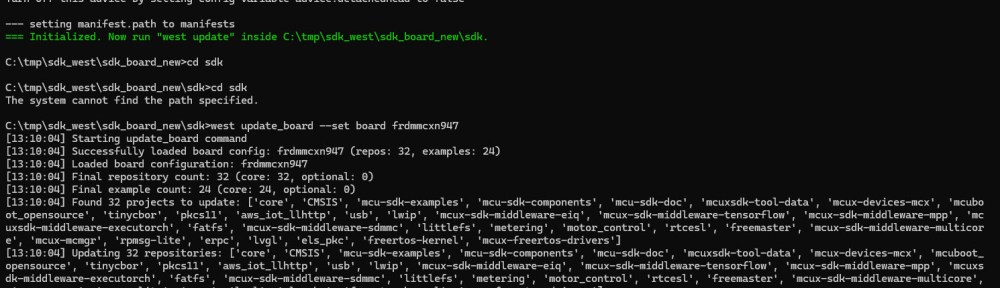
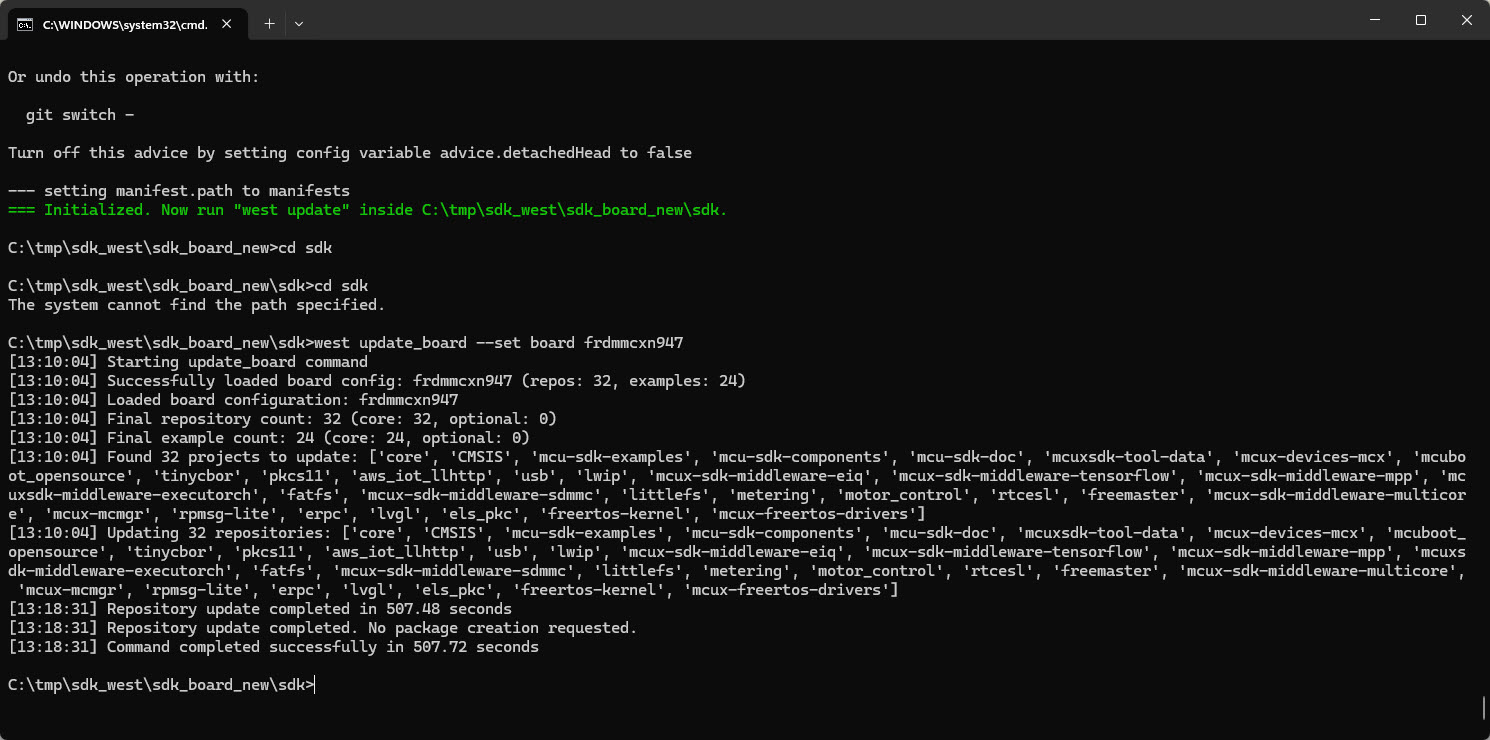
The next step would be to download the repositories with west update. I do NOT recommend doing this. This will take a long time (~30 minutes) and will download ~8 GBytes of data (yikes!!!!!).
Instead a ‘full’ update, one can limit it to a board only, say with
$ west update_board --set board frdmmcxn947
💡 at the time of writing this article, the v25.12.00 version of the manifest is broken with referencing non-existing repositories for the FRDM-MCXN947. The workaround is to remove
se_hostlibandemwinfrommanifests\boards\frdmmcxn947.yml.
But this still pulls in a lot of unnecessary files, downloading 2 GBytes (yikes!! for a board only?).
Instead, let’s limit the number of files with looking at the manifest files.
Manifests
Inside mcuxpresso-sdk there is a .west folder plus a manifests folder.
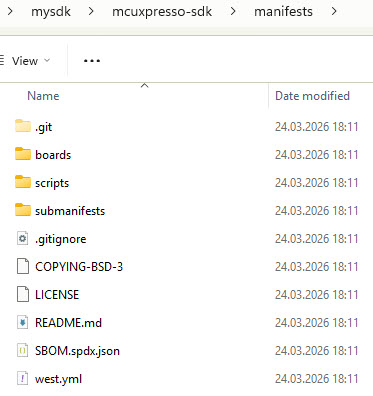
The boards directories lists all the supported boards. I can now create a new ‘minimal’ board file, for example myboard.yml:
board_name: "frdmmcxn947"
repo_list:
  - core
  - mcu-sdk-components
  - mcux-devices-mcx
  - mcuxsdk-tool-data
example_list:
  - driver_examples
  - demo_apps
optional_repos:
  - mbedtls3x
  - tfm
  - tf-m-tests
  - qcbor
  - psa-arch-tests
optional_examples:
  - tfm_examples
And I can pull it with
$ west update_board --set board myboard
Now this SDK takes about one minute to download and is only 300 MByte in size. I recommend such a ‘minimal’ SDK after you have explored all the features you need. This way, you know what you need. Otherwise go with the ‘normal board’ way of downloading things.
Summary
It takes time to learn west. And west usually is be the first obstacle to use an SDK like the MCUXpresso or Zephyr one. It is a new tool. And because it is Python based, it comes with all the ‘Python hell’ problems. But once it is working, it is really handy and useful. And the learning time is well invested, because more and more SDKs in the industry are adopting west.
The idea of west is great. And in theory it would allow me just to get and pull the necessary parts of the SDK. The default board manifest files still get mostly ‘everything’. Using time to tweak and reduce the number of files and repositories is well invested time. Especially for a team of developer.
In my next article, I’m going to show how to use west with Visual Studio Code. This will help you get the SDK repository with a GUI interface.
What is your experience with west? Please share it in the comments section below.
Happy westing:-)
Links
- Tutorial: Getting Started with MCUXpresso SDK – Tool Installation
- Tutorial: Getting Started with MCUXpresso SDK – Repositories with VS Code
- Zephyr: https://www.zephyrproject.org/
- West: https://docs.zephyrproject.org/latest/develop/west/index.html and https://github.com/zephyrproject-rtos/west
- MCUXpresso core repository: https://github.com/nxp-mcuxpresso/mcuxsdk-core
- GitHub MCUXpresso SDK manifest: https://github.com/nxp-mcuxpresso/mcuxsdk-manifests
- Getting started with MCUXpresso SDK: https://mcuxpresso.nxp.com/mcuxsdk/latest/html/gsd/repo.html
 MCU on Eclipse
“because more and more SDKs in the industry are adopting west.”
Oh God… save us from this level of complexity. Few people are thinking KISS these days. Elegance is dead.
Not a fan of west (and a serious critic of Zephyr). And don’t get me started on VS Code.
LikeLiked by 1 person
Hi Randy,
I’m not a fan of west neither. It has been the number one failure point in my projects where I have used it. And as noted in the article, many customer and research project partners working with me with Zephyr project, west has been one of the biggest problems. Putting that aside: there are some good concepts about west, at least solving some of the monolithic repo issues. And for Zephyr there is no alternative (yet) for west, so I had to bite the bullet. And as you say: the problem is the complexity or I would add the code bloat. Why does a SDK do be 2 GByte in size for a single micro-controller? With west at least one could get it down to a few hundreds of MBytes, but then not all the tools might work any more with the SDK as some meta files might be missing (because the dependency might not be clear). west should be supposed to solve that, but actually it is not, unfortunately.
The positive side is: I can change and tweak things I get from the vendor. That part is easier than ever. But this requires a lot of expertise too.
I hope that makes sense.
LikeLike
nice that you *can* edit things to change things up some anyway.
One thing that’s problematic with west (and zeyphr) is its short term outlook. These are attempting to solve a build problem but not a long term maintenance problem. I projects have a life that I have to figure for being 20 years. Can’t count on *any* outside repo over that long a period so that means I have to have all the support code in my repo of the project (and I have like 150 projects), because at some point, it might not exist and the project has to *in its current form* tools and all.
That also means west is a use once and ignore it thereafter in my scenario.
LikeLike
Yes, I do the same: use things like west to get what I need. Tweak it, but then host it locally. For production software, getting updates with west is a road to disaster imho. So as you say: use it once, and ignore it afterwards. Because there is no guarantee that all the referenced repos in the manifest will be there in the future. Just for example: the current west manifest points to the emwin git repository, but this one does not exist any more. As consequence, west fails, and I had to remove that repository from the list. I already find it problematic that not necessary/optional repositories are in the manifest by default. This adds to that 2-8 GByte download every user will face at the beginning, until he realizes that bloat. I would prefer a ‘minimal’ manifest and repo list from the start, and then I can add things on demand. Much more user friendly imho.
There is only one good use case for ‘pulling’ updates later on: for example if there are security flaws/issues or important bugs. But here I would like to see an LTS (Long Time Support) model: I stick to a LTS version, and then in the future I can decide if I want to add updates to it. That model worked well in the Linux world, and I guess it will get adopted to the ‘MCU SDK’ world in the future too. Or it has to.
LikeLike
I understand some frustration regarding west and Zephyr but what is wrong with VS Code?
It’s the most elegant solution for code development I’ve ever seen (or VS Codium as a telemetry free alternative).
Sure it contains some bloat but that mostly comes from the plugins which you can manage on your own.
On top of that it also has an amazing Docker and Remote Development support.
At the end it’s just a fancy editor which at the end is just a tool – but a very good one IMHO
BR,
Michael
LikeLike
VS Code has a couple of problems for people who need stability (like me):
So, is this a great tool? Partially depends on your perspective but I’ll take Segger over that any day of the week personally. Hell, TECO was a GREAT editor.
Editors are a dime a dozen, some better than others, but Microsoft is not particularly good at design work (or coding for that matter). Their designs are pedestrian and uninspired. As long as you do things exactly how they think things should be done, it works pretty well but cut across that grain and things shatter quickly. Pedestrian. Brittle. Uninspired. As an editor, Notepad++ is better. YRMV
BR,
rjl
LikeLike
Hi Randy,
I’m using both Eclipse and VS Code for my development. I would say both have their pros and cons, and for some projects I’m even using both of them for the same project, because the combination of it makes it better.
– To me, one of the biggest plus of VS Code is that it is ‘just an editor’, and well, you can add extensions. This drills down basically to CMake/Make/Ninja as build system. Not depending on an IDE build system. As such, everything can be done on the command line. Something which has been hard for me with Eclipse based tools. That way I can (hopefully) things for many years to come, and my scripts/environment pull together the correct toolchain, and then things can be built. Without an editor or VS Code at all.
– Things can be easily wrapped into a docker container. I’m using DevContainers, meaning all the tools/sources can stay in a container, and using VS Code as an external editor. I really like this as a modern way of development: https://mcuoneclipse.com/2025/02/08/optimizing-embedded-development-with-vs-code-and-devcontainer/
– Only one instance of VS Code: I’m using the -n option to have a new instance of VS Code with its own environment: https://mcuoneclipse.com/2025/01/19/start-new-vs-code-instances-with-unique-environments/. That way I can have as many different instances running, all with their own settings.
– I agree on the extensions, and ‘extension creep’. I avoid depending on vendor specific extensions as much as possible and try using the common and popular one. To me, the extensions are some helper, but I can run everything without them too. And to avoid any conflicts, I’m using ‘profiles’ on VS Code. With profiles, I have separated sets of extensions, depending on what I need: https://mcuoneclipse.com/2023/11/11/vs-code-cure-the-extension-creep-with-profiles/
– not sure what you mean with “on using outside repos for *everything* it does”. As for VS Code and extensions, as said above: I really don’t depend on it, and can use standard build tools with CMake. As for “makes it damn slow” this is certainly something I have observed with Eclipse too. But there are ‘slim’ and fast distributions like the SEGGER one too. I think it is the same for Eclipse and VS Code: if you are adding too much things, bells and whistles to it, it makes it slow, regardless what it is.
For me, neither Eclipse or VS Code (or any other editor) is perfect. What matters for me is that I can choose, what I want to use. The other thing what really matters is the source code and the toolchain for it. Everything is some ‘icing on the cake’ and can be easily replaced.
I hope this helps,
Erich
LikeLike
I’m also a microsoft sceptic type of person but the VS Code is something they did a good job with. Not saying it’s perfect, just saying for once they did something in the direction of being good and actually useful.
Going back to your reply. I see your problem I and do not deny it, but it feels like there are already tools embedded into VS Code that should help you deal with some of the problems (I’ll address your points in order):
1. Containerization using Docker (or any other containerization technology) that allows you to stay consistent in terms of dev environment.
You choose what dependencies (toolchains, binaries, etc.) you need in Docker image, build that and use straight away. You can go a step further and distribute those to some server (local or cloud) and perform build/validation daily or per trigger/demand. That type of WoW (way of working) integrates well with VS Code from my personal experience.
2. That is not true AFAIK. You can only have one instance running as admin. If you run it as user it you can have many instances running.
+ If you are using docker containers or connections to over ssh to remote machines, you can open each new context in a new VS Code windows/session
3. Again Docker comes to rescue with separation of concerns and isolation of environments. You can also prepare a .devcontainer with a JSON file that describes what docker container VS Code should run and what plugins it should install for this context.
It’s a huge time saver when it comes to onboarding new employees and works well for me.
Having high dependency on plugins alone is a risk, but depending on one’s use-case, it doesn’t have to be that way. You can just install dependencies you need that VS Code should use (Cmake, Ninja, toolchain XYZ etc.) you don’t need plugins for those.
4. I’m not sure I understand you point here.
5. Are you sure that VS Code is the culprit here?
SEGGER integrates its Toolchain with CMake and VS Code – it seems like Segger also provides the toolchain integration with VS Code as well.
In the end, it’s the toolchain and its compiler that does the heavy lifting here, so why would that make is so much slower on the VS Code side and super fast on the Segger Embedded Studio (I assume that’s what you use) side?
It does not make sense for me at first glance but I can’t relate as I don’t have any Nordic related experience.
6. I think it comes down to understanding the capabilities of the tools at your disposal and using them in a way that allows you to do some things better (whatever that means for your context – build time, setup time, easier this and that, etc.) than in any other way.
Not sure I get the part: “Having tools that think they know more than I do about what I’m doing does more than annoy me.”
I’d even say that from the tools you mentioned you use, VS Code provides the most convenient and open (in terms of plugin architecture) environment. You want only editor without that ridiculous bloat of stuff like eclipse based tools provide? – here you go.
Want full featured environment with 200 plugins? – help yourself and install everything.
LikeLike
Exactly what @Erich wrote and I forgot to add in my own lengthy reply.
Creating your environment so that you can run in it from terminal is paramount IMHO, because of the following:
1. You stay independent of the GUI and toolchains it offers (often times toolchains come embedded/baked into the installer), which means you can package those dependencies like toolchains, scripts etc. and distribute them to build servers, CI/CD runners and etc.
One environment, multiple use-cases (dev, test, CI/CD validation etc.)
2. You do not need some ridiculously bloated GUI application to perform the most basic of tasks like adding some code logic, test cases or wahtever. If you want to perform some advanced debugging, then doing that from gdb, openOCD or pyOCD might not be the best of experiences but can be done, however when some Segger like task tracing is needed, then proper GUI is a must in that case and there’s obviously nothing wrong with that or using that same thing for simpler debugging – whatever works for you.
3. All of that scripting, environment setup and dependency management you can perform from one tool which is vs code. You can go through you files as in a typical GUI editor fashion and perform actions via terminal – any plugins you install in VS Code do only just that, call other applications/scripts via terminal session in the background and display some results in GUI and/or terminal in VS Code.
For me it’s the best of both worlds which also allows you to stay independent of most things and gives freedom of choice.
Staying independent of dependencies is crucial but it’s good to have those dedicated GUI apps as they often offer some nice things you can use for your advantage to deal with a problem.
It’s not like you need to choose only one tools right?
BR,
Michael
LikeLike
Hi all,
I’ve read all your replies and I agree with the suggestions provided (containers, etc.). However, I’d like to share my experience with West, since that is the main topic of this post.
For a long time I was looking for a tool to keep multiple project repositories in sync. I first tried Git submodules, but they never worked well for my use case. Then I experimented with git-repo (from Google), but it did not work reliably on Windows.
My project is fairly large and involves multiple modules, programming languages, and hardware components. The key question for me was: how do I reliably tie all these repositories to a specific project version?
One suggestion was to create a separate repository to store the commit SHAs or tags for each dependency. However, that approach is manual and therefore error-prone.
Git submodules rely on a parent–child structure, which does not work well when repositories need to be related more like siblings, as in my case.
Later I discovered git-repo, which initially looked like the right solution. I spent quite some time trying to make it work, but I finally had to move on because I couldn’t make it run.
I eventually came across Python West. Saying that I “found” it is probably not entirely accurate, as it is closely tied to the Zephyr ecosystem (for example, running
west initwill clone the Zephyr project by default) rather than general for a multi repo sync.It’s not perfect, but I decided to give it a try. I spent about two “full weeks” experimenting with it, and once I felt comfortable with the workflow I migrated my project to West.
Interestingly, many of the issues I encountered helped me better understand how git works under the hood. Several problems were simply due to gaps in my understanding of git itself. In that sense, working with West actually improved my git knowledge (though of course this may just be my personal experience).
I’ve now been using West for a couple of weeks and everything seems to be working well. It helped me structure the project architecture more clearly, and recently I also started using groups to update only my own repositories while keeping external dependencies fixed to the last working release.
I also spent quite a bit of time discussing examples with LLMs, which turned out to be surprisingly helpful (I’d say around 80% of the answers were correct). I reviewed the official documentation as well, so I don’t have a specific tutorial to recommend, but I would definitely encourage others to give West a try, it’s a very useful tool every developer should keep in their “toolbox”!
Cheers,
AGA
LikeLiked by 1 person
Hi Aga,
I certainly agree with you that west is a extremely useful tool and it serves its purpose for certain use-case like yours or wherever Zephyr is involved because of the sheet amount of independent modules.
This solution is by far my most favorite in terms of ease of long-term management, even though I have 0 experience with west and Zephyr – it’s the concept I’m writing about.
What is more, the fact that west is tied to Zephyr is a bit of disadvantage for me, because there are some use-cases where one does not need and even can’t use Zephyr and a tool such as west could be extremely useful. I’d love to see it as a standalone solution that Zephyr only uses in its own way, as any other complex project could.
Do you have any specific advices or learning materials for those who would like to use west outside of Zephyr?
Does it take a lot to “unhook” it from Zephyr and customize it to your own needs?
As far as I know from NXP provided materials, one can make a custom manifests in which repos can be listed for use, but I have not tried it yet on my own.
Thanks for sharing this.
BR,
Michael
LikeLiked by 1 person
Hi Michael,
I share your thoughts about West and Zephyr. West was originally created to support Zephyr, although I’m a bit surprised that something similar didn’t appear earlier for general multi-repo management (except git repo-tool and submodules for which I already wrote my thoughts).
When I started looking into it, I found only a few resources online, and most of them barely scratched the surface.For that reason, I ended up using an LLM (Gemini) to work through examples step by step.
One piece of advice: it really helps to create real repositories to experiment with. If you only work locally, you’ll likely run into issues later when trying to connect everything properly.
What I did was create four repositories on GitHub (private):
prj_A,prj_B,prj_C, andprj_manifest. I then spent about two weeks experimenting. The basic steps I followed were:Install West.
Clone the manifest repository (even if it is initially empty) and create the project manifest, then commit it.
Clone the other repositories, add some dummy files (just to have something to work with), and commit them.
Start developing the three projects independently, committing changes at different times.
When you want to create a snapshot of the whole project, run:
west updatewest manifest --freeze > <manifest_folder>/manifest/V1.0.0.ymlAnother important concept (and really a foundation of West) is that every time you run
west update, the repositories move from their working branches (main,master, or your development branch) into a detached HEAD state. Before continuing work, you therefore need to switch back to your working branch.It took me a bit of time to fully understand this behavior, but later it becomes clear why it’s useful: it guarantees that the files in your workspace match exactly the committed versions defined in the manifest. This is essentially how West ensures that everyone working on the project has the exact same files.
I would also recommend experimenting with development branches and learning how to use groups in the manifest. Groups can be very helpful for updating only certain repositories while keeping others fixed.
Hope this helps!Here the content of the
west.ymlfile (pay attention to the extension, it NOT.yaml!!!)manifest:
remotes:
– name: github
url-base: https://github.com/<your-repo>
projects:
– name: prj_A
remote: github
revision: main
– name: prj_B
remote: github
revision: main
– name: prj_C
remote: github
revision: main
Cheers,AGA
LikeLiked by 1 person
Hi Michael,
sorry but for some reason I can’t edit my answer… (see the one below)
The correct manifest is the following:
manifest:
remotes:
– name: github
url-base: https://github.com/<your-repo>
projects:
– name: prj_A
remote: github
revision: main
– name: prj_B
remote: github
revision: main
– name: prj_C
remote: github
revision: main
self:
path: manifest
Unfortunately me and WordPress are not friends…
I always had a lot of troubles trying to apply styles..
I hope it will be correct…
LikeLiked by 1 person
Thank you for both of your comments and for sharing your observations with me.
BR,
Michael
LikeLiked by 1 person