
SWO (Serial Wire Output) is a cool feature defined by ARM as part of the CoreSight debug block. However, not every debug connection supports SWO, as it requries extra pins routed from the microcontroller to the debug JTAG/SWD header.
If I’m using the Segger J-Link, and if my hardware does not support SWO, I will get a dialog telling me “The connected emulator does not support serial wire output (SWO).”
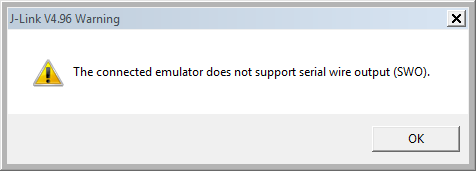
The connected emulator does not support serial wire output (SWO)
That dialog shows up for every debug session. But there is an easy way in Eclipse using the GNU ARM Eclipse Segger plugins (e.g. used in Freescale Kinetis Design Studio V1.x-V3.0):
- Go the debug/launch configuration for your project (menu Run > Debug Configurations)
- Select your debug configuration, and in the ‘Startup’ tab, make sure ‘EnableSWO’ is disabled:
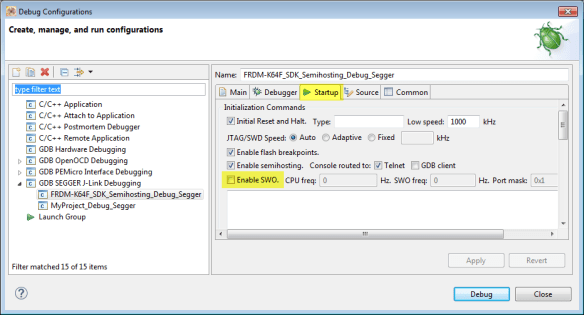
Disabled SWO
- Save your settings with the ‘Apply’ button

Now there should be no such dialog any more.
Happy Debugging 🙂
Links
- ARM Page about SWO: http://infocenter.arm.com/help/index.jsp?topic=/com.arm.doc.ddi0314h/Chdgcbbg.html
- GNU ARM Eclipse Plugins
- Segger J-Link: https://www.segger.com/jlink-debug-probes.html
 MCU on Eclipse
thanks!! 😀
LikeLike
Pingback: Tutorial: Using Single Wire Output SWO with ARM Cortex-M and Eclipse | MCU on Eclipse
I still get the error after enabling it, kindly help
LikeLike
Hi,
you have to *disable* that SWO option in the debugger.
In any case: enable it, press the apply button (you might need to change somethign else so you can apply), then disable the SWO option and press apply again.
LikeLike