
One of the greatest features in Eclipse is the Indexer: it parses automatically my code in the background. It creates all the needed information so I can browse around my sources. I can use the Open Declaration context menu in the source code:
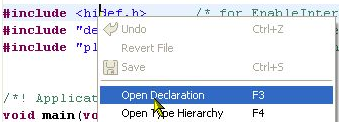
Open Declaration Context Menu
Another way is to click into the variable/include/etc and press the F3 key. Or to hold the CTRL key pressed and hover over it with the cursor to hyperlink it:
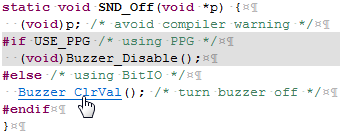
Hyperlinking with the CTRL key pressed
The Indexer knows as well my macros and grays out things if not active or disabled. But sometimes things simply look wrong: I know that my macro is enabled, but the editor still shows it grayed out?
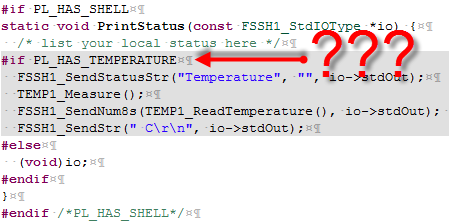
Wrong Indexer? Macro block grayed out…..
I’m sure that I have defined PL_HAS_TEMPERATURE in my header file, and I properly have included it. Still eclipse thinks it is not defined or not set to one?
One first thing I try is to rebuild the index. For this I select the project and select the menu Index > Rebuild:
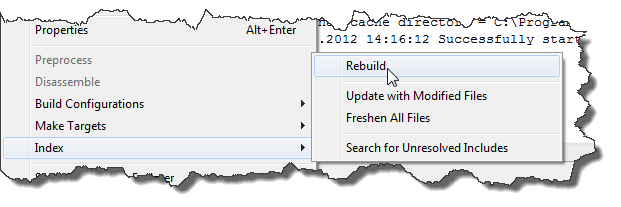
Rebuilding the Index
This usually fixes things for me.
If not, then there is a problem with the project or workspace settings for the Indexer: the project settings for the Indexer are accessible in the project properties. The workspace settings are found in Window > Preferences > C/C++ > Indexer:
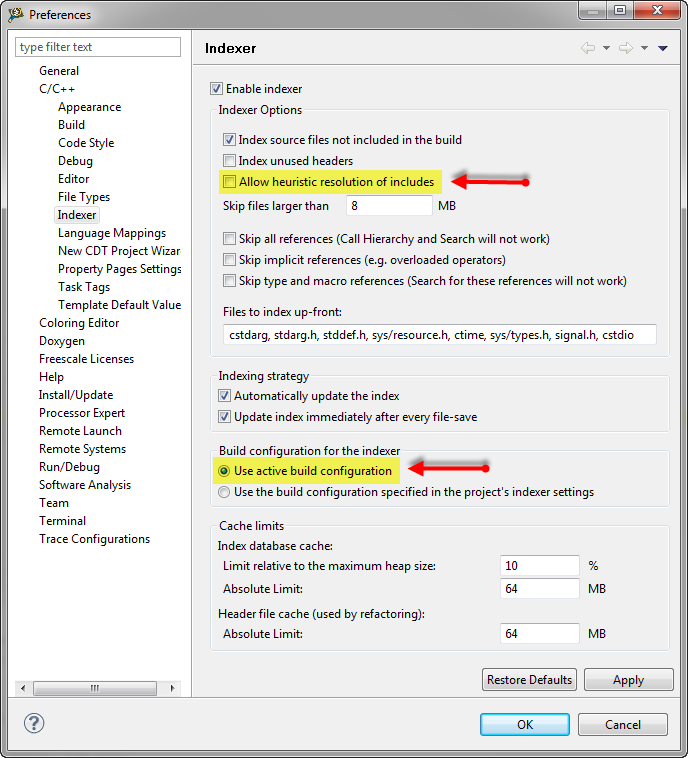
Indexer settings with disabled heuristics and using active build configuration
What I have found out is that ‘Allow heuristic resolution of includes‘ is causing inaccurate results. As in my example above,the indexer is not correctly using the includes if heuristics are enabled. The solutions is to disable heuristics.
The other setting is for the active build configuration: I make sure I have ‘Use active build configuration‘ enabled. That way the Indexer is switching the data base based on the build configuration too.
With these options the result is now correct:
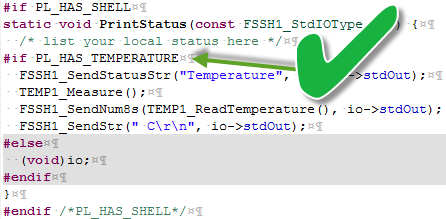
Fixed Indexer: showing macro correctly
Happy Indexing 🙂


Pingback: Eclipse Editor Scalability | MCU on Eclipse
Pingback: Compiler Defines and Eclipse Editor Highlighting | MCU on Eclipse
Pingback: Top 10 Customization of Eclipse Settings | MCU on Eclipse
Nice, that didn’t solve my problem but it pointed me in the right direction. I was seeing a lot of my symbols not showing up as being indexed. Some of my class types would be green and some would stay black.
Solution:
Increase the Cache Limits in the same window as listed in the article. We have a rather large C++ project that was exceeding the cache limit.
LikeLike
ah, that might explain a similar problem I had: I used to rebuild the index to solve it. I have many projects in my workspace, some with shared folders and linked files. It looks like increasing the cache limits solved that problem 🙂
LikeLike
Dude, how can I thank you more!!
The solution actually worked for an issue that had been in the back of my head bothering me all the time!
LikeLike
you are welcome!
LikeLike
Thank you for taking the time to post, you have solved an issue i have had for 8 years!
Turning of “Allow heuristic resolution of includes” fixes my issues with greyed out #ifdef areas which has being a constant point of stress with this IDE.
LikeLike
> The other setting is for the active build configuration: I make sure I have ‘Use active build configuration‘ enabled.
This setting doesn’t seem to get exported using File > Export > General > Preferences…
😦
LikeLike
Yes, I believe I have seen a bug report about this. I have not checked it in Eclipse Luna, but the hope is that it is fixed there.
LikeLike
OK – thanks. I’m still on Kepler SR2 but will try Luna when I get a chance.
(I hope the following isn’t too off topic….?)
More generally I’m having problems getting imported epf file settings taking effect. I presume that no editing of the exported epf file (e.g. to remove the leading “/instance”) is needed unlike when putting the settings into, say, plugin_customization.ini?
Also (and maybe this is already well known) it seems pretty hit and miss which settings exported to an epf file can be edited and then applied via plugin_customization.ini and which seem to be ignored.
E.g. I’d like to set a PATH env var but org.eclipse.cdt.core/environment/workspace/PATH/value= in plugin_customization.ini doesn’t take effect for some reason.
Similarly I’d like to override and disable the GNU ARM Eclipse OpenOCD debug pre run reset setting but ilg.gnuarmeclipse.debug.gdbjtag.openocd/gdb.openocd.doPreRunReset=false in plugin_customization.ini doesn’t take effect.
Any advice/suggested reading as it seems difficult to find authoritative and comprehensive info about this stuff.
Thanks a lot.
LikeLike
Hi TM,
unfortunately, this is out of my knowledge area 😦
Sorry.
LikeLike
Thanks a lot! It was really driving me crazy to edit active code in grayed area where no suggestion was available. This solved it.
LikeLike
Glad to hear that you have found the solution, this one has bogged me for a long time too.
LikeLike
More great stuff. With this and your “Refresh Policy” build fix, you’ve converted my Eclipse from a blithering idiot to a valuable team member. (Before I made the indexing changes you suggest, I had projects go from zero errors to 1000+ errors with no changes to the source code. I was spending more time fiddling with the indexing than writing / testing / debugging the code. The situation was made worse by the fact that switching off the indexing did not get rid of the listed errors / red source code annotations, even after restarting the IDE and opening and closing the affected projects). Eclipse is now actually pleasurable to use rather than painful. I think my blood pressure is beginning to return to normal…
Eclipse has got a bad reputation and quite frankly, with such problems, it deserves it. Yet it’s also very close to being very good indeed.
Thanks again!
JB.
LikeLike
Yes, these small things indeed are very painful. The good thing is knowing these small fixes, with everyone else in the industry using Eclipse: that knowledge can be applied to all these different tool vendor IDE’s based on Eclipse. It is a shame that somehow the Eclipse developer community is paying so little attention to all these small (but important) things.
Glad to know that this article was helpful to one more developer struggling with it 🙂
LikeLike
Pingback: Hiding Inactive Code In Eclipse | MCU on Eclipse
Pingback: Different Ways of Software Configuration | MCU on Eclipse
Pingback: Building and Flashing ESP32 Applications with Eclipse | MCU on Eclipse
Pingback: Eclipse Gems, Tips & Tricks: Open Declaration | MCU on Eclipse
Pingback: FreeRTOS and Eclipse Indexer for >5K Lines Source Files | MCU on Eclipse
Pingback: Eclipse Indexer Debug Tips | MCU on Eclipse