
This article is part of a ‘mini series’ about hidden gems, tips and tricks around Eclipse.
The topic of this one is how to organize projects in the workspace with ‘Working Sets’.

Working Set Selection
If you are like me, then an Eclipse workspace gets populated with many, many projects.

Workspace with projects
A powerful way to organize the projects is to use one or multiple Working Set.
A Working Set is a selection or group of projects. Working Sets are managed through the menu in the Project Explorer view:

Select Working Set
Use the ‘New’ button to create a new working set:
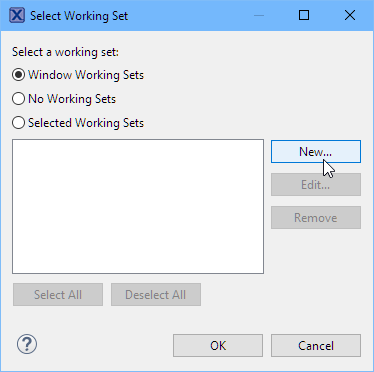
New Working Set
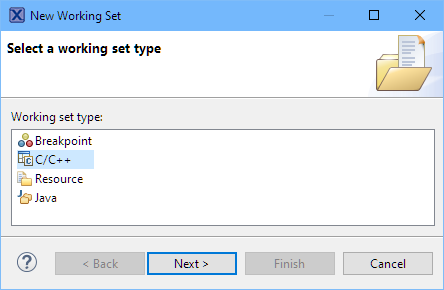
C C++ working set
Give it a name, select the project and done:
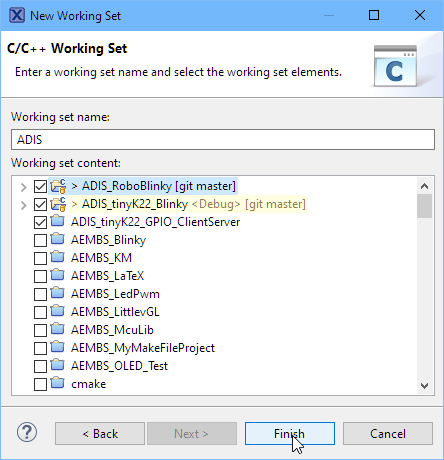
Selected working set projects
Any combination of working sets can be selected:
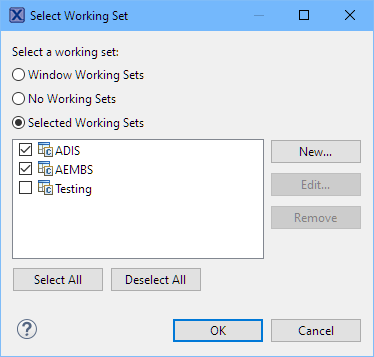
List of working sets
That way I can decide which projects or sets are shown in the Project Explorer:

working set projects in project explorer
This is especially useful if grouping projects for a training or for a lecture or for set of projects working on.
To show all projects and disable the working set(s): there is a menu for this:

Deselect Working Set
Happy working 🙂
Links
- Eclipse Gems, Tips & Tricks: Importing Projects
- Eclipse Gems, Tips & Tricks: Close and Open Projects
- Eclipse Gems, Tips & Tricks: Text Block Selection
- Eclipse Gems, Tips & Tricks: Project Filter
- Eclipse Gems, Tips & Tricks: Black Theme
- Eclipse Gems, Tips & Tricks: Faster Debugger Start
- Eclipse Gems, Tips & Tricks: RT(F)M
- Eclipse Gems, Tips &Tricks: Show in System Explorer
- Eclipse Gems, Tips & Tricks: Open Declaration
- Eclipse Gems, Tips & Tricks: Code Completion
- Eclipse Gems, Tips & Tricks: Highlight Usage and Definition
- Eclipse Gems, Tips & Tricks: Block Comments
- Eclipse Gems, Tips & Tricks: Working Sets
 MCU on Eclipse
Pingback: Eclipse Gems, Tips & Tricks: Block Comments | MCU on Eclipse
Pingback: Eclipse Gems, Tips & Tricks: Highlight Usage and Definition | MCU on Eclipse
Pingback: Eclipse Gems, Tips & Tricks: Code Completion | MCU on Eclipse
Pingback: Eclipse Gems, Tips & Tricks: Faster Debugger Start | MCU on Eclipse
Pingback: Eclipse Gems, Tips & Tricks: Project Filter | MCU on Eclipse
Pingback: Eclipse Gems, Tips & Tricks: Text Block Selection | MCU on Eclipse
Pingback: Eclipse Gems, Tips & Tricks: Close and Open Projects | MCU on Eclipse
Pingback: Eclipse Gems, Tips & Tricks: Importing Projects | MCU on Eclipse
Pingback: Eclipse Gems, Tips & Tricks: Code Folding | MCU on Eclipse
Pingback: Grouping Eclipse Projects with Working Sets | MCU on Eclipse