
I have to make an application configuration decision: Using USB CDC or RS-232?
In the lab I use a Tower system which offers both RS-232 and USB connectivity. It uses a FSShell component to communicate with a terminal on the host. Typically this is using an RS-232 serial cable connected to the host. Well, the challenge is that today most notebooks do not have a serial port any more. But they have USB.
So I ended up implementing both serial/RS-232 and USB CDC (Communication Device Class) support. Everything with Processor Expert components :-).
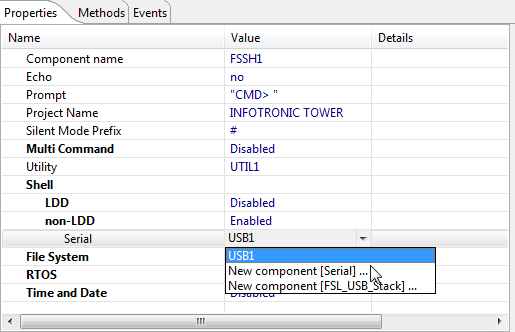
Selection between USB and Serial in the FSShell
Processor Expert in CodeWarrior for MCU10.2 is great in configuring the hardware and generating drivers. But in my case I need to switch between different operation modes of my hardware: either I use RS-232 or I use USB CDC. And this means different components and different settings :-(.
On the software side I use #defines in my platform header file to configure the system:
#define PL_HAS_SHELL        (1)
  /*!< if we have shell support */
#define PL_USE_USB_SCI      (0 && PL_HAS_SHELL && PL_IS_TOWER_BOARD)
  /*!< if we route SCI through USB (CDC) */
So if I want to switch to USB CDC in my application, I turn that PL_USE_USB_SCI macro to 1. That works fine, except that way I cannot switch configurations in Processor Expert.
But wait, there are configurations in Processor Expert!
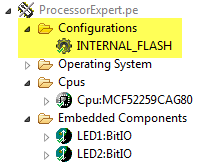
Configurations Folder in Processor Expert
If I create a Processor Expert project in MCU10, it already comes with a default configuration. I can rename it or add configurations using the context menu. That way I can create two configurations: one for USB and one for RS232:
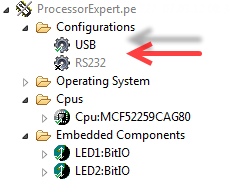
USB and RS232 Configuration
I can create as many configurations I want, but only one is active at a time:
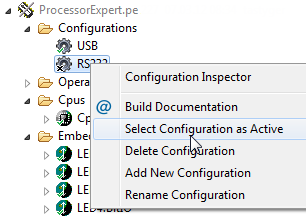
Selecting the Active Configuration
To add/remove components to a configuration, I simply enable or disable the component. If required I can have the same component multiple times in the project with different settings depending on the configuration selected:
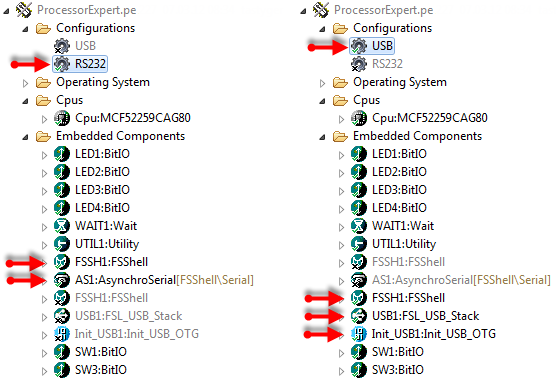
Configurations Side-by-Side
Now I can switch between two configurations just with a mouse click. But what about my define for PL_USE_USB_SCI? Luckily there is a solution for this too :-).
The cool feature is that Processor Expert generates for each configuration a define. It is defined in the header file for the CPU component (usually Cpu.h). So depending on which configuration is active, it creates
/* Active configuration define symbol */
#define PEcfg_USB                   1U
or
/* Active configuration define symbol */
#define PEcfg_RS232                 1U
The define starts with PEcfg_ and uses the name used in the configuration. This allows me to rewrite my macros using PEcfg_USB:
#define PL_USE_USB_SCI      (defined(PEcfg_USB) && PL_HAS_SHELL && PL_IS_TOWER_BOARD)
  /*!< if we route SCI through USB (CDC) */
Changing Processor Expert configuration has now a direct impact on the components and automatically configures the user software part of my application. Neat!
Happy Configuring 🙂
 MCU on Eclipse
Erich, thanks for sharing, but how can I get “FSL_USB_Stack” component?
LikeLike
Hi Jack! I plan to publish it on http://www.steinerberg.com/EmbeddedComponents/ as the other components. I have it working reliably on ColdFire V2. I run it as well on the S08 JM60, but there were some buffering problems I still need to investigate. I have it as well for MCF51JM128, but still need to test it a little bit. It is night and week-end work. But I plan to have it ready over the week end.
LikeLike
Happy reading your blog and expect the next one:)
LikeLike
Thanks, worked on it last night already. I already have a beta tester who contacted me directly signed up. On my end I have it now running as well on the DEMOJM board with the MCF51JM128 on it. Looks good 🙂
LikeLike
Hi Jack, I have posted more details on the “FSL_USB_Stack” component in https://mcuoneclipse.wordpress.com/2012/03/10/usb-or-not-cdc-with-processor-expert/. The component is now published on http://www.steinerberg.com/EmbeddedComponents/FSL_USB_Stack and examples are on http://www.steinerberg.com/EmbeddedComponents/Examples/Example_PE_CDC_V1JM128.
LikeLike
Pingback: USB or not: CDC with Processor Expert | MCU on Eclipse
Pingback: Changing the CPU with Processor Expert | MCU on Eclipse
Pingback: Switching Processor Package in Processor Expert | MCU on Eclipse
It sounds like PE is not free software, is this matter?
LikeLike
Hello,
Processor Expert is free in the sense of ‘free of charge’. So it is not limited (except that it is limited for Freescale devices). But it is not ‘open source’, means Freescale provides it free of charge, but you it not ‘free open source’ e.g. like GNU.
LikeLike
Pingback: RAM Target with Kinetis Design Studio and FRDM-K64F | MCU on Eclipse
A very useful feature (which is implicit in the screen shots but not emphasised in the text) is the ability to have two components with the same name (e.g. LED_Red, or AS1) but different settings (e.g. pin assignment and active high or low) then enable one in each configuration. Then the code remains identical between configurations – no need even to use the #define (in this case).
I suppose you can even switch between different processors (e.g.KL25 or KL05) – though I have not tried that yet.
LikeLike
Yes, sorry that I did not mention that, as I use components with the same name all the time that way, it was to logical for me :-(. And yes, you can use two different processors like that too. But I recommend that only if it does not require compiler/project setting changes (e.g. I would not switch between a Kinetis-K and a Kinetis-L that way). But doable for switching between different memory sizes (e.g. KL25Z32 vs KL25Z128 or inside the same family).
LikeLike
Pingback: Switching the Microcontroller Package, Device and Family | MCU on Eclipse
Is there a way to specify a PE Configuration to be used with a specific Build Configuration?
I.e. I would like to just choose a Build Configuration and that will in turn select the appropriate PE configuration.
CW for MCU 10.7.
LikeLike
Hi Paul,
unfortuntately, this is not supported. The CDT build configurations are not linked to the Processor Expert configurations. That’s I wish/feature request I have for a long time too.
Erich
LikeLike