
Git Submodules allow me to keep a git repository as a sub-directory in another git repository. This let me clone another repository into my project and keep sources in and libraries/SDKs in sync.
This can be a challenge if using CI/CD runners. They have to clone the repositories in a recursive way. It gets more complex if the sub-modules are not public. Because the CI/CD runner does not have access rights to the non-public repositories.

In this article I explain how I’m using git sub-modules in my CI/CD GitLab pipeline, both for public and private repositories
Outline
I’m using GitLab CI/CD runners for my projects. For example I have the GitLab private ‘grp_00’ repository with two submodules:
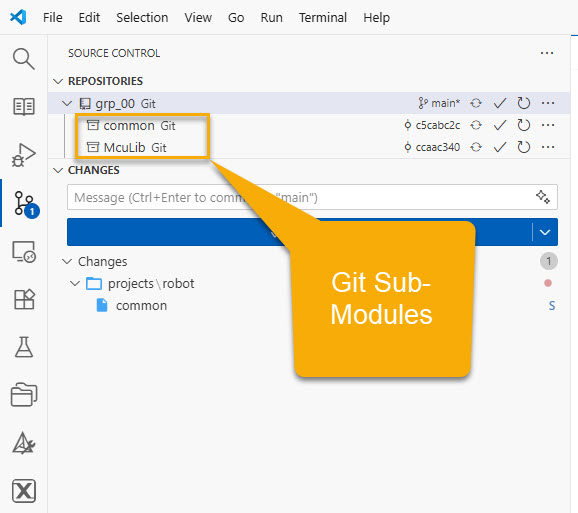
- McuLib is a public repository hosted on GitHub.
- common is private repository hosted on an internal GitLab server.
It took me a while to get the GitLab runner working with such a scenario. If you are searching the documents, the information is not easily available. And examples or instructions on the internet are outdated and do not work with a more recent GitLab version.
That’s why I believe this article should help you if you are using GitLab CI/CD with git submodules.
CI/CD Runner Recursive Clone
Because the repository contains sub-modules, I have to tell the GitLab runner to check it out in a recursive way. For this I add the following variable to the .gitlab-ci.yml:
GIT_SUBMODULE_STRATEGY: recursive
This works fine for public sub-repositories, as no special authentication is needed. For example you can easily clone public repositories in the runner that way.
.gitmodules
The project sub-modules are listed in the .gitmodules file inside the main repository:
[submodule "projects/robot/common"]
	path = projects/robot/common
	url = git@gitlab. ......../common.git
[submodule "projects/robot/McuLib"]
	path = projects/robot/McuLib
	url = https://github.com/ErichStyger/McuLib
Non-Public Repositories
The issue starts with non-public repositories. The reason is that the runner is a docker container. The container has the access rights of its own repository. But it does not have the credential and access rights of protected or non-public repositories.
Below is the runner log which fails for the mentioned project:
Updating/initializing submodules recursively with git depth set to 20...
Submodule 'projects/esp_ctf/McuLib' (https://github.com/ErichStyger/McuLib) registered for path 'projects/esp_ctf/McuLib'
Submodule 'projects/esp_ctf/common' (git@gitlab.switch.ch:hslu/edu/.../common.git) registered for path 'projects/esp_ctf/common'
Submodule 'projects/robot/McuLib' (https://github.com/ErichStyger/McuLib) registered for path 'projects/robot/McuLib'
Submodule 'projects/robot/common' (git@gitlab.switch.ch:hslu/edu/.../common.git) registered for path 'projects/robot/common'
Synchronizing submodule url for 'projects/esp_ctf/McuLib'
Synchronizing submodule url for 'projects/esp_ctf/common'
Synchronizing submodule url for 'projects/robot/McuLib'
Synchronizing submodule url for 'projects/robot/common'
Entering 'projects/esp_ctf/McuLib'
Entering 'projects/esp_ctf/common'
Entering 'projects/robot/McuLib'
Entering 'projects/robot/common'
Entering 'projects/esp_ctf/McuLib'
HEAD is now at ccaac34 fixed small typo
Entering 'projects/esp_ctf/common'
HEAD is now at c5cabc2 moved common into subrepo, initial commit
Entering 'projects/robot/McuLib'
HEAD is now at ccaac34 fixed small typo
Entering 'projects/robot/common'
HEAD is now at c5cabc2 moved common into subrepo, initial commit
error: cannot run ssh: No such file or directory
fatal: unable to fork
Unable to fetch in submodule path 'projects/robot/common'; trying to directly fetch 4dd1b4ea9dc3bd9151d796dd5427aa72a4b7d077:
error: cannot run ssh: No such file or directory
fatal: unable to fork
fatal: Fetched in submodule path 'projects/robot/common', but it did not contain 4dd1b4ea9dc3bd9151d796dd5427aa72a4b7d077. Direct fetching of that commit failed.
Updating submodules failed. Retrying...
It fails because it cannot access the private ‘common’ repository.
The runner is able to access its own repository. Because the GitLab system creates a short-lived access token for it, not visible to the outside.
No SSH
The important message is this:
Entering 'projects/robot/common'
HEAD is now at c5cabc2 moved common into subrepo, initial commit
error: cannot run ssh: No such file or directory
fatal: unable to fork
The runner tries to connect using SSH. Because this is the connection and access method I have in .gitmodules :
url = git@gitlab. ......../common.git
💡 The same problem would happen if I would use HTTPS. Because the runner needs login information to access the repository.
The challenge is: how can I tell it the credentials? I don’t want to add the SSH keys or password to the docker image. This would be a security issue.
Job Tokens
The solution is to create some special access tokens in the sub-module. The access token gives special rights to another GitLab repository, so it can access other private repos.
For this, go to the settings of the submodule repository:
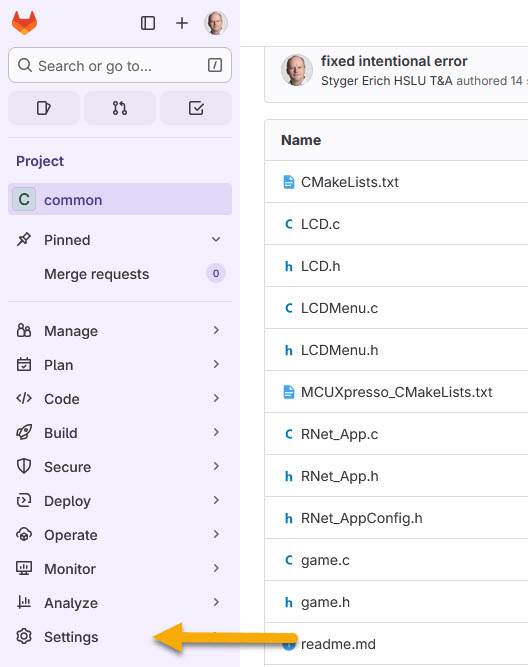
In the Settings, choose CI/CD:

Go there to the Job token permissions:

Add a new permission entry with the ‘Add‘ button, and select ‘Group or project‘:

Then specify the full path the repository which shall be capable of using the token:
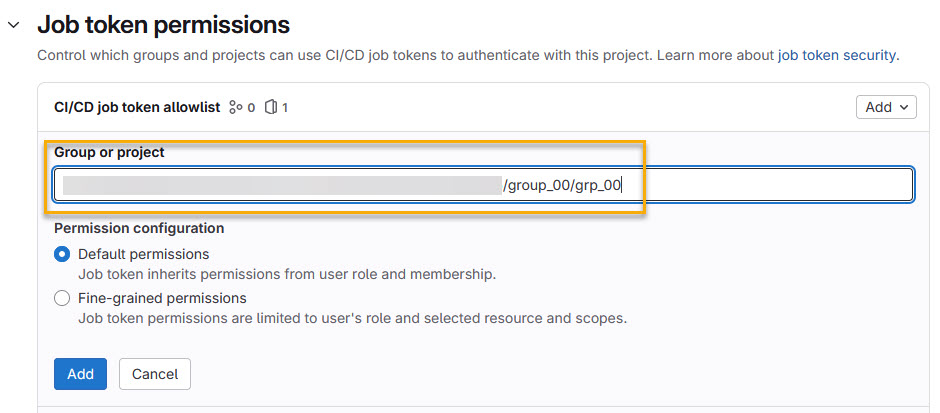
Next, I recommend using ‘Fine-grained permissions‘ and only allow reading the repository:
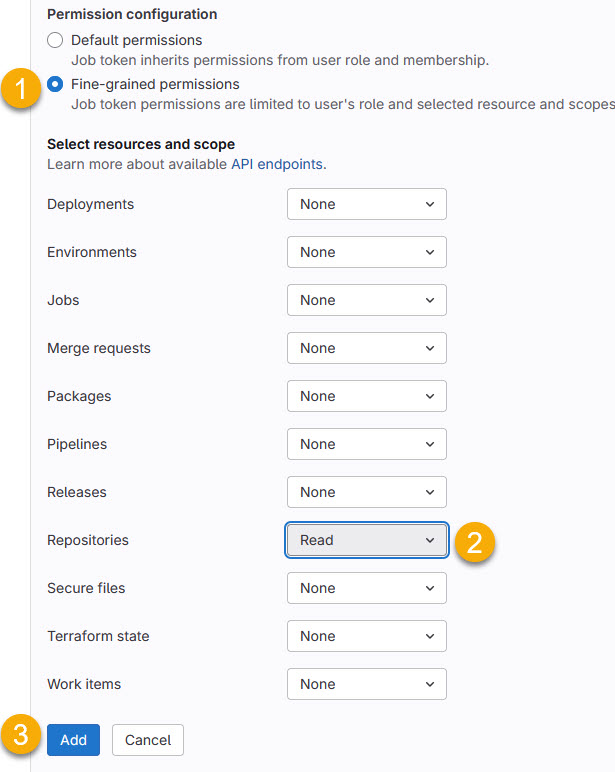
Press ‘Add’ and you have a new Job token created:

Then press the Save button to store it.
Forcing HTTPS
The last thing is about not using SSH, but HTTPS access instead. In addition to the recursive GIT_SUBMODULE_STRATEGY strategy, I have to force using HTTPS in the .gitlab-ci.yml:
  GIT_SUBMODULE_STRATEGY: recursive
  GIT_SUBMODULE_FORCE_HTTPS: "true"

Result
With this, private and public sub-module cloning works in a GitLab CI/CD pipeline :-).

Summary
Git submodules are very useful. I can build a project based on modules and libraries. Each is based on its own git repository. That way I can easily re-use code and keep them in sync. Nonetheless, such ‘recursive’ modules can be a challenge in a CI/CD environment, especially if different login details are used. Credentials should be secret, and are not known by the runner or docker container.
The solution in GitLab is to set a variable to enable recursive repository cloning. There is another (not well documented?) GitLab option required to force HTTPS connection to the sub-modules. Finally, an access token needs to be setup in the ‘sub’ repository. The token allows the ‘main’ repository runner to read the sub-module.
With this, I’m have a successful GitLab pipeline. Both for private and public submodules. And a YES: a passing pipeline is something very rewarding 🙂

Happy gitlabing:-)
 MCU on Eclipse