With Optimizing Embedded Development with VS Code and DevContainer I showed the benefits of using development containers. And with Remote Debugging with DevContainer and VS Code I explained ways use hardware debugging using that concept.
One topic is still open: how to use semihosting with file I/O using development container? The challenge here is that we need to work with two different file systems.

In this article I show how semihosting file I/O can be used with DevContainer.
Outline
Semihosting is a technology which allows the debugger to use resources both on the host and target. That way I can for example read/write files on the host using the embedded target. This is for example incredibly helpful if I want to collect target coverage information with gcov.

File Systems
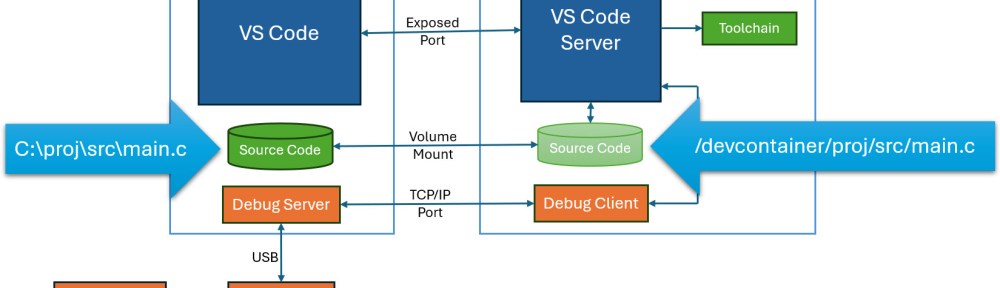
As explained in Remote Debugging with DevContainer and VS Code, debugging with DevContainer works with a remote TCP/IP connection:

The binary has been built in the container. The compiler is using the file system of the container. The debugger or debug server runs on the host, and is using the file system of the host.
So if the running target wants to use file I/O, the effective file system is the one on the host.
DevContainer File System
In the case of a VS Code DevContainer, the project gets mapped into a /devcontainer folder inside the container:
GNU Coverage
In the case of GNU coverage, the note (.gcno) files are using the container file system and path. And the gnu data files (.gcda) need to be stored in the same location.

This is now a problem with remote debugging and semihosting file I/O. The two paths do not match. The target tries to write to a workspace path. This path does not exist on the host.
This is visible in the case of GNU coverage with the path passed to the file open function:

Solution
The solution is a small extension in the semihosting and file I/O library to strip off the wrong path. For this, there I have to enable the cutting and specify what to cut off:
#define McuSemihost_CONFIG_CUT_FILENAME_PREFIX      (1)
#define McuSemihost_CONFIG_CUT_FILENAME_PREFIX_STR  "/workspace/" /* DevContainer path for workspace. */
With that setting, the path gets corrected:

So now instead of
/workspace/build/Debug/srcLib/CMakeFiles/srcLib.dir/usb_descriptors.c.gcdawe get
build/Debug/srcLib/CMakeFiles/srcLib.dir/usb_descriptors.c.gcdaThis is now a relative path. And if the GDB server is using the project root folder as the current directory, then everything is fine. So the last thing is: I start the gdb server in the project directory :-).
Summary
File I/O with semihosting and VS Code DevContainer have the challenge of two file systems with different paths. This is a problem especially if using GNU coverage with DevContainer. The solution is having the gcov and semihosting part making the file paths relative. With the GDB server started on the host in the project directory, the problem is solved.
Happy covering 🙂
 MCU on Eclipse