
“There is no such thing as a free lunch.”
https://en.wikipedia.org/wiki/No_such_thing_as_a_free_lunch
And this applies to VS Code and many of its extensions. You agree to the licensing conditions, and you pay with your data.
VS Code source code is MIT licensed, but the binaries you can download and install have telemetry built in: you are giving Microsoft your usage data in return for using VS Code.
If you are concerned about this, and looking for free and libre open source binaries of VS Code, then have a look at MIT-Licensed VSCodium.

To be more precise: VS Code is not open source, it based on open source. Similar to Eclipse, where the foundation is open source, and vendors add their own plugins and extensions. Vendors like Nordic, STM or NXP are adding their support, but it is not ‘open source’, or at least not everything. In VS code, for example the telemetry and market-place integration is not open. What many might might realize: one of the ‘crown jewels’ and what probably everyone loves about VS Code, the IntelliSense, is not open. For example check the VS Code cpptools extension license:
Additional binary files are included in the official VSIX files built and distributed by Microsoft; these are governed by the more restrictive proprietary license terms found at RuntimeLicenses. (Source: https://github.com/microsoft/vscode-cpptools/blob/main/LICENSE.md)
Because Microsoft is restricting some extensions only to be used in their products, you might face an error notification while installing an extension:
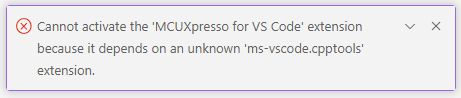
Cannot activate the 'MCUXpresso for VS Code' extension because it depends on an unknown 'ms-vscode.cpptools' extension.
This is what you might face if installing extensions into VS Code. The VSCodium github provides an explanation of this, and why they have to keep the extension repository separate.
The licensing terms of Microsoft have this:
INSTALLATION AND USE RIGHTS. a) General. You may install and use any number of copies of the software only with Microsoft Visual Studio, Visual Studio for Mac, Visual Studio Code, Codespaces, Azure DevOps, Team Foundation Server, and successor Microsoft products and services (collectively, the “Visual Studio Products and Services”) to develop and test your applications. b) Third Party Components.
So from the legal side, you might want to check and verify this.
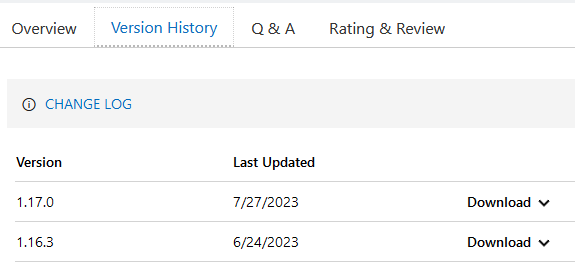
The good news is, there is a workaround: install the plugins from the .vsix file. If you go to https://marketplace.visualstudio.com and the version tab, you can download the file there:

If you are on the Extensions view, click on the ‘…’ button and you can can install an extension from the local .vsix file:

But this will not work, if the extension depends on other extensions it cannot find. The solution is that you need download these .vsix files and install them on the command line. For the MCUXpresso for VS Code, the following extensions and files are needed:
- https://marketplace.visualstudio.com/items?itemName=ms-vscode.cpptools
- https://marketplace.visualstudio.com/items?itemName=ms-vscode.vscode-embedded-tools
- https://marketplace.visualstudio.com/items?itemName=ms-vscode.vscode-serial-monitor
As shown earlier, use the ‘Version History’ to download the latest file:
In a command line shell to install them (you might need to change the file name):
codium --install-extension ms-vscode.cpptools-1.7.1.vsix
codium --install-extension "ms-vscode.vscode-embedded-tools-0.7.230727001@win32-x64.vsix"
codium --install-extension "ms-vscode.vscode-serial-monitor-0.10.230727001.vsix"
After that, you shall be able to install the NXP extension with the menu item shown above, or simply use the command line too:
codium --install-extension NXPSemiconductors.mcuxpresso-1.0.68.vsix
With this, you should be up and running with VSCodium and the NXP extension.
License
But, and this is a BIG BUT: Doing this probably violates the license agreement of the Microsoft?
Reading cpptools-LICENSE.txt says:
- INSTALLATION AND USE RIGHTS.
a) General. You may install and use any number of copies of the software
only with Microsoft Visual Studio, Visual Studio for Mac, Visual Studio Code, Azure DevOps, Team Foundation Server, and successor Microsoft products and services to develop and test your applications. Further, you may install, use and/or deploy these software copies via a network management system or as part of a desktop image within your internal corporate network to develop and test your applications.
The question is: Does ‘Visual Studio Code’ cover VSCodium too?
Disabling Telemetry in VS Code
Back to the topic of telemetry and collecting usage or other data. There is a setting in VS Code inside the menu File > Preferences > Settings, filter for telemetry, where you can turn it off: This is something usually I do as a first thing in tools collecting telemetry data.
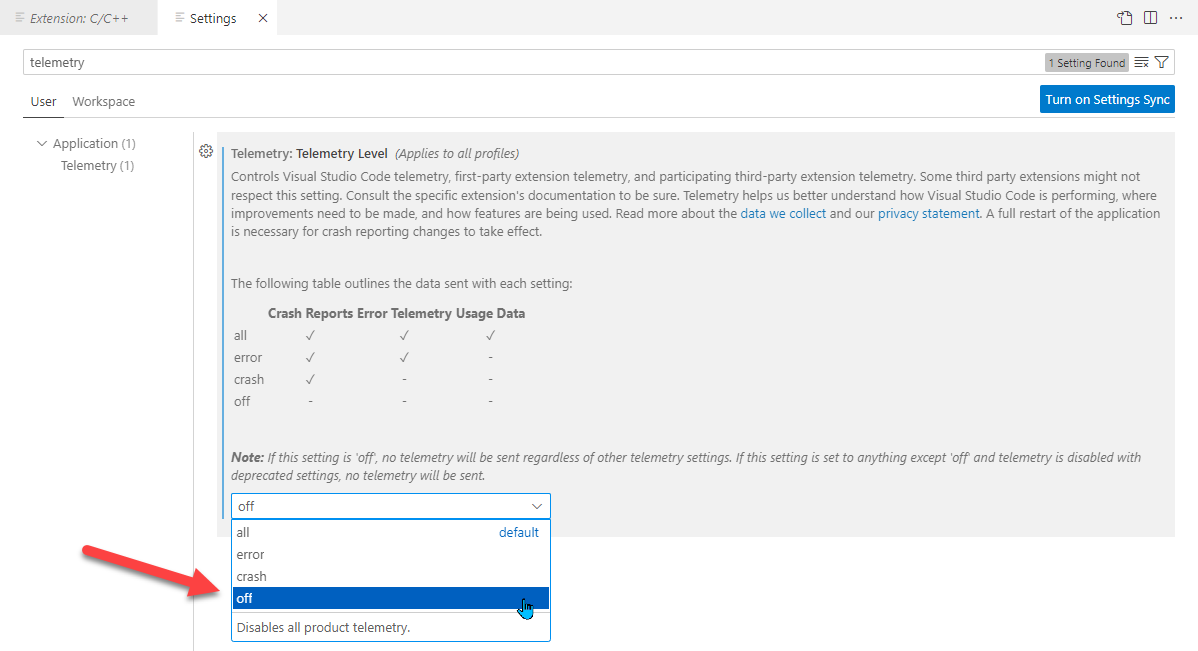
As noted and shown in the screenshot: there might be extensions out there ignoring this setting. Not that I think that this is currently the case, but as with apps on mobile phones: you never can be 100% sure.
Summary
If you intend to use VSCodium or not: you know now that you can import extensions with a a command line interface, and that you can change the telemetry level in VS Code.
I hope I did not scare you off VS Code. Unsurprisingly, nothing is for free, and one always should read the licensing terms and conditions. Naturally, companies want and need to protect their IP and investments. Should one be worried about the difference between ‘based on open source‘ and ‘is open source‘? Maybe not, and I continue to use VS Code for my lecture and lab material. As a university, we are concerned about open source. And with VSCodium there is open alternative.
Happy telemetring:-)
Links
- VSCodium Website: https://vscodium.com/
- C/C++ Extension cannot be installed: https://github.com/VSCodium/vscodium/issues/493
- VSCodium Releases: https://github.com/VSCodium/vscodium/releases
- NXP Visual Studio Code Extension: MCUXpresso for VS Code
- VS Code: MCUXpresso Extension
- VS Code Marketplace: https://code.visualstudio.com/docs/editor/extension-marketplace
 MCU on Eclipse
According to recent-year antihuman changes in Windows 11 and Edge, I won’t be suprised if such things happen on VSCode. Having an opensource replacement is always good.
LikeLike
Having choices is always good. I’m wondering: how many are concerned about the telemetry data and turn it off? Or I’m one of few and everyone else does not seem to care (or is not aware)? Curious to know the thoughts of everyone….
LikeLike