
This article is part of a ‘mini series’ about hidden gems, tips and tricks around Eclipse.
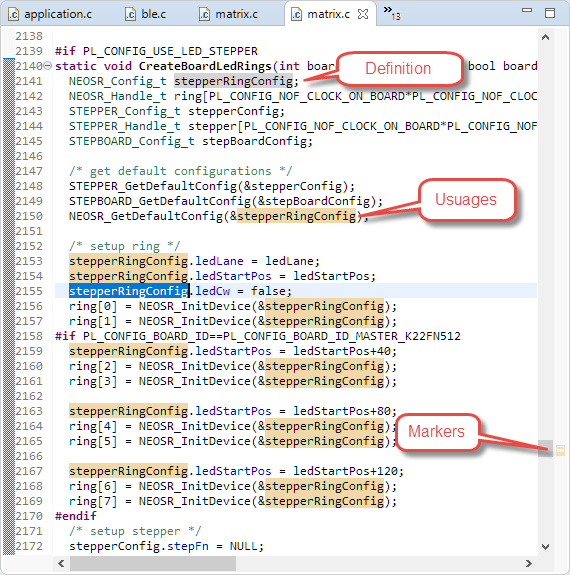
The topic of this one is how to quickly mark and show where a variable is used and defined in the code.
Highlighted Usages
This feature is very helpful to quickly see where an item is defined or used. Simply double click on the item and it will highlight in in different ways, including setting markers on the side:

Double-Click to Highlight
Happy highlighting 🙂
Links
- Eclipse Gems, Tips & Tricks: Importing Projects
- Eclipse Gems, Tips & Tricks: Close and Open Projects
- Eclipse Gems, Tips & Tricks: Text Block Selection
- Eclipse Gems, Tips & Tricks: Project Filter
- Eclipse Gems, Tips & Tricks: Black Theme
- Eclipse Gems, Tips & Tricks: Faster Debugger Start
- Eclipse Gems, Tips & Tricks: RT(F)M
- Eclipse Gems, Tips &Tricks: Show in System Explorer
- Eclipse Gems, Tips & Tricks: Open Declaration
- Eclipse Gems, Tips & Tricks: Code Completion
- Eclipse Gems, Tips & Tricks: Highlight Usage and Definition
- Eclipse Gems, Tips & Tricks: Block Comments
- Eclipse Gems, Tips & Tricks: Working Sets
 MCU on Eclipse
Pingback: Eclipse Gems, Tips & Tricks: Working Sets | MCU on Eclipse
Pingback: Eclipse Gems, Tips & Tricks: Block Comments | MCU on Eclipse
Pingback: Eclipse Gems, Tips & Tricks: Code Completion | MCU on Eclipse
Pingback: Eclipse Gems, Tips & Tricks: Faster Debugger Start | MCU on Eclipse
Pingback: Eclipse Gems, Tips & Tricks: Project Filter | MCU on Eclipse
Pingback: Eclipse Gems, Tips & Tricks: Text Block Selection | MCU on Eclipse
Pingback: Eclipse Gems, Tips & Tricks: Close and Open Projects | MCU on Eclipse
Pingback: Eclipse Gems, Tips & Tricks: Importing Projects | MCU on Eclipse
Pingback: Eclipse Gems, Tips & Tricks: Code Folding | MCU on Eclipse