
One new feature in CDT 8.4 or later is the ability to see the instruction opcode in the disassembly view:
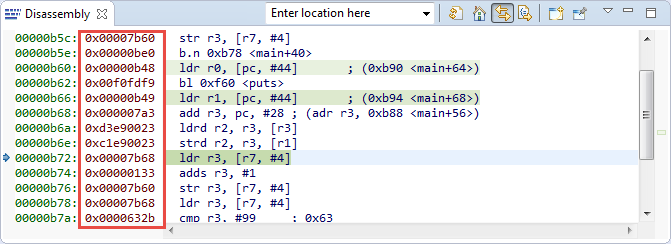
Opcodes in Disassembly View
Before that, I had to use the Memory view to inspect the instruction opcodes. The ability to see the instruction opcodes is especially useful if I’m running code in RAM (especially self-modifying code for special purposes), and be able to see the opcodes that way helps a lot.
💡 However, for ARM (Thumb mode) the disassembly has a bug (https://bugs.eclipse.org/bugs/show_bug.cgi?id=357270): instead of return 16bit opccodes, the instructions are 32bit and do not make much sense 😦
To show the opcodes, right-click on the address column on the left and select ‘Show Opcodes’:

Show Opcodes
This feature is included in CDT 8.4. Freescale Kinetis Design Studio switched from CDT 4.3 (in KDS v2.0.0) to CDT 8.6 in KDS v3.0.0. But as this does not work very well for ARM Thumb mode, I guess I have to wait until this is fixed in GDB :-(.
Happy Opcoding 🙂
 MCU on Eclipse
You probably forgot to add that this mode “thumb”.)))
LikeLike
Yes, I already noticed that :-(. I have used set arm force-mode thumb, but did not help. Do you have an idea?
LikeLike
Where is the “disassembly” view anyway? How do I activate it? I have CDT 9.1
LikeLike
It is under Window > Show View > Other > Disassembly
LikeLike