
Processor Expert components have an interesting concept: Events. Events are shown in green color with the ‘E’ (for Event):
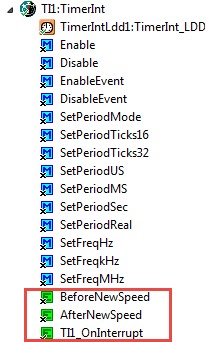
TimerInt Component with Events
As for this TimerInt component, it will call the event OnInterrupt() when the timer interrupt happens. Double clicking on that event in the view will jump to the event:
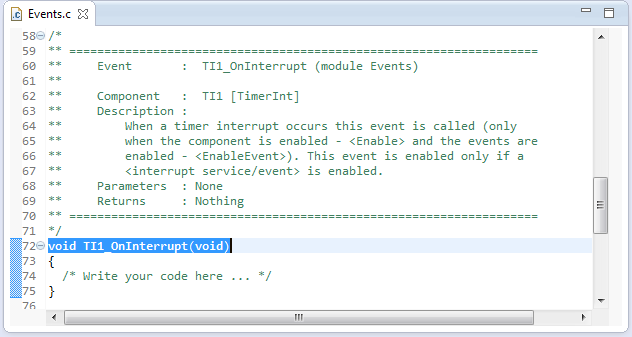
OnInterrupt in Events.c
The comment /* Write your code here */
/* Write your code here ... */
indicates that I can add my code here, whatever I need to do for that timer interrupt. Or in other words: this is my application event handler.
Events.c
Processor Expert places all these events in a special file: Events.c. It does a good job adding/removing event handlers as I change my components. I only need to be careful about to write my code inside the functions, or where the /* Write your code here .... */ is.
Processor Expert is scanning the Events.c and Events.h and tries to find/match the code it has generated. For this it uses the file and function headers/footers as ‘signature’. So do not try to change things outside the places where you are supposed to write code. You can completely remove a function (with its comment) if you want to clean it up. Processor Expert will then regenerate the empty template again as needed.
If you do not want that Processor Expert cleans up non-used events, then there is a setting for that in the project settings:

Setting to delete unused events
If I need to add more interfaces/header files, then there is a place at the beginning of Events.c which is the right place for it:
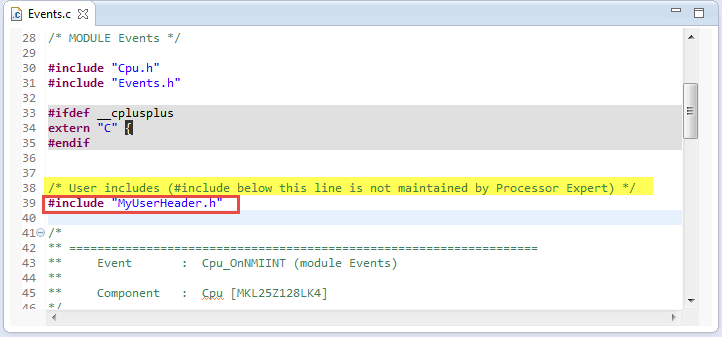
Place for User Includes
Interrupts and Events
Back to the Timer OnInterrupt() event: as the name indicates, this event is called from an interrupt context: Processor Expert deals with all the low-level interrupt stuff (like acknowledging the interrupt).
To see from where the event handler gets called, I can use the Eclipse function ‘Open Call Hierarchy’:
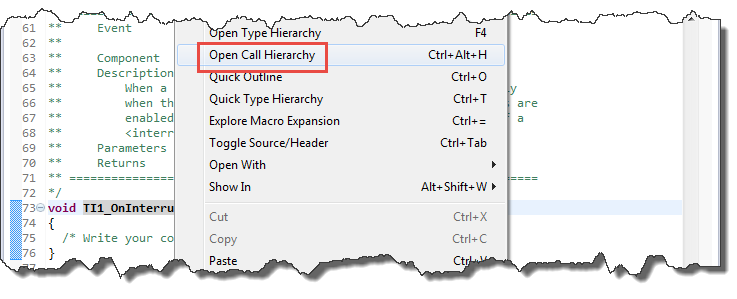
Open Call Hierarchy
This shows the call chain:
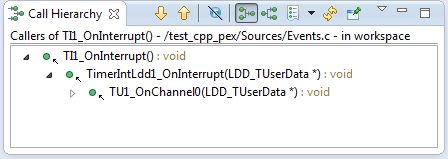
Call Hierarchy for Timer Interrupt
So my event indeed gets called from the hardware interrupt handler, which then calls TimerIntLdd1_OnInterrupt():
void TU1_OnChannel0(LDD_TUserData *UserDataPtr)
{
  TimerIntLdd1_TDeviceData *DeviceDataPrv = PE_LDD_DeviceDataList[PE_LDD_COMPONENT_TimerIntLdd1_ID];
  uint16_t Ticks;

  (void)UserDataPtr;                   /* Parameter is not used, suppress unused argument warning */
  (void)TU1_GetOffsetTicks(DeviceDataPrv->LinkedDeviceDataPtr, CHANNEL, &Ticks);
  Ticks += DeviceDataPrv->CmpVal;
  (void)TU1_SetOffsetTicks(DeviceDataPrv->LinkedDeviceDataPtr, CHANNEL, Ticks);
  if (DeviceDataPrv->EnEvents & LDD_TIMERINT_ON_INTERRUPT) { /* Is the event enabled? */
    TimerIntLdd1_OnInterrupt(DeviceDataPrv->UserDataPtr); /* Invoke OnInterrupt event */
  }
}
TimerIntLdd1_OnInterrupt() then calls my user handler TI1_OnInterrupt():
void TimerIntLdd1_OnInterrupt(LDD_TUserData *UserDataPtr)
{
  (void)UserDataPtr;                   /* Parameter is not used, suppress unused argument warning */
  TI1_OnInterrupt();                   /* Invoke OnInterrupt event */
}
Because my event is called from an interrupt, I better handle things effientyl and quickly, as I’m in an interrupt context. Blocking in an interrupt handler would be a bad thing. Additionally I need to keep the rules of reentrance in mind: if accessing shared data between the application and the interrupt handler (or my event handler), then I need to properly create critical sections. See “EnterCritical() and ExitCritical(): Why Things are Failing Badly” on that topic.
Software Events
We looked at Interrupts events. But events are not only about interrupts. It is possible that a component raises non-interrupt events: software events. In our TimerInterrupt there are two events which are called for a clock/speed change, if I change the clock speed from my application:
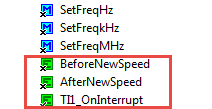
Timer Speed Change Events
These events can be called as a side effect of a method of the component or from the overall system. The above two events get called when the system changes the clock speed.
Another way to use events for a component is to tell the application about errors (onError()):
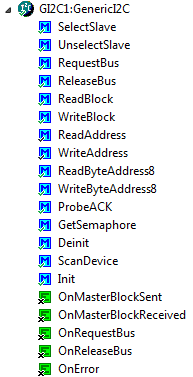
I2C Events
The other usage of events is to give the application a chance to hook into actions, e.g. before and after a bus access (onRequestBus() and onReleaseBus()): With such events the application for example could use a semaphore to protect access to the bus.
Another usage of events is such as in FreeRTOS: it informs about errors or allows the application to be informed about every timer tick:
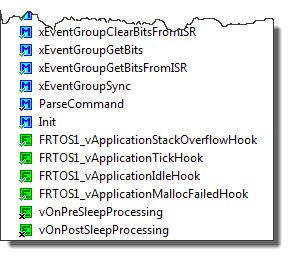
FreeRTOS Events
As indicated above, some components are disabled (with an ‘x’): so as a user I can decide which events I want to receive, or which ones I’m not interested in.
Summary
Events are used in Processor Expert components both for hardware and software events, and are ‘hooked’ usually in the Events.c source file. Hardware events are typically raised by interrupts, and using events the application code can be notified. Software events are used by components to tell the application about errors, or give the application a way to hook into the execution flow, e.g. for protecting mutual access to a ressource. Many events can be disabled if I’m not interested. In any case, using events is a powerful way for components to interact with the application. I’m using them a lot 🙂
Happy Eventing 🙂
 MCU on Eclipse
Thanks for your work Erich! Always interesting and useful.
LikeLike