
SonarQube from Sonar is a free static analysis tool for VS Code. It is able to analyze the source code and find issues. SonarQube does a similar job as other static analysis tools like CppCheck for VS Code.

Outline
SonarQube is a commercial product from Sonar. But it offers a free mode which works great for smaller teams or public projects. I like SonarQube because it is a good extensions to other tools like CppCheck. It can catch issues other tools can miss or do not report.
Installation
The VS Code extension can be installed from the VS Code Marketplace. Additionally, VSIX packages can be downloaded from the GitHub page. After installation, restart VS Code.
Compilation Database
The tool depends on a compiler data base. This holds information about the tool chain used, the files compiled and the options set.
If getting a message like the one below:

Simply add the following line the beginning of the CMakeLists.txt:
set(CMAKE_EXPORT_COMPILE_COMMANDS ON)

Usage
SonarQube scans the source while I’m editing it. Messages are shown int he ‘Problems’ output:

Hovering over the location and marker in the source code shows an explanation:
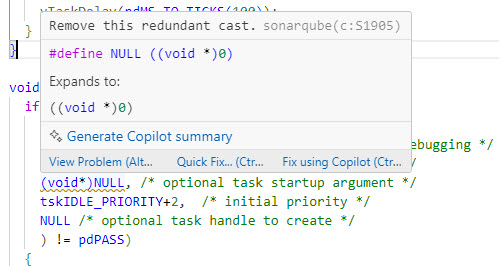
With ‘quick fix’ I can deactivate the rule:

But where it really shines: It shows the issue description in great details:

Summary
I like SonarQube because it is very easy to use. It has a free-of-charge model which works for many of my projects. And having an extra static analysis tool I can run on my code gets me closer to a ‘clean code’.
Happy Sonaring 🙂
Links
- Marketplace: https://marketplace.visualstudio.com/items?itemName=SonarSource.sonarlint-vscode
- Sonar web site: https://www.sonarsource.com/
- SonarQube for VS Code: https://docs.sonarsource.com/sonarqube-for-ide/vs-code/
 MCU on Eclipse
Lovely Erich, good posting. One question, is this extension available also en Eclipse ? I’m still on the MCUXpresso loop.
LikeLike
Yes, there is an Eclipse plugin for it too: https://docs.sonarsource.com/sonarqube-for-ide/eclipse/
LikeLiked by 1 person