
Eclipse and CodeWarrior for MCU10 come with a wealth of functionality. But there is more out there: I can install more plugins from the eclipse market place. The possibilities are endless! Here are the five plugins I always add to my base installation, starting with rank #5: WickedShell. The plugin is installed from http://www.wickedshell.net/updatesite.
WickedShell gives my access to the system shell/console within eclipse.This is very handy as I do not need to leave eclipse for things I want to do in a DOS shell: I use the WickedShell inside eclipse.
WickedShell comes with two views: Shell and Batch Files.
The Shell view provides a wrapper to the system shell. On top of this, the command completion function provides a nice pop-up (I type a command and use the TAB key) which includes environment variables:
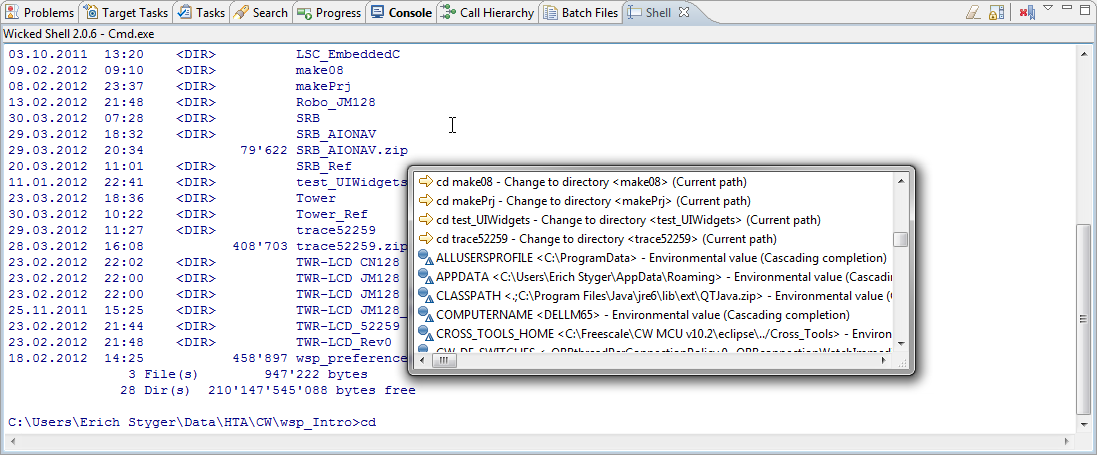
Wicked Shell with Command Completion Pop-Up Window
The Batch Files view gives me an editable list of batch files:
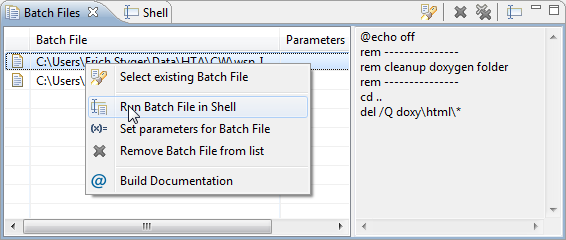
Witched Shell Batch Files View
From here, I can launch batch files (with or without parameters) and I have a preview of the batch file.
Especially for regular tasks the WickedShell is really useful.
Happy Wicking 🙂
—————————————————————————————–
Ranking:
- Rank #1: Eclox
- Rank #2: AnyEdit Tools
- Rank #3: System and Desktop Search
- Rank #4: EHEP
- Rank #5: WickedShell


Pingback: 5 Best Eclipse Plugins: #4 (EHEP) | MCU on Eclipse
Pingback: 5 Best Eclipse Plugins: #3 (System and Desktop Search) | MCU on Eclipse
My brother suggested I may like this web site. He used to be totally right. This post actually made my day. You can not believe just how much time I had spent for this info! Thanks!
LikeLike
Pingback: 5 Best Eclipse Plugins: #1 (Eclox with Doxygen, Graphviz and Mscgen) | MCU on Eclipse
Pingback: 5 Best Eclipse Plugins: #2 (AnyEdit Tools) | MCU on Eclipse
That sounds like a really sophisticated tool for using the command line from within eclipse.
Does it work on Linux as well?
If you’re just looking for a very simple way to run a batch file from eclipse you might want to have a look at this.
LikeLike
I have it not tried on Linux, but this should work according to the documentation on http://www.wickedshell.net/documentation/Wicked%20Shell%20Documentation.pdf: “Wicked Shell uses a default shell for different OS. Currently, this is bash for Linux and Cmd.exe for Microsoft
Windows.”
LikeLike
I am trying to use WickedShell plugin in eclipse under Windows 10, but I cannot make it Works. I always obtain the following error message: “Exception Occured: java.langRuntimeException — No shelldescriptor found with id Please refer to error log for further details”: What am I doing wrong??
LikeLike
Yes, I have the same problem. And I have not found a solution for it.
LikeLike