
As outlined in Quickstart for Processor Expert in Eclipse, it is easy to create a new Processor Expert project. There are three shared files which are maintained by Processor Expert. At the same time I need to change them with my code. So how does this work, and how can I configure it to my needs?
Checking the directory structure, I see three files outside of the Generated_Code folder maintained by Processor Expert:

Processor Expert maintained Files
- Events.c and Events.h: Processor Expert adds into these all the events which are coming from the components in your project.
- ProcessorExpert.c: This one has the main() of my application. Notice that the naming has changed from classic CodeWarrior to eclipse based CodeWarrior: in classic the name was the project name (e.g. MyProject.c), in eclipse it is ProcessorExpert.c.
Processor Expert creates and maintains the three files. If I delete one, Processor Expert will recreate it at the time of code generation. They are shared between me/my application and Processor Expert. I only have to obey a single rule:
Rule: Only add or change things in places which are marked by Processor Expert for user code.
For the ProcessorExpert.c file, areas where I can add/change things are marked below in yellow:
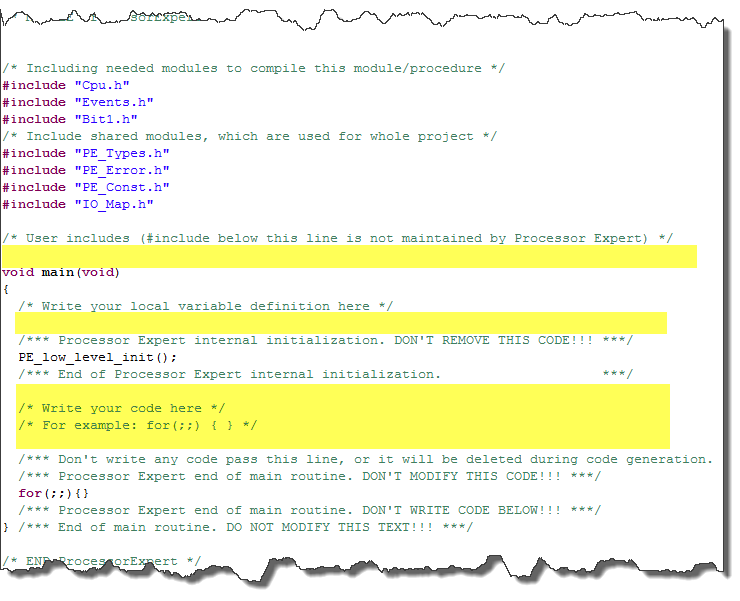
Areas in main source file which I can change
I can add something like this:

ProcessorExpert.c with my code
Processor Expert will keep my changes as long as I only change within the yellow areas.
The same thing applies to Events.c: The example below used the callback KBI_OnInterrupt() where I can fill in my code:
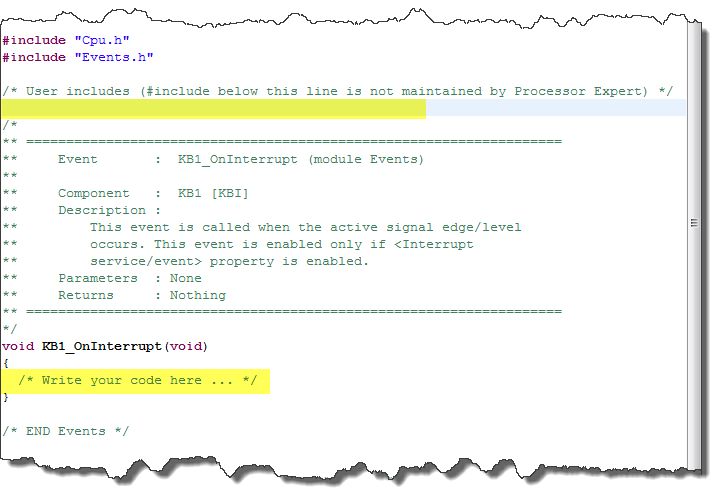
Events.c Source where you can add your own stuff
Tip: Processor Expert will not remove things from this file, it will only add. In case I want to remove the Keyboard (KBI) component, the event handler for it will still stay in Events.c. If I really want to get rid of it, I delete the whole function with the comment block of the function.
So far so good. But what if I am not happy with the file names? Maybe they conflict with file names I use in my project? How to change the names of Events.c, Events.h or ProcessorExpert.c?
For Events.c and Events.h there is an option: I use the context menu of a component to open the Inspector:
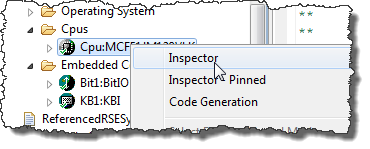
Inspector on CPU component
In the Component Inspector View, I select the Events tab. Here I can change the name of the Event module:
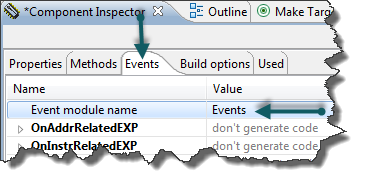
Inspector with Events tab of the CPU module
Note: This changes the Event module name for that single component only!
If I want to have all events created in a different module with the same file name, I need to change all the components. But it is nice as well to have a single event file for each component too with that feature.
Changing ProcessorExpert.c is a bit different: there is no option to change the name :-(. But here is a trick: I select the project and use the menu Project > Properties. This gives me many settings:

Processor Expert Project Options
What I can do here is to disable the code generation for the main module (Main module update). So if I do not like the ProcessorExpert.c file name, I do this:
- I generate code as usual. This will generate ProcessorExpert.c.
- I Go to Project > Properties > Processor Expert and set ‘Main module update’ to ‘Do not generate’.
- I rename ProcessorExpert.c to whatever I like: it is now under my full control 🙂
With this I hope you have a good overview about the shared files generated by Processor Expert, and how you can configure it.
Happy Experting 🙂
 MCU on Eclipse
Pingback: Disable my Code Generation | MCU on Eclipse