
Installation of Eclipse plugins is really ease: I use the menu Help > Install New Software, point to the update site and I have it installed. Uninstallation of a plugin is not that obvious. Not sure why it is so hidden, and yes, I rarely need to uninstall a plugin. But from time to time I try out a new plugin, and if it does not fit my needs, I want to get it removed. How to uninstall it?
It is easy to uninstall a plugins, once I know about where to do it. To uninstall a plugin, use the menu Help > Install New Software (yes, that’s the same to install plugins):

Install New Software
In the next dialog, I select the hyperlink ‘What is already installed?‘:
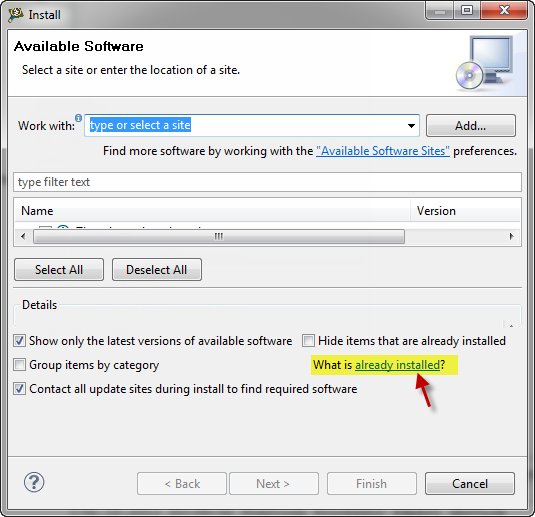
What is already installed
Then I can select any installed plugin or feature and uninstall it:

Uninstall of a plugin
It is that easy once I know about this!
Happy Uninstalling 🙂
 MCU on Eclipse
Pingback: Revert an Eclipse Update Installation | MCU on Eclipse
Pingback: EmbSysRegView 0.2.6 for NXP Kinetis Design Studio V3.2.0 | MCU on Eclipse